# CDM Analysis

# Debtor Search Menu

# Debtors Search Analysis

Debtors search is a duplicate of the Debtors setup menu however you cannot add new debtors here.

This menu is for staff members who want to see the debtor's/customer's details but may not be allowed to any details.

Enable Edit Debtor in the security button

[![image.png](https://hugeerp10.co.za/hsofmanual/uploads/images/gallery/2024-01/scaled-1680-/8Ndimage.png)](https://hugeerp10.co.za/hsofmanual/uploads/images/gallery/2024-01/8Ndimage.png)

<span class="ts0">System Buttons:</span>

<span class="ts0">The search button allows a user to search using the Basic Search Tab and Custom Search Tab</span>

<table border="1" id="bkmrk-expand-button-to-sho" style="border-collapse: collapse; width: 100%;"><colgroup><col style="width: 22.5186%;"></col><col style="width: 77.5803%;"></col></colgroup><tbody><tr><td>**<span class="ts0">Search</span>**</td><td><span class="ts0">Search Debtors</span></td></tr><tr><td>**Create Reminder**</td><td>Create a reminder for a Debtor</td></tr><tr><td>**<span class="ts0">Edit button</span>**</td><td><span class="ts0">Click the edit button to make changes to an existing Debtor.</span></td></tr><tr><td>**<span class="ts0">Expand button</span>**</td><td><span class="ts0">To show more search filter criteria or a Contract button to show less search filter criteria</span></td></tr></tbody></table>

<span class="ts0">Print Export Drop Down allows one to select from the following options:</span>

<table border="1" id="bkmrk-print-button-print-a" style="border-collapse: collapse; width: 100%; height: 89.3907px;"><colgroup><col style="width: 22.1482%;"></col><col style="width: 77.9507%;"></col></colgroup><tbody><tr style="height: 29.7969px;"><td style="height: 29.7969px;">**<span class="ts0">Print button</span>**</td><td style="height: 29.7969px;"><span class="ts0">Print all the debtors listed in the system sorted alphabetically</span></td></tr><tr style="height: 29.7969px;"><td style="height: 29.7969px;">**<span class="ts0">Export Debtors button</span>**</td><td style="height: 29.7969px;"><span class="ts0">Export debtors list to Excel spreadsheet.</span></td></tr><tr style="height: 29.7969px;"><td style="height: 29.7969px;">**<span class="ts0">Export Contacts button</span>**</td><td style="height: 29.7969px;"><span class="ts0">Exports Contacts to an Excel spreadsheet</span></td></tr></tbody></table>

<p class="callout info"><span class="ts0">In the Basic Search tab, if the debtor’s code or name is left blank, this will bring back all the debtors listed in the system sorted alphabetically. If the cursor is placed on Name at the column head, this will sort the names A-Z or Z-A as preferred. Remember to put a tick by remove paging so it sorts by all customers/ debtors or this will only look at a current page</span></p>

<span class="ts0">The Custom Search tab searches according to the category selection on the drop-down arrow, and the system will bring back all that is selected in that category.</span>

# Customer Price Enquiry Menu

# Customer Price Enquiry

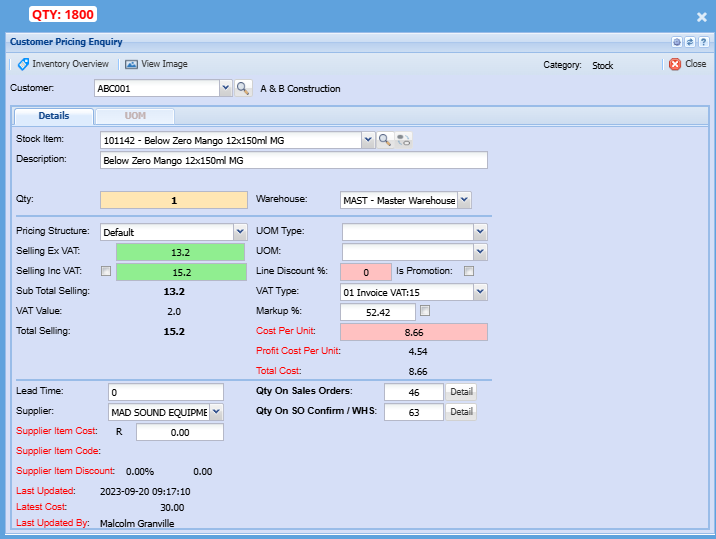
Customer price enquiry provides the ability to see previous prices for a customer, which can be useful for resolving disputes or understanding pricing trends

This green Shows an overview breakdown of the price, such as base price, discounts, VAT/GST or other adjustments that apply

<span style="color: rgb(45, 194, 107);">**Debtors Module&gt; Analysis&gt; Customer Price Enquiry**</span>

[![image.png](https://hugeerp10.co.za/hsofmanual/uploads/images/gallery/2024-09/scaled-1680-/hWZimage.png)](https://hugeerp10.co.za/hsofmanual/uploads/images/gallery/2024-09/hWZimage.png)

# Debtor Analysis Menu

# Debtor Analysis Search

Analysis of all the posted customer/ debtor information in one place

[![image.png](https://hugeerp10.co.za/hsofmanual/uploads/images/gallery/2024-01/scaled-1680-/bJnzadimage.png)](https://hugeerp10.co.za/hsofmanual/uploads/images/gallery/2024-01/bJnzadimage.png)
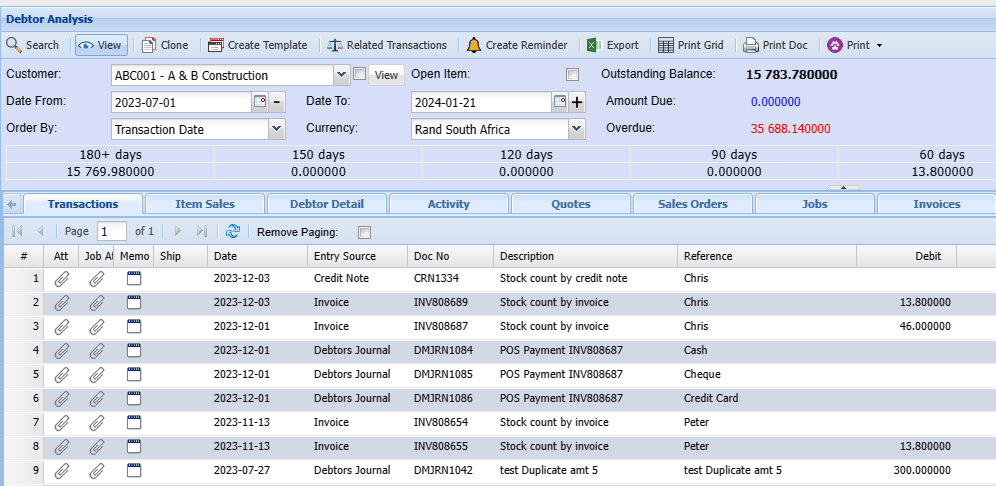
<table border="1" id="bkmrk-search-search-button" style="border-collapse: collapse; width: 100%; height: 512.344px;"><colgroup><col style="width: 25.2163%;"></col><col style="width: 74.7837%;"></col></colgroup><tbody><tr style="height: 29.7969px;"><td style="height: 29.7969px;">**<span class="ts50">Search</span>**</td><td style="height: 29.7969px;"><span class="ts7">The search button will search for the items you selected for the search</span></td></tr><tr style="height: 29.7969px;"><td style="height: 29.7969px;">**<span class="ts50">View</span>**</td><td style="height: 29.7969px;"><span class="ts7">The View button allows the user to see the details of a quote or invoice etc.</span></td></tr><tr style="height: 29.7969px;"><td style="height: 29.7969px;">**<span class="ts50">Clone</span>**</td><td style="height: 29.7969px;"><span class="ts7">This button allows you to create a duplicate copy of a transaction</span></td></tr><tr style="height: 29.7969px;"><td style="height: 29.7969px;">**<span class="ts50">Create Template</span>**</td><td style="height: 29.7969px;"><span class="ts7">Save transaction documents as a template to use for similar transactions later</span></td></tr><tr style="height: 29.7969px;"><td style="height: 29.7969px;">**<span class="ts50">Related Transactions</span>**</td><td style="height: 29.7969px;"><span class="ts7">This will show the related transaction of an invoice Quote etc.</span></td></tr><tr style="height: 48.5938px;"><td style="height: 48.5938px;">**<span class="ts50">Create Reminder</span>**</td><td style="height: 48.5938px;"><span class="ts7">A reminder can be created in this field for this debtor or yourself depending on what the purpose of the reminder is for.</span></td></tr><tr style="height: 29.7969px;"><td style="height: 29.7969px;">**<span class="ts50">Export</span>**</td><td style="height: 29.7969px;"><span class="ts7">The export button allows the exporting of data to an Excel spreadsheet</span></td></tr><tr style="height: 46.5938px;"><td style="height: 46.5938px;">**<span class="ts50">Print Grid</span>**</td><td style="height: 46.5938px;"><span class="ts7">The print button will open a quote print selection window and that will allow you to select what you want to have on your printout</span></td></tr><tr style="height: 29.7969px;"><td style="height: 29.7969px;">**Print Doc**</td><td style="height: 29.7969px;"> </td></tr><tr style="height: 29.7969px;"><td style="height: 29.7969px;">**<span class="ts50">Customer</span>**</td><td style="height: 29.7969px;"><span class="ts7">This is where you enter the details of your customer.</span></td></tr><tr style="height: 29.7969px;"><td style="height: 29.7969px;">**<span class="ts50">Outstanding Balances</span>**</td><td style="height: 29.7969px;"><span class="ts7">This is the monies owed to you by this client.</span></td></tr><tr style="height: 29.7969px;"><td style="height: 29.7969px;">**<span class="ts50">Date From and date to</span>**</td><td style="height: 29.7969px;"><span class="ts7">This is the date range that governs the display of transactions against this client.</span></td></tr><tr style="height: 29.7969px;"><td style="height: 29.7969px;">**<span class="ts50">Order By</span>**</td><td style="height: 29.7969px;"><span class="ts7">This is the directive in which you want the information to be displayed.</span></td></tr><tr style="height: 29.7969px;"><td style="height: 29.7969px;">**<span class="ts50">Currency</span>**</td><td style="height: 29.7969px;"><span class="ts7">This is the currency used for this debtor as setup in the debtor’s setup.</span></td></tr><tr style="height: 29.7969px;"><td style="height: 29.7969px;">**<span class="ts50">Total, current, 30 days etc.</span>**</td><td style="height: 29.7969px;"><span class="ts7">This displays the total monies due and at certain periods 4</span></td></tr></tbody></table>

---

##### Print Drop Down

The print drop down allows you to print customer/ debtor or customer information by the information below:

- Statement PDF
- Allocation Report
- Linked Serial Numbers
- Debtor Enquiry

[![image.png](https://hugeerp10.co.za/hsofmanual/uploads/images/gallery/2024-09/scaled-1680-/image.png)](https://hugeerp10.co.za/hsofmanual/uploads/images/gallery/2024-09/image.png)

<table border="1" id="bkmrk-print-statement-pdf-" style="border-collapse: collapse; width: 100%; height: 120.188px;"><colgroup><col style="width: 24.3511%;"></col><col style="width: 75.6489%;"></col></colgroup><tbody><tr style="height: 29.7969px;"><td style="height: 29.7969px;">**<span class="ts50">Print Statement PDF</span>**</td><td style="height: 29.7969px;"><span class="ts7">A PDF statement for this debtor can be printed</span></td></tr><tr style="height: 29.7969px;"><td style="height: 29.7969px;">**<span class="ts50">Print Allocation Report</span>**</td><td style="height: 29.7969px;"><span class="ts7">From here an allocation report for this debtor can be generated.</span></td></tr><tr style="height: 30.7969px;"><td style="height: 30.7969px;">**<span class="ts50">View Linked S/N</span>**</td><td style="height: 30.7969px;"><span class="ts7">This allows the user to view serial numbers that are linked to items</span></td></tr><tr style="height: 29.7969px;"><td style="height: 29.7969px;">**Debtor/ Customer Enquiry**</td><td style="height: 29.7969px;"> </td></tr></tbody></table>

---

#### <span class="ts7">Related Transactions</span>

<span class="ts7">This part shows the accounts involved in a transaction</span>

![](https://hugeerp0.co.za/csp/webhelp/topics/images/image(68).png)

<table border="1" id="bkmrk-transaction-list-tab" style="border-collapse: collapse; width: 95.679%;"><colgroup><col style="width: 37.1925%;"></col><col style="width: 62.8075%;"></col></colgroup><tbody><tr><td>**<span class="ts7">Transaction List Tab</span>**</td><td><span class="ts7">Shows a list of transactions involved</span></td></tr><tr><td>**<span class="ts7">View Accounts Tab</span>**</td><td><span class="ts7">To view the t-accounts</span></td></tr><tr><td>**<span class="ts7">Print Grid button</span>**</td><td><span class="ts7">To print the transactions</span></td></tr><tr><td>**<span class="ts7">Print T Account button</span>**</td><td><span class="ts7">To print the T accounts</span></td></tr></tbody></table>

---

### <span class="ts7">Tabs defined</span>

<span class="ts7">The following tabs work like dashboard tabs where the user gets to have an overall view of the transactions against the selected Client.</span>

[![image.png](https://hugeerp10.co.za/hsofmanual/uploads/images/gallery/2024-09/scaled-1680-/rF1image.png)](https://hugeerp10.co.za/hsofmanual/uploads/images/gallery/2024-09/rF1image.png)

<table border="1" id="bkmrk-transactions-tab-wil" style="border-collapse: collapse; width: 81.358%; height: 296px;"><colgroup><col style="width: 23.9988%;"></col><col style="width: 75.9708%;"></col></colgroup><tbody><tr style="height: 29.6px;"><td style="height: 29.6px;">**<span class="ts50">Transactions Tab</span>**</td><td style="height: 29.6px;"><span class="ts7">Will list all the transactions for this debtor (date range inconsideration)</span></td></tr><tr style="height: 29.6px;"><td style="height: 29.6px;">**<span class="ts50">Debtor Detail</span>**</td><td style="height: 29.6px;"><span class="ts7">Will display the company information for the selected client</span></td></tr><tr style="height: 29.6px;"><td style="height: 29.6px;">**<span class="ts50">Quotes</span>**</td><td style="height: 29.6px;"><span class="ts7">will show all the quotes</span></td></tr><tr style="height: 29.6px;"><td style="height: 29.6px;">**<span class="ts50">Jobs</span>**</td><td style="height: 29.6px;"><span class="ts7">Shows all the Jobs</span></td></tr><tr style="height: 29.6px;"><td style="height: 29.6px;">**<span class="ts50">Invoices</span>**</td><td style="height: 29.6px;"><span class="ts7">Shows All the Invoices</span></td></tr><tr style="height: 29.6px;"><td style="height: 29.6px;">**<span class="ts50">Credit Notes</span>**</td><td style="height: 29.6px;"><span class="ts7">Any Available Credit Notes</span></td></tr><tr style="height: 29.6px;"><td style="height: 29.6px;">**<span class="ts50">Debit Allocations</span>**</td><td style="height: 29.6px;"><span class="ts7">Shows Debit allocations</span></td></tr><tr style="height: 29.6px;"><td style="height: 29.6px;">**<span class="ts50">Credit Allocations</span>**</td><td style="height: 29.6px;"><span class="ts7">Shows Credit allocations</span></td></tr><tr style="height: 29.6px;"><td style="height: 29.6px;">**<span class="ts50">Cashbooks</span>**</td><td style="height: 29.6px;"><span class="ts7">Shows you the available processed cashbooks</span></td></tr><tr style="height: 29.6px;"><td style="height: 29.6px;">**<span class="ts50">Journals</span>**</td><td style="height: 29.6px;"><span class="ts7">Will display all the processed Journals for this Debtor</span></td></tr></tbody></table>

# Document History Menu

# Debtors Document History

<span class="ts15">Search on all posted debtors documents</span>

<span class="ts15">Posted documents reside here from the Activity Menu</span>

<span style="color: rgb(45, 194, 107);">**<span class="ts15">Debtors &gt; Analysis&gt; Document History</span>**</span>

[![image.png](https://hugeerp10.co.za/hsofmanual/uploads/images/gallery/2024-01/scaled-1680-/Qciimage.png)](https://hugeerp10.co.za/hsofmanual/uploads/images/gallery/2024-01/Qciimage.png)

<span class="ts7">This allows you to search for any documents created.</span>

<table border="1" id="bkmrk-document-type-select" style="border-collapse: collapse; width: 100.741%;"><colgroup><col style="width: 25.8037%;"></col><col style="width: 74.1681%;"></col></colgroup><tbody><tr><td>**<span class="ts52">Document Type</span>**</td><td><span class="ts7">Select the type of document you wish to find.</span></td></tr><tr><td>**<span class="ts52">Document Number</span>**</td><td><span class="ts7">Enter a specific document number if applicable.</span></td></tr><tr><td>**<span class="ts52">Debtor Code</span>**</td><td><span class="ts7">Enter a specific debtor’s code to narrow down search results.</span></td></tr><tr><td>**<span class="ts52">Date From and to</span>**</td><td><span class="ts7">Enter the time frame in which the search should run.</span></td></tr><tr><td>**<span class="ts52">Short Description</span>**</td><td><span class="ts7">Enter the short description that would appear on the document.</span></td></tr><tr><td>**<span class="ts52">Order By</span>**</td><td><span class="ts7">Select the order in which the results should be displayed.</span></td></tr><tr><td>**<span class="ts52">Sales Rep</span>**</td><td><span class="ts7">Select the sales representative to narrow down search results.</span></td></tr><tr><td>**<span class="ts52">Debtors Name</span>**</td><td><span class="ts7">Enter the Debtors name to narrow down search results.</span></td></tr><tr><td>**<span class="ts52">Reference</span>**</td><td><span class="ts7">Enter a reference that would have appeared on the document.</span></td></tr></tbody></table>

---

#### Functions

[![image.png](https://hugeerp10.co.za/hsofmanual/uploads/images/gallery/2024-10/scaled-1680-/wU0image.png)](https://hugeerp10.co.za/hsofmanual/uploads/images/gallery/2024-10/wU0image.png)

Update Bulk Email Flags

[![image.png](https://hugeerp10.co.za/hsofmanual/uploads/images/gallery/2024-10/scaled-1680-/HKUimage.png)](https://hugeerp10.co.za/hsofmanual/uploads/images/gallery/2024-10/HKUimage.png)

# Debtors Transactions History Menu

# Debtors Transaction History

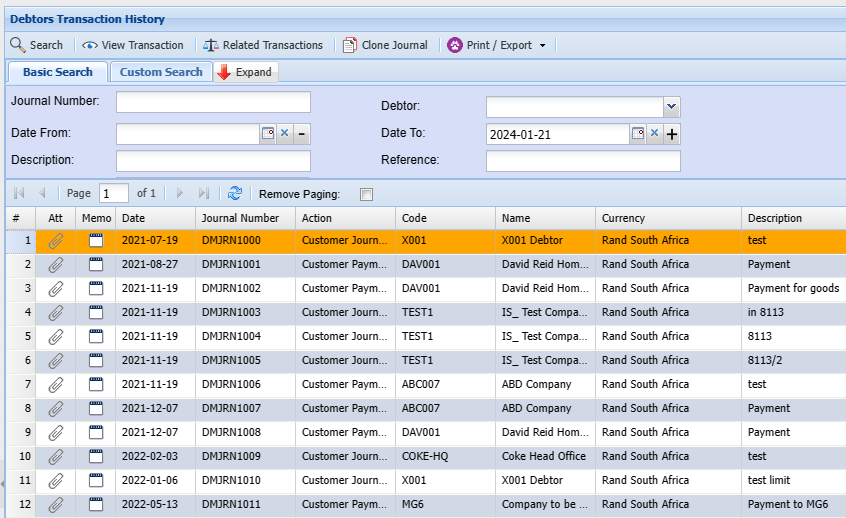
<span class="ts15">View all posted Debtors transaction journals</span>

**<span class="ts15" style="color: rgb(45, 194, 107);">Debtors Module&gt; Analysis&gt; Debtors Transaction History</span>**

<span class="ts0">Find a list of all debtors journal transactions captured in the system</span>

<p class="callout info"><span class="ts0">Remember to be mindful of the date range when searching for a document</span></p>

[![image.png](https://hugeerp10.co.za/hsofmanual/uploads/images/gallery/2024-01/scaled-1680-/KLAimage.png)](https://hugeerp10.co.za/hsofmanual/uploads/images/gallery/2024-01/KLAimage.png)

<table border="1" id="bkmrk-search-view-transact" style="border-collapse: collapse; width: 100%; height: 88.8px;"><colgroup><col style="width: 26.0927%;"></col><col style="width: 73.9073%;"></col></colgroup><tbody><tr style="height: 29.6px;"><td style="height: 29.6px;">**Search**</td><td style="height: 29.6px;">The search button will search for the items you selected for search</td></tr><tr style="height: 29.6px;"><td style="height: 29.6px;">**View Transaction**</td><td style="height: 29.6px;">  
</td></tr><tr style="height: 29.6px;"><td style="height: 29.6px;">**Related Transactions**</td><td style="height: 29.6px;">This will show the related transaction of an invoice Quote etc.</td></tr></tbody></table>

# Dispatch Stock History Menu

# Dispatch Stock History

<span class="ts15">View all posted dispatch stock documents here</span>

<span style="color: rgb(45, 194, 107);">**<span class="ts15">Debtors&gt; Analysis&gt;Dispatch Stock History</span>**</span>

<span class="ts0">This allows a user to search for all posted dispatch stock documents </span>

#### <span class="ts0">View Button</span>

<span class="ts0">This button allows you to view the following details of a dispatch stock</span>

- <span class="ts0">Delivery Address/ Address where the stock should be dispatched too</span>
- <span class="ts0">Shipping details</span>
- <span class="ts0">Line item selected for dispatch</span>

[![image.png](https://hugeerp10.co.za/hsofmanual/uploads/images/gallery/2024-09/scaled-1680-/5I7image.png)](https://hugeerp10.co.za/hsofmanual/uploads/images/gallery/2024-09/5I7image.png)

---

#### Print Dispatch

You can print dispatch stock by the following criteria

[![image.png](https://hugeerp10.co.za/hsofmanual/uploads/images/gallery/2024-09/scaled-1680-/LE9image.png)](https://hugeerp10.co.za/hsofmanual/uploads/images/gallery/2024-09/LE9image.png)

<table border="1" id="bkmrk-show-back-order-qty-" style="border-collapse: collapse; width: 100%;"><colgroup><col style="width: 35.3581%;"></col><col style="width: 64.7408%;"></col></colgroup><tbody><tr><td>**Show Back Order Qty**</td><td>This is the amount of stock items ordered but not yet shipped</td></tr><tr><td>**Show Outstanding Items**</td><td>These are items that have been ordered or requested but have not yet been dispatched, partially dispatched, or are pending delivery</td></tr></tbody></table>

# Debtors Cashbook History Menu

# Debtors Cashbook History

<span class="ts15">View all posted Debtors cashbooks</span>

<span style="color: rgb(45, 194, 107);">**<span class="ts15">Debtors&gt; Analysis&gt; Debtors Cashbook History</span>**</span>

<span class="ts0">This allows a user to search for all created and posted cashbooks</span>

[![image.png](https://hugeerp10.co.za/hsofmanual/uploads/images/gallery/2024-01/scaled-1680-/xEiimage.png)](https://hugeerp10.co.za/hsofmanual/uploads/images/gallery/2024-01/xEiimage.png)

<table border="1" id="bkmrk-search-search-for-a-" style="border-collapse: collapse; width: 72.963%;"><colgroup><col style="width: 27.6828%;"></col><col style="width: 72.283%;"></col></colgroup><tbody><tr><td>**<span class="ts0">Search</span>**</td><td><span class="ts0">Search for a list of cashbooks in the system</span></td></tr><tr><td>**<span class="ts0">View Cashbook</span>**</td><td><span class="ts0">View the Cashbook entries.</span></td></tr><tr><td>**<span class="ts0">Related Transactions</span>**</td><td><span class="ts0">Check the Posting of the Cashbook Transactions</span></td></tr><tr><td>**<span class="ts0">Save As Template</span>**</td><td><span class="ts0">Save this Cashbook as a template to use for similar transactions.</span></td></tr><tr><td>**<span class="ts0">Print</span>**</td><td><span class="ts0">Print cashbook</span></td></tr></tbody></table>

# Document Management Menu

# Document Management Search

<span class="ts0">The purpose of Document Management is to help customers add attachments to the system that is not really linked to any document.</span>

<span class="ts0">Some examples are as follows</span>

<div aria-label="Page Section Options" class="pointer-container" id="bkmrk-%C2%A0" refs="pointer@pointer" tabindex="-1"><div class="pointer flex-container-row items-center justify-space-between p-s anim is-page-editable"><div class="flex-container-row items-center gap-s" refs="pointer@mode-section"><button class="text-button icon px-xs" title="Permalink mode, Press to show include tag"><svg class="svg-icon" data-icon="link" role="presentation" viewbox="0 0 24 24" xmlns="http://www.w3.org/2000/svg"></svg></button><div class="input-group"> <button class="button outline icon" title="Copy Link" type="button"><svg class="svg-icon" data-icon="copy" role="presentation" viewbox="0 0 24 24" xmlns="http://www.w3.org/2000/svg"></svg></button></div></div><svg class="svg-icon" data-icon="edit" role="presentation" viewbox="0 0 24 24" xmlns="http://www.w3.org/2000/svg"></svg></div></div>- <span class="ts0">VAT / GST returns with all of its attachments</span>
- Supplier monthly statements
- Customer contracts
- Customer payment advises
- Company document legal information which I would put under system configuration
- The general company contracts like insurance I would put under the General Ledger

For more information click [here](https://hugeerp10.co.za/hsofmanual/books/general/page/document-management-spec "Document Management")