# Unmanage All Job Lines
The **“Unmanage All”** function will reverse any managed quantities on job lines, reducing them back to an unmanaged state based on what has not yet been invoiced.
- Any quantities already **invoiced cannot be unmanaged**, as they are finalised in the system
- Only **non-invoiced quantities** will be adjusted
To fully remove or reset job lines, use the available actions provided below in combination.
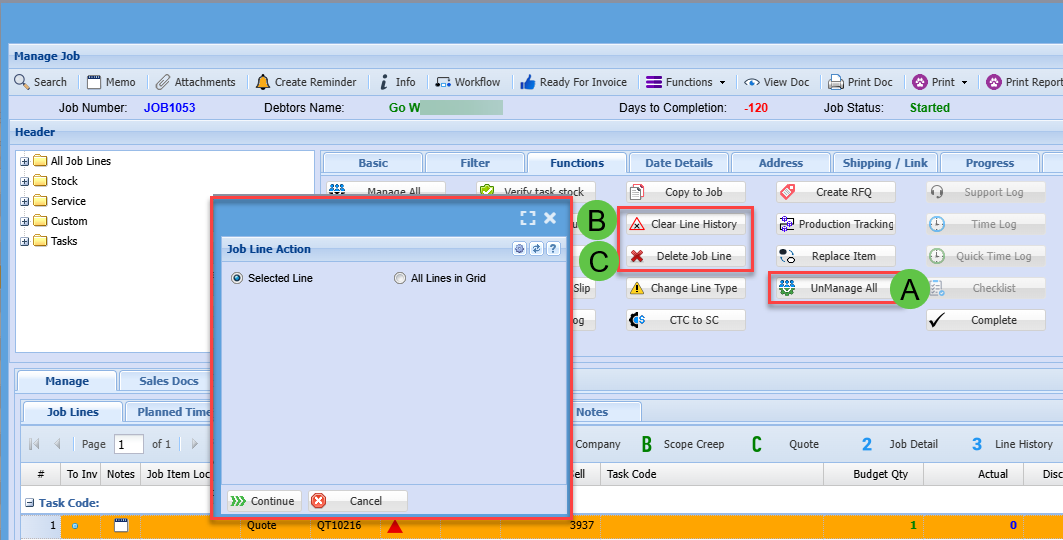
| **A** | UnManage All items on a job |
| **B** | Clear Line History
Only works if the Managed Actual quantity equals zero
|
| **C** | Delete Job Line
Only works if there are no Line History entries
|
[](https://hugeerp10.co.za/hsofmanual/uploads/images/gallery/2025-04/j75image.png)
Actions can be applied to either **selected lines** or **all lines within the grid**.
- **All Lines in Grid** – This option will apply the action only to the lines currently visible, based on the applied filters
- If a line cannot be processed (e.g. due to system restrictions), it will be **skipped automatically**, and the action will continue on the remaining lines
This ensures efficient processing without interruption when working with multiple job lines.