Unmanage All Job Lines
The “Unmanage All” function will reverse any managed quantities on job lines, reducing them back to an unmanaged state based on what has not yet been invoiced.
- Any quantities already invoiced cannot be unmanaged, as they are finalised in the system
- Only non-invoiced quantities will be adjusted
To fully remove or reset job lines, use the available actions provided below in combination.
| A | UnManage All items on a job |
| B |
Clear Line History Only works if the Managed Actual quantity equals zero |
| C |
Delete Job Line Only works if there are no Line History entries |
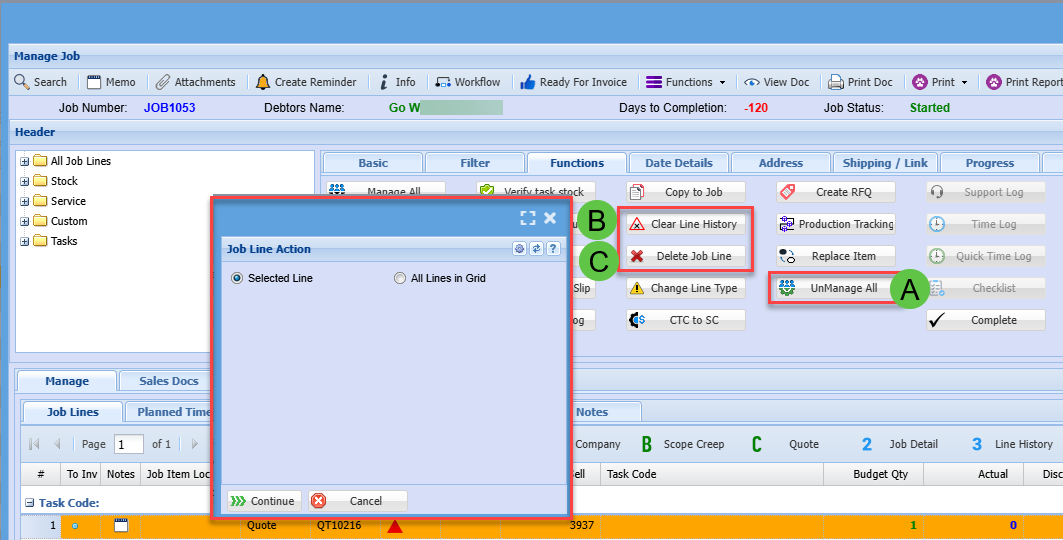
Actions can be applied to either selected lines or all lines within the grid.
- All Lines in Grid – This option will apply the action only to the lines currently visible, based on the applied filters
- If a line cannot be processed (e.g. due to system restrictions), it will be skipped automatically, and the action will continue on the remaining lines
This ensures efficient processing without interruption when working with multiple job lines.