# Repackage Basic Import

<span lang="EN-GB">In place of adding items individually on the repackage function, one can import the item.</span>

<span lang="EN-GB"> </span><span lang="EN-GB">To import items:</span>

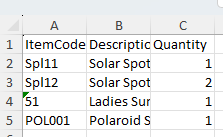
<span lang="EN-GB"> </span><span lang="EN-GB">You will need to create the import file</span>

<span lang="EN-GB">The file template is a s below and is a standard excel format file</span>

[![image.png](https://hugeerp10.co.za/hsofmanual/uploads/images/gallery/2025-01/scaled-1680-/DNCimage.png)](https://hugeerp10.co.za/hsofmanual/uploads/images/gallery/2025-01/DNCimage.png)

<span lang="EN-GB">Once the file has been created. Save the file in a dedicated folder</span>

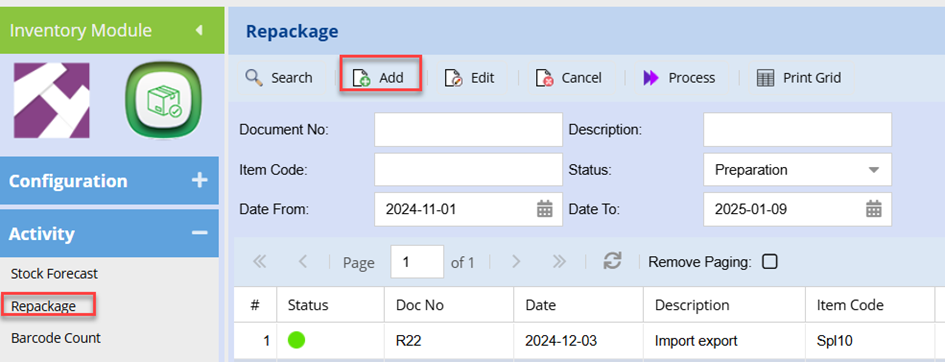
<span lang="EN-GB"> </span><span lang="EN-GB">Go to Repackage</span>

<span lang="EN-GB">Create a new repackage setup</span>

<span lang="EN-GB"> </span>[![image.png](https://hugeerp10.co.za/hsofmanual/uploads/images/gallery/2025-01/scaled-1680-/ktqimage.png)](https://hugeerp10.co.za/hsofmanual/uploads/images/gallery/2025-01/ktqimage.png)

<span lang="EN-GB">Select the relevant code and Enter the description as you would normally</span>

<span lang="EN-GB"> </span><span lang="EN-GB">Click Save at the bottom of the page</span>

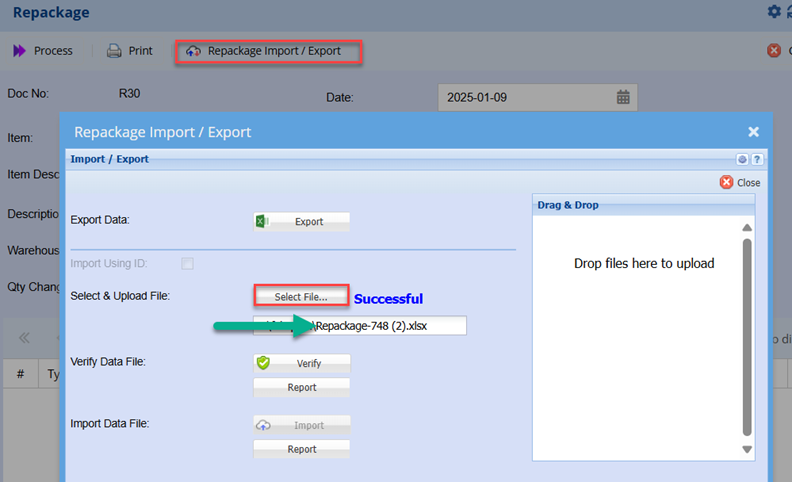
<span lang="EN-GB"> </span><span lang="EN-GB">Click the Repackage Import / Export Button</span>

<span lang="EN-GB"> </span><span lang="EN-GB">Search for the file and select</span>

<span lang="EN-GB"> </span><span lang="EN-GB">This will upload and you should see “successful” indicted<span style="mso-spacerun: yes;"> </span>(once the file has bene uploaded ) </span>

<span lang="EN-GB"> </span>[![image.png](https://hugeerp10.co.za/hsofmanual/uploads/images/gallery/2025-01/scaled-1680-/Ffnimage.png)](https://hugeerp10.co.za/hsofmanual/uploads/images/gallery/2025-01/Ffnimage.png)

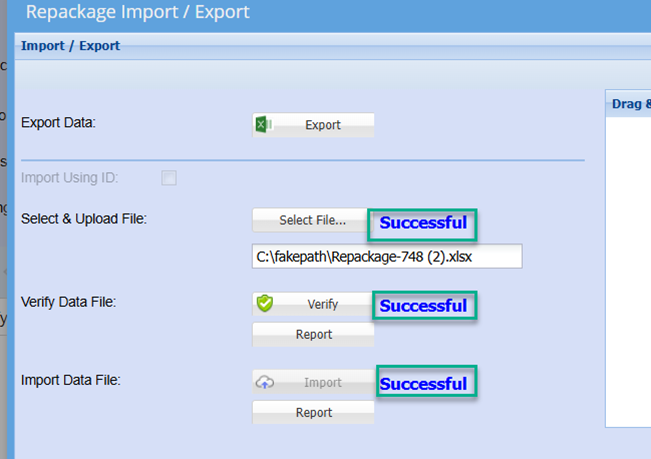
<span lang="EN-GB">Click Verify</span>

<span lang="EN-GB">Successful should be returned</span>

<span lang="EN-GB">If unsuccessful or failed, click the Report button to establish the cause of the file failing to verify.</span>

<span lang="EN-GB"> </span><span lang="EN-GB">Once successfully verified, click the import button</span>

<span lang="EN-GB"> </span><span lang="EN-GB">Again, successful should be displayed</span>

<span lang="EN-GB"> </span>[![image.png](https://hugeerp10.co.za/hsofmanual/uploads/images/gallery/2025-01/scaled-1680-/KQHimage.png)](https://hugeerp10.co.za/hsofmanual/uploads/images/gallery/2025-01/KQHimage.png)

<span lang="EN-GB" style="mso-no-proof: yes;"></span>

<span lang="EN-GB"> </span><span lang="EN-GB">Click close.</span>

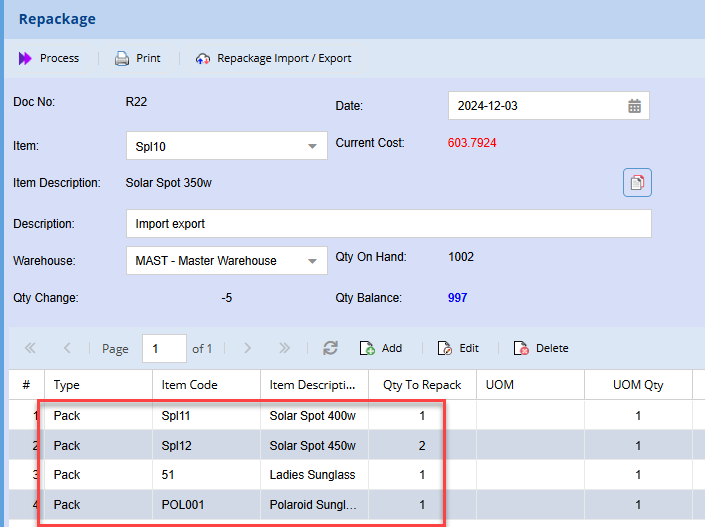
<span lang="EN-GB">This will return to the Repackage grid where you should notice all item have been import and are displayed on the grid</span>

<span lang="EN-GB"> </span>

[![image.png](https://hugeerp10.co.za/hsofmanual/uploads/images/gallery/2025-01/scaled-1680-/uPBimage.png)](https://hugeerp10.co.za/hsofmanual/uploads/images/gallery/2025-01/uPBimage.png)

<span lang="EN-GB"> </span>

<span lang="EN-GB"> </span>

<span lang="EN-GB"></span>