# Import Invoice to Credit Note

<span class="ts6">The simplest way of creating a credit note </span><span class="ts6">by simply “Import from invoice”</span>

<span class="ts6">You can however use the long method of capturing</span>

<span style="color: rgb(45, 194, 107);">**<span class="ts45">Open Debtors Module&gt; Activity &gt; Credit Note</span>**</span>

<span class="ts45"><span class="ts6">Select Import from Invoice</span></span>

[![image.png](https://hugeerp10.co.za/hsofmanual/uploads/images/gallery/2024-06/scaled-1680-/kwrimage.png)](https://hugeerp10.co.za/hsofmanual/uploads/images/gallery/2024-06/kwrimage.png)

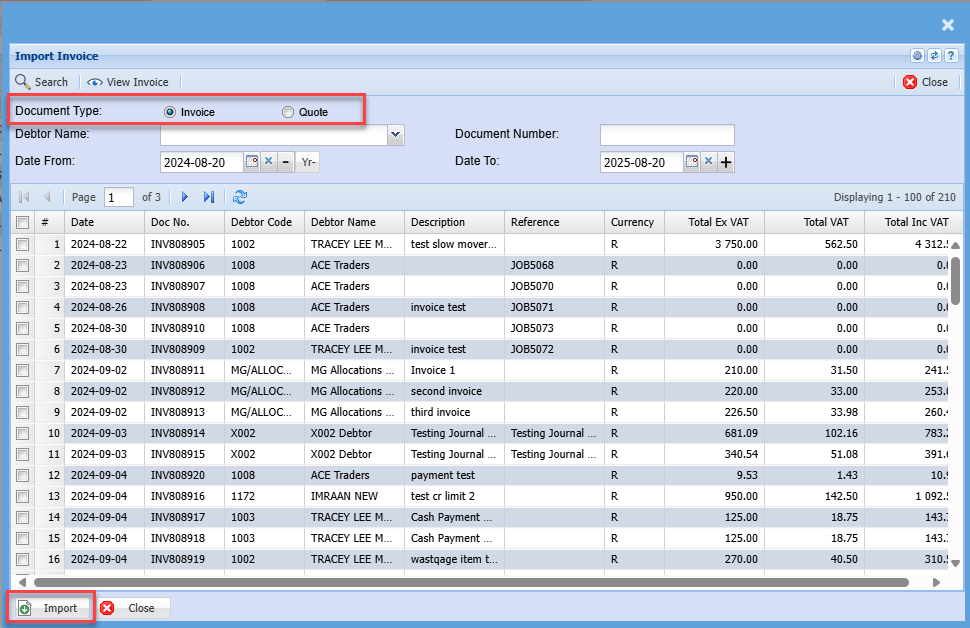
<span class="ts6">Search by document number or customer, remember the date range also counts.</span>

<span class="ts6">The default option is to import from an invoice or import from a quote.</span>

<p class="callout info"><span class="ts6">Importing from quote helps keep the Task build structure in place for Credit note</span></p>

<span class="ts6">You can view the invoice to verify that it’s the correct one you want to reverse by clicking on the view invoice button.</span>

<span class="ts6">Click on the Import button to create a credit note</span>

[![image.png](https://hugeerp10.co.za/hsofmanual/uploads/images/gallery/2025-08/scaled-1680-/fsgimage.png)](https://hugeerp10.co.za/hsofmanual/uploads/images/gallery/2025-08/fsgimage.png)

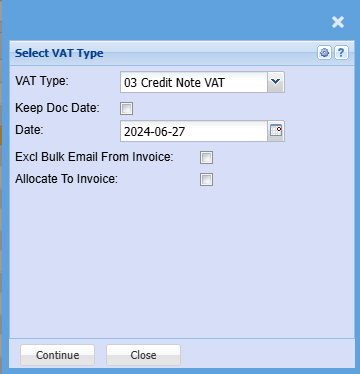
<span class="ts6">And Click Continue</span>

[![image.png](https://hugeerp10.co.za/hsofmanual/uploads/images/gallery/2024-06/scaled-1680-/9FIimage.png)](https://hugeerp10.co.za/hsofmanual/uploads/images/gallery/2024-06/9FIimage.png)

<table border="1" id="bkmrk-vat-%2F-gst-type-selec" style="border-collapse: collapse; width: 100%;"><colgroup><col style="width: 27.6885%;"></col><col style="width: 72.3115%;"></col></colgroup><tbody><tr><td>**VAT / GST Type**</td><td>Select the correct Tax Type for Credit Note</td></tr><tr><td>**Keep Doc Date**</td><td>Enforce credit note to make date same as invoice date</td></tr><tr><td>**Date**</td><td>Put in a date for credit note</td></tr><tr><td>**Excl Bulk Email from Invoice**</td><td>Put this tick on to mark invoice to not be sent out when using Bulk email invoice function</td></tr><tr><td>**Allocate to Invoice**</td><td>Automatically allocate the credit note to invoice after processing the credit note</td></tr></tbody></table>

<p class="callout warning"><span class="ts6">If one changes the customer of the imported invoice to credit note, the Allocate to invoice will be cleared. No automatic allocation will occur</span></p>

<span class="ts6">The credit note will now be under preparation status in the credit notes waiting to be processed</span>

![](https://hugeerp0.co.za/csp/webhelp/topics/images/image(2173).png)

<span class="ts6">Click On process Credit note to process this document</span>

![](https://hugeerp0.co.za/csp/webhelp/topics/images/image(2174).png)