# Debtors Interest Transaction Menu

# Debtors Interest Search

Search all interest batches

Interest will only run on debtors that have been flagged with an interest active

[![image.png](https://hugeerp10.co.za/hsofmanual/uploads/images/gallery/2024-01/scaled-1680-/BBJimage.png)](https://hugeerp10.co.za/hsofmanual/uploads/images/gallery/2024-01/BBJimage.png)

<table border="1" id="bkmrk-search-search-intere" style="border-collapse: collapse; width: 100%; height: 119.188px;"><colgroup><col style="width: 28.21%;"></col><col style="width: 71.9137%;"></col></colgroup><tbody><tr style="height: 29.7969px;"><td style="height: 29.7969px;">**Search**</td><td style="height: 29.7969px;">Search interest batches</td></tr><tr style="height: 29.7969px;"><td style="height: 29.7969px;">**Add**</td><td style="height: 29.7969px;">Add a new interest batch</td></tr><tr style="height: 29.7969px;"><td style="height: 29.7969px;">**Edit**</td><td style="height: 29.7969px;">Edit an existing batch</td></tr><tr style="height: 29.7969px;"><td style="height: 29.7969px;">**Cancel**</td><td style="height: 29.7969px;">Cancel an open batch</td></tr><tr><td>**Print**</td><td>Print interest batch</td></tr></tbody></table>

# Add Debtors Interest Journals

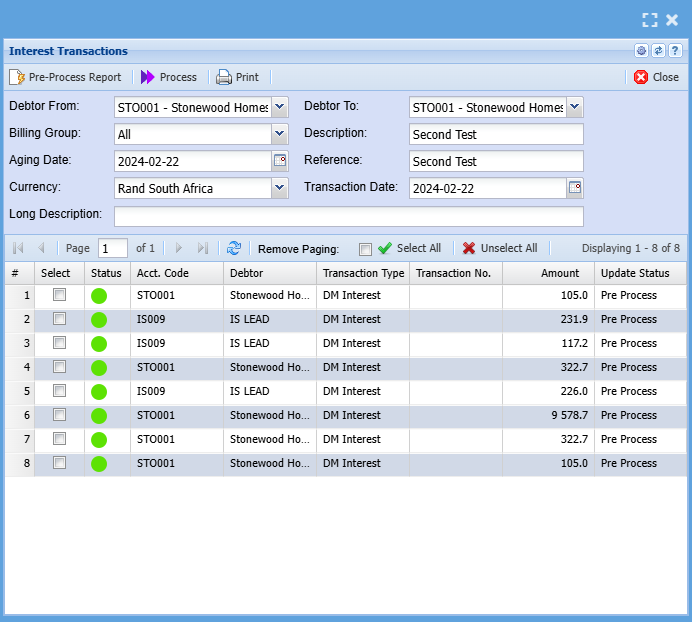
<span class="ts7">This utility will calculate and create a Debtor Journal for each debtor that is Checked to have interest charges against them for outstanding balances.</span>

<span class="ts7">The interest is calculated per age period per debtor for the outstanding amount per age period.</span>

<span class="ts7">The interest percentage is setup on the Debtor Master Detail window.</span>

<span style="color: rgb(45, 194, 107);">**<span class="ts15">Debtors&gt; Activity&gt; Interest Transactions&gt; Add</span>**</span>

[![image.png](https://hugeerp10.co.za/hsofmanual/uploads/images/gallery/2024-07/scaled-1680-/image.png)](https://hugeerp10.co.za/hsofmanual/uploads/images/gallery/2024-07/image.png)

<div class="block0" id="bkmrk-debtor-from-select-t"><table class="tbl4" style="width: 100%;"><tbody><tr class="row1"><td class="cell27" style="width: 31.9974%;">**<span class="ts7">Debtor From</span>**

</td><td class="cell28" style="width: 67.9779%;"><span class="ts7">Select the from debtor. (The From and to can be left blank to include all debtors)</span>

</td></tr><tr class="row1"><td class="cell27" style="width: 31.9974%;">**<span class="ts7">Debtor To</span>**

</td><td class="cell28" style="width: 67.9779%;"><span class="ts7">Select the To debtor.</span>

</td></tr><tr class="row1"><td class="cell27" style="width: 31.9974%;">**<span class="ts7">Billing Group</span>**

</td><td class="cell28" style="width: 67.9779%;"><span class="ts7">A selectable value from a dropdown to create journals for a specific debtor billing group.</span>

</td></tr><tr class="row1"><td class="cell27" style="width: 31.9974%;">**<span class="ts7">Aging Date</span>**

</td><td class="cell28" style="width: 67.9779%;"><span class="ts7">This is the date that the aging for the debtors will be based on.</span>

</td></tr><tr class="row1"><td class="cell27" style="width: 31.9974%;">**<span class="ts7">Description</span>**

</td><td class="cell28" style="width: 67.9779%;"><span class="ts6">Enter a description for you interest batch.</span>

<span class="ts6">e.g. Interest on overdue account</span>

</td></tr><tr class="row1"><td class="cell27" style="width: 31.9974%;">**<span class="ts7">Currency</span>**

</td><td class="cell28" style="width: 67.9779%;"><span class="ts7">Select the currency from the drop down.</span>

</td></tr><tr class="row1"><td class="cell27" style="width: 31.9974%;">**<span class="ts7">Reference</span>**

</td><td class="cell28" style="width: 67.9779%;"><span class="ts7"><span class="ts6">Enter a reference of your choice.eg, Interest on Overdue Account. </span><span class="ts6">This is the reference that will appear on your interest transaction line on </span><span class="ts6">the debtors statement</span></span>

</td></tr><tr class="row1"><td class="cell27" style="width: 31.9974%;">**<span class="ts7">Transaction Date</span>**

</td><td class="cell28" style="width: 67.9779%;"><span class="ts7">This is the actual transaction date for the debtor journal.</span>

</td></tr><tr class="row1"><td class="cell27" style="width: 31.9974%;">**<span class="ts7">Long Description</span>**

</td><td class="cell28" style="width: 67.9779%;"><span class="ts7">Enter a description regarding the interest journal.</span>

</td></tr><tr class="row1"><td class="cell29" style="width: 31.9974%;">**<span class="ts7">Standard Tab has four buttons</span>**

</td></tr><tr class="row1"><td class="cell27" style="width: 31.9974%;">**<span class="ts7">Pre-Process Report</span>**

</td><td class="cell28" style="width: 67.9779%;"><span class="ts7">Pre-process runs the journal calculations but does not process the actual transaction, this allows for assessment and scrutiny before actually processing the interest journals.</span>

</td></tr><tr class="row1"><td class="cell27" style="width: 31.9974%;">**<span class="ts7">Process</span>**

</td><td class="cell28" style="width: 67.9779%;"><span class="ts7">Actually run debtors interest utility.</span>

</td></tr><tr class="row1"><td class="cell27" style="width: 31.9974%;">**<span class="ts7">Close button</span>**

</td><td class="cell28" style="width: 67.9779%;"><span class="ts7">Closes the window.</span>

</td></tr><tr class="row1"><td class="cell27" style="width: 31.9974%;">**<span class="ts7">Print button</span>**

</td><td class="cell28" style="width: 67.9779%;"><span class="ts7">Print debtor’s interest run report</span>

</td></tr></tbody></table>

</div>Preview interest run

![](https://hugeerp0.co.za/csp/webhelp/topics/images/image(418).png)

<span class="ts6">If the amounts are not correct, you can close and amend the relevant parameters such date, Interest Rate, etc. and rerun the interest calculations.</span>

<p class="callout info"><span class="ts51">Note: If you click “Process” This will post the interest transaction to the respective debtor's accounts. Typically, you will only Process these transactions on month end, prior to running the debtor's statements and if you are satisfied that the interest amounts are correct.</span></p>

<span class="ts51">If you process and there is an error in a particular calculation, you will need to do a journal to correct the mistakes.</span>

---

<span class="ts6">Interest Calculation Example</span>

<span class="ts6">Assume you wish to charge ABC Stores interest of 10% on their outstanding account. </span>

<span class="ts6">Using the interest setup of 10%, Zero Minimum amount, Period From 30 Days.</span>

<table border="1" id="bkmrk-debtor-from-abc-stor" style="border-collapse: collapse; width: 100%;"><colgroup><col style="width: 16.3457%;"></col><col style="width: 83.7531%;"></col></colgroup><tbody><tr><td>**<span class="ts6">Debtor From</span>**</td><td><span class="ts6">ABC Stores</span></td></tr><tr><td>**<span class="ts6">Debtor To</span>**</td><td><span class="ts6">ABC Stores</span></td></tr><tr><td>**<span class="ts6">Billing Group</span>**</td><td>  
</td></tr><tr><td>**<span class="ts6">All Description</span>**</td><td><span class="ts6">Interest on overdue account</span></td></tr><tr><td>**<span class="ts6">Ageing Date</span>**</td><td><span class="ts6">30/04/2012</span></td></tr><tr><td>**<span class="ts6">Reference</span>**</td><td><span class="ts6">Interest on overdue account</span></td></tr><tr><td>**<span class="ts6">Currency</span>**</td><td><span class="ts6">Rands</span></td></tr><tr><td>**<span class="ts6">Transaction Date</span>**</td><td><span class="ts6">30/04/2012</span></td></tr></tbody></table>

<table border="1" id="bkmrk-180days-150days-120d" style="border-collapse: collapse; width: 100%;"><colgroup><col style="width: 12.4691%;"></col><col style="width: 12.4691%;"></col><col style="width: 12.4691%;"></col><col style="width: 12.4691%;"></col><col style="width: 12.4691%;"></col><col style="width: 12.4691%;"></col><col style="width: 12.4691%;"></col><col style="width: 12.4691%;"></col></colgroup><tbody><tr><td class="align-center"><span class="ts6">180days</span></td><td class="align-center"><span class="ts6">150days</span></td><td class="align-center"><span class="ts6">120days</span></td><td class="align-center"><span class="ts6">90days</span></td><td class="align-center"><span class="ts6">60days</span></td><td class="align-center"><span class="ts6">30days</span></td><td class="align-center"><span class="ts6">Current</span></td><td class="align-center"><span class="ts6">Balance</span></td></tr><tr><td class="align-center">0</td><td class="align-center">0</td><td class="align-center">0</td><td class="align-center">1200</td><td class="align-center">1000</td><td class="align-center">500</td><td class="align-center">0</td><td class="align-center">2700</td></tr></tbody></table>

<span class="ts6">30/04/2012 Interest calculations:</span>

<span class="ts6">Current: 31/01/2012 to 29/02/2012 Interest not applicable – zero balance</span>

<span class="ts6">30 Days:01/03/2012 to 31/03/2012 Interest = R 0.00 (Due to From Period set at 30days)</span>

<span class="ts6">60 Days: 01/04/2012 to 30/04/2012 Interest = R 8.33(1000 \* 10%) / 12</span>

<span class="ts6">90 Days:</span>

<span class="ts6">Therefore on 30/04/2012 the ABC stores account will reflect a journal of R 8.32 for the interest calculate from 30-60days.</span>

<table border="1" id="bkmrk-debtors-account-dr-c" style="border-collapse: collapse; width: 72.5926%;"><colgroup><col style="width: 52.338%;"></col><col style="width: 20.5613%;"></col><col style="width: 14.206%;"></col><col style="width: 12.8976%;"></col></colgroup><tbody><tr><td><span class="ts6">Debtors Account</span></td><td class="align-center"><span class="ts6">Dr</span></td><td class="align-center"><span class="ts6">Cr</span></td><td class="align-center"><span class="ts6">Balance</span></td></tr><tr><td><span class="ts6">01/04/2012 Opening Balance</span></td><td class="align-center"><span class="ts6">1000.00</span></td><td class="align-center">  
</td><td class="align-center"><span class="ts6">1000.00</span></td></tr><tr><td><span class="ts6">30/04/2012 Interest on overdue account</span></td><td class="align-center"><span class="ts6">8.33</span></td><td class="align-center">  
</td><td class="align-center"><span class="ts6">1008.33</span></td></tr></tbody></table>

# Interest Activation Setup

<span class="ts15">Setup interest to be run in Debtors setup</span>

<span class="ts15">Debtors Module&gt; Configuration&gt; </span><span class="ts15">Debtors Setup</span>

<span class="ts0">Select the debtor&gt; Amend&gt; Account Details&gt; Interest Setup</span>

<span class="ts0"> </span>![](https://hugeerp0.co.za/csp/webhelp/topics/images/image(2180).png)

<span class="ts0"> </span>![](https://hugeerp0.co.za/csp/webhelp/topics/images/image(2181).png)

<table border="1" id="bkmrk-tick-the-activate-op" style="border-collapse: collapse; width: 100%; height: 178.781px;"><colgroup><col style="width: 31.9137%;"></col><col style="width: 68.21%;"></col></colgroup><tbody><tr style="height: 29.7969px;"><td style="height: 29.7969px;">**<span class="ts0">Tick the Activate Option</span>**</td><td style="height: 29.7969px;"><span class="ts0">This will activate interest calculations on that particular debtor</span></td></tr><tr style="height: 29.7969px;"><td style="height: 29.7969px;">**Minimum Amount**</td><td style="height: 29.7969px;"><span class="ts0">This amount is the minimum amount that interest will be calculated from. That is, if the amount outstanding is less than this amount, no interest will be calculated</span></td></tr><tr style="height: 29.7969px;"><td style="height: 29.7969px;">**Period From**</td><td style="height: 29.7969px;"><span class="ts0">This field indicates from how many days outstanding to start calculating interest. ie, if you choose 30 Days as an example, the system will start calculating interest if the amount outstanding is more than 30 days old</span></td></tr><tr style="height: 29.7969px;"><td style="height: 29.7969px;">**Interest Rate**</td><td style="height: 29.7969px;">Enter the interest rate, number only</td></tr></tbody></table>

<p class="callout warning"><span class="ts0">No need to enter a %, only a number</span></p>

<p class="callout info"><span class="ts0">Interest Rate: This is an annual percentage.</span></p>

<span class="ts0">If you wish to have interest calculated on all debtors, you will have to follow this process for every debtor.</span>

<span class="ts9"> </span>

<span class="ts9"> </span>

<span class="ts9"></span>