# Customer Dashboard Menu

# Customer Dashboard

<span style="color: rgb(45, 194, 107);">**<span class="ts15">Debtors Module&gt; Activity&gt; </span><span class="ts15">Customer Dashboard</span>**</span>

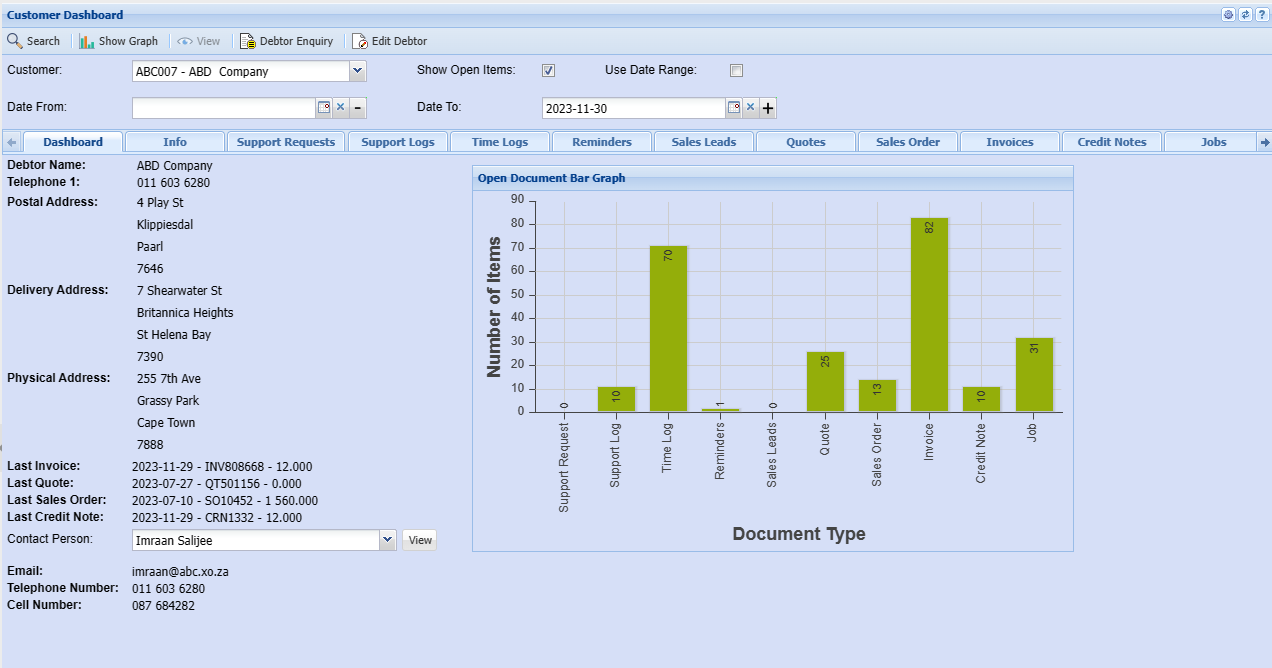
Customer dashboard is like your personal control center for all things related to your customers. It's a webpage or screen that brings together important info and key stats about your interactions with customers.

Customer dashboards give you an overview of a clients activities and transactions

<span class="ts0">You can only select one client at a time </span>

<p class="callout warning"><span class="ts0">If you do not select a debtor/ customer you will receive an error</span></p>

[![image.png](https://hugeerp10.co.za/hsofmanual/uploads/images/gallery/2023-11/scaled-1680-/b1jimage.png)](https://hugeerp10.co.za/hsofmanual/uploads/images/gallery/2023-11/b1jimage.png)

<table border="1" id="bkmrk-%C2%A0" style="border-collapse: collapse; width: 100%; height: 316.734px;"><colgroup><col style="width: 28.8033%;"></col><col style="width: 71.1967%;"></col></colgroup><tbody><tr style="height: 29.7969px;"><td style="height: 29.7969px;">**Show Graph**</td><td style="height: 29.7969px;">Shows a graph with a summary of client's activities</td></tr><tr style="height: 80.1719px;"><td style="height: 80.1719px;">**Debtor/ Customer Enquiry**</td><td style="height: 80.1719px;"><span class="ts0">The customer inquiry window allows you to view the customer at a quick glance Information on invoices in payments.</span>

Debtor enquiry allows you to view all transactions against the client

</td></tr><tr style="height: 57.7812px;"><td style="height: 57.7812px;">**Edit Debtor/ Customer**</td><td style="height: 57.7812px;">This button will take you back to customer setup screen to edit debtor/customer details

For a detailed manual on how to edit debtor/ customer click [here ](https://hugeerp10.co.za/hsofmanual/books/adm-configuration/page/add-debtor)

</td></tr><tr style="height: 29.7969px;"><td style="height: 29.7969px;">**Customer**</td><td style="height: 29.7969px;">Select a debtor/ customer you want to view the dashboard for</td></tr><tr style="height: 29.7969px;"><td style="height: 29.7969px;">**Show Open Items** </td><td style="height: 29.7969px;">Include items that are not yet completed to the dashboard</td></tr><tr style="height: 29.7969px;"><td style="height: 29.7969px;">**Use Date Range**</td><td style="height: 29.7969px;">You can also view by date range</td></tr><tr style="height: 29.7969px;"><td style="height: 29.7969px;">**Date From / Date To**</td><td style="height: 29.7969px;">Choose the date range for which you want to view the report from  
Select a date range of when you want to see the report to</td></tr></tbody></table>