# Add Alerts

<span class="ts0">Alerts allow an automatic pop-up to occur when selecting a specific customer, supplier, stock item and other sections within the system.</span>

<span class="ts0">When creating the alert it will be in an active state</span>

<span class="ts0">If you want to remove the alert, make the alert inactive or Cancel the alert</span>

<p class="callout info"><span class="ts0">Alerts can be created across the system for various document types</span></p>

<span style="color: rgb(45, 194, 107);">**<span class="ts0">CRM Module&gt; Activity&gt; Alert Search</span>**</span>

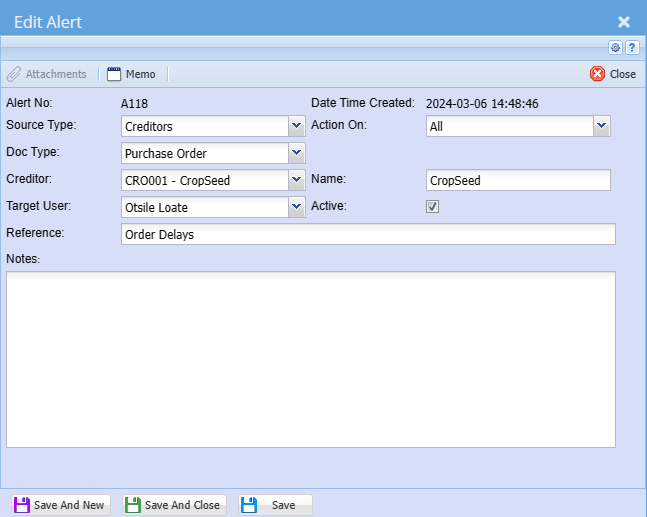
[![image.png](https://hugeerp10.co.za/hsofmanual/uploads/images/gallery/2024-03/scaled-1680-/y4Uimage.png)](https://hugeerp10.co.za/hsofmanual/uploads/images/gallery/2024-03/y4Uimage.png)

<table border="1" id="bkmrk-source-type-select-t" style="border-collapse: collapse; width: 100%; height: 253.6px;"><colgroup><col style="width: 26.2223%;"></col><col style="width: 73.8766%;"></col></colgroup><tbody><tr style="height: 29.6px;"><td style="height: 29.6px;">**Source Type**</td><td style="height: 29.6px;">Select the source type you are creating an alert for on the drop down selection</td></tr><tr style="height: 29.6px;"><td style="height: 29.6px;">**Doc Type**</td><td style="height: 29.6px;">Select the document type you are creating an alert for on a drop down selection</td></tr><tr style="height: 29.6px;"><td style="height: 29.6px;">**Creditor/ Debtor**</td><td style="height: 29.6px;">Select the creditor or customer you are creating an alert for on a drop down selection

This will change based on the source type selection

</td></tr><tr style="height: 46.4px;"><td style="height: 46.4px;">**Target User**</td><td style="height: 46.4px;">Select the user who must see this alert on the drop down selection. You can also send it to all users</td></tr><tr style="height: 29.6px;"><td style="height: 29.6px;">**Reference**</td><td style="height: 29.6px;">Add alert search reference</td></tr><tr style="height: 29.6px;"><td style="height: 29.6px;">**Action on**</td><td style="height: 29.6px;">Select when the alert must pop-up on the drop down selection</td></tr><tr style="height: 29.6px;"><td style="height: 29.6px;">**Name**</td><td style="height: 29.6px;">The name of the creditor, Debtor or inventory item</td></tr><tr style="height: 29.6px;"><td style="height: 29.6px;">**Active**</td><td style="height: 29.6px;">The tick means that the alert is active and no tick means that the alert is inactive</td></tr></tbody></table>