# Add Stock Return Note

<span style="mso-bidi-font-family: Calibri; mso-bidi-theme-font: minor-latin; mso-bidi-font-weight: bold;">Stock return notes are usually done in the event that stock purchased and received from a supplier are incorrect or faulty and need to be returned to the supplier for credit.</span>

<span style="mso-bidi-font-family: Calibri; mso-bidi-theme-font: minor-latin;">There are 2 ways one can create a stock return note:</span>

<table border="1" id="bkmrk-1-capture-manually-2" style="border-collapse: collapse; width: 39.3827%;"><colgroup><col style="width: 9.26841%;"></col><col style="width: 90.7069%;"></col></colgroup><tbody><tr><td>1</td><td><span style="mso-bidi-font-family: Calibri; mso-bidi-theme-font: minor-latin;">Capture manually</span></td></tr><tr><td>2</td><td><span style="mso-bidi-font-family: Calibri; mso-bidi-theme-font: minor-latin;">Import from GRV Document</span></td></tr></tbody></table>


####  

---

#### <span style="mso-bidi-font-family: Calibri; mso-bidi-theme-font: minor-latin; mso-bidi-font-weight: bold;">Capture Manually</span>

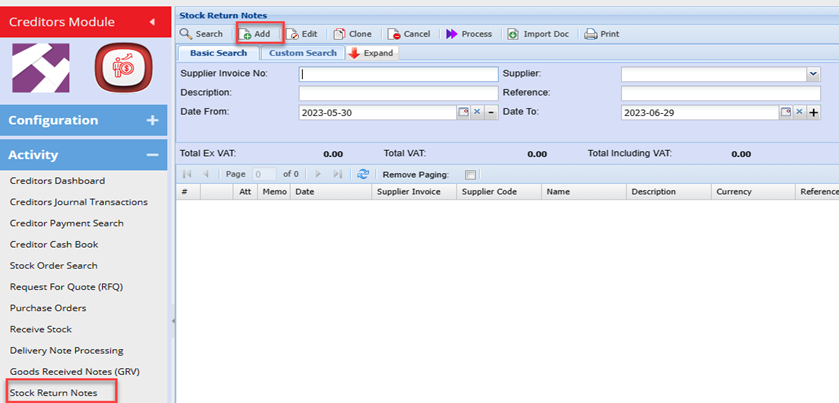
<span style="color: rgb(45, 194, 107);">**<span style="mso-bidi-font-family: Calibri; mso-bidi-theme-font: minor-latin; mso-bidi-font-weight: bold;">Cre</span><span style="mso-bidi-font-family: Calibri; mso-bidi-theme-font: minor-latin;">ditors Module&gt;Activity Menu&gt;Stock Return Notes</span>**</span>

Click the Add button

<span style="mso-no-proof: yes;">Select the Creditor</span>

<span style="mso-no-proof: yes;">Enter the description</span>

<span style="mso-no-proof: yes;">Enter a Reference: this could be the original Supplier invoice number</span>

Enter the respective date

Click Save

You can create standard reason typically for stock being returned and select the respective reason from the Drop down
<span style="mso-no-proof: yes;">![](https://hugeerp10.co.za/hsofmanual/uploads/images/gallery/2023-08/embedded-image-98go7myy.png)  
</span>

Click Add to enter the item details being returned

The capture process here is the same as one would capture a Purchase order
<span style="mso-no-proof: yes;">![](https://hugeerp10.co.za/hsofmanual/uploads/images/gallery/2023-08/embedded-image-syk9n3by.png)  
</span>

Enter the **Quantity** of the items you are returning.

Enter the **Cost Price** per item.

Select the **VAT Type** from the drop down box which will be Stock **Return VAT**

Click on save and new button to add another item

Or Save an Close if no other items are being returned

Click on Process button

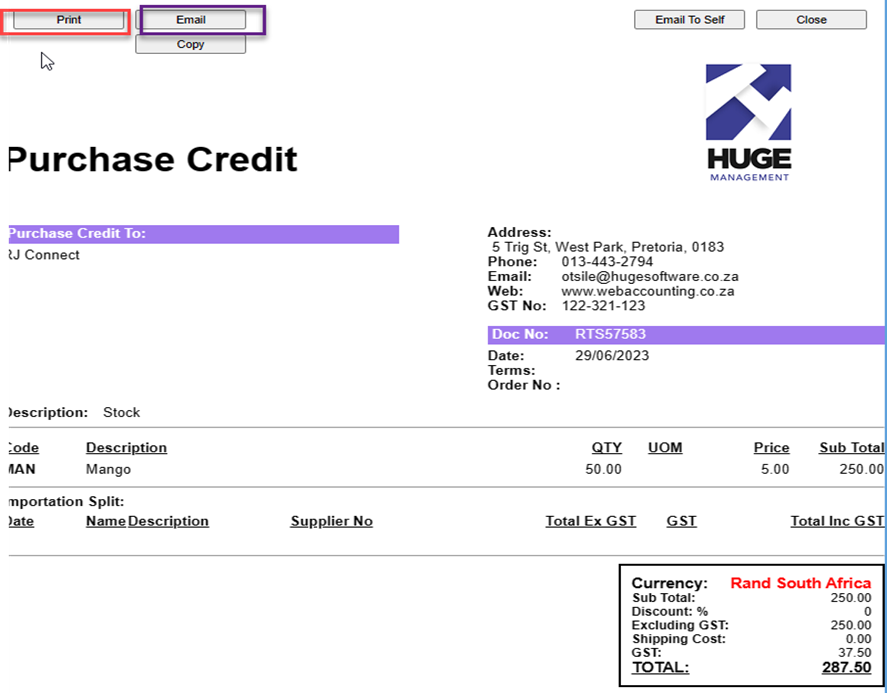
<span style="mso-bidi-font-family: Calibri; mso-bidi-theme-font: minor-latin;">The document will be generated and you can print if needs to be send with the Stock being returned.</span>

<span style="mso-bidi-font-family: Calibri; mso-bidi-theme-font: minor-latin;">The Stock return note can also be emailed directly to the Creditor from the system.</span>

#### <span style="mso-bidi-font-family: Calibri; mso-bidi-theme-font: minor-latin; mso-no-proof: yes;">![](https://hugeerp10.co.za/hsofmanual/uploads/images/gallery/2023-08/embedded-image-qluhhcma.png)</span>

#### <span style="mso-bidi-font-family: Calibri; mso-bidi-theme-font: minor-latin; mso-no-proof: yes;"></span>

---

#### <span style="mso-bidi-font-family: Calibri; mso-bidi-theme-font: minor-latin;">Import from GRV Document</span>

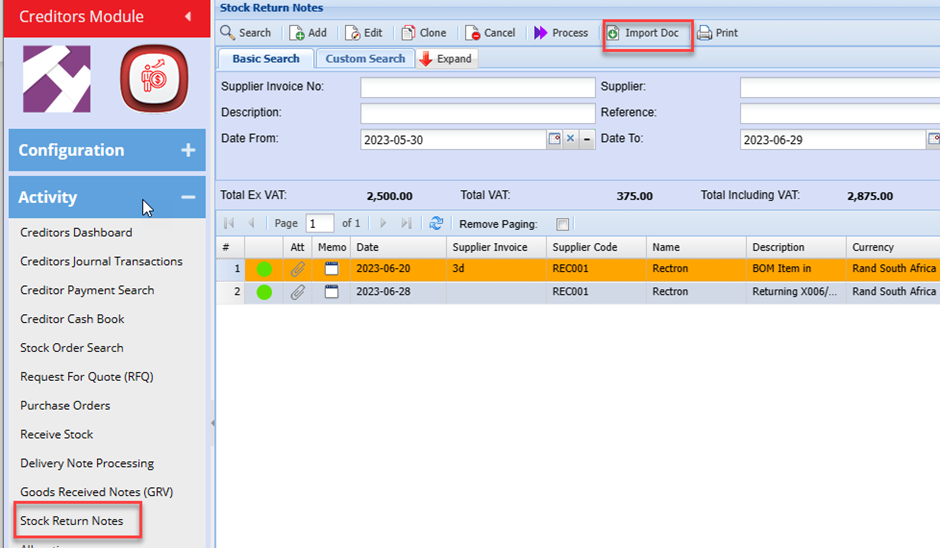
<span style="mso-bidi-font-family: Calibri; mso-bidi-theme-font: minor-latin;"> </span><span style="mso-bidi-font-family: Calibri; mso-bidi-theme-font: minor-latin;">Go to <span style="color: rgb(45, 194, 107);">**Creditors &gt; Activity&gt; Stock Return Note**</span></span>

<span style="mso-no-proof: yes;">![](https://hugeerp10.co.za/hsofmanual/uploads/images/gallery/2023-08/embedded-image-ewdrzj8u.png)</span>

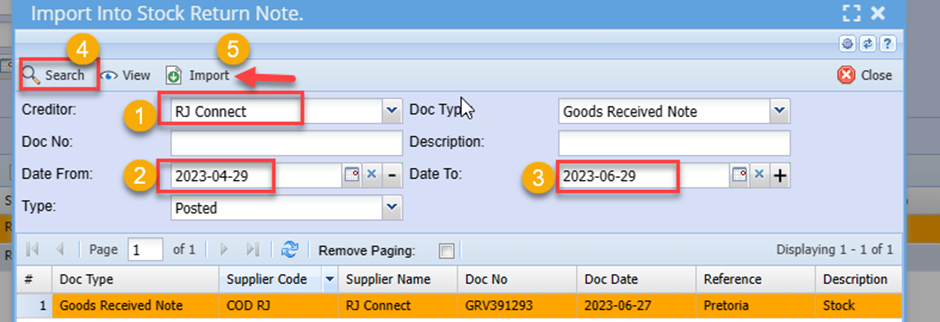
<span style="mso-no-proof: yes;"></span><span style="mso-bidi-font-family: Calibri; mso-bidi-theme-font: minor-latin;">Search for the required Goods Received Voucher (GRV)</span>

<span style="mso-bidi-font-family: Calibri; mso-bidi-theme-font: minor-latin;">Select and Click the Import Button</span>

<span style="mso-no-proof: yes;">![](https://hugeerp10.co.za/hsofmanual/uploads/images/gallery/2023-08/embedded-image-2zz8acpd.png)  
</span>

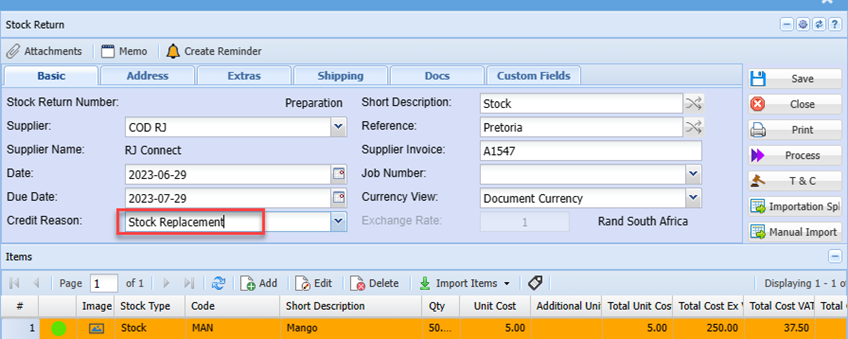
<span style="mso-bidi-font-family: Calibri; mso-bidi-theme-font: minor-latin;">Edit and details on the document header</span>

<span style="mso-bidi-font-family: Calibri; mso-bidi-theme-font: minor-latin;">Double click the item line if any edit is required. Eg. Changing the quantity being returned</span>

<span style="mso-bidi-font-family: Calibri; mso-bidi-theme-font: minor-latin;">Delete any item not be returned ( in the event the Imported GRV had more than 1 item line)</span>

<span style="mso-bidi-font-family: Calibri; mso-bidi-theme-font: minor-latin;">Process the Stock return note and Print/ email in the same manner as with manually capturing (see above)</span>