# Creditors Cashbooks Menu

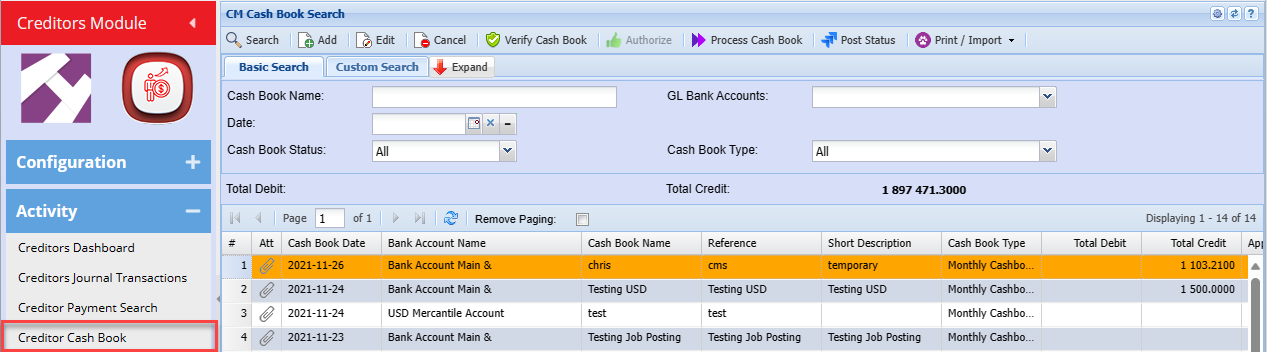
# Creditors Cashbook Search

<span class="ts10">Video training manual 2016 - [Click Here](https://vimeo.com/357004745)</span>

<span class="ts10">Creditors cashbook is used to control payments to creditors.</span>

[![image.png](https://hugeerp10.co.za/hsofmanual/uploads/images/gallery/2024-01/scaled-1680-/xC1image.png)](https://hugeerp10.co.za/hsofmanual/uploads/images/gallery/2024-01/xC1image.png)

<table border="1" id="bkmrk-search-add-edit-canc" style="border-collapse: collapse; width: 100%;"><colgroup><col style="width: 19.6791%;"></col><col style="width: 80.4198%;"></col></colgroup><tbody><tr><td>**Search**</td><td>  
</td></tr><tr><td>**Add**</td><td>  
</td></tr><tr><td>**Edit**</td><td>  
</td></tr><tr><td>**Cancel**</td><td>  
</td></tr><tr><td>**Verify Cash Book**</td><td> </td></tr><tr><td>**Authorize**</td><td>  
</td></tr><tr><td>**Process Cash Book**</td><td>  
</td></tr><tr><td>**Post Status**</td><td>  
</td></tr></tbody></table>

---

#### **Print/Import Drop Down**

[![image.png](https://hugeerp10.co.za/hsofmanual/uploads/images/gallery/2024-01/scaled-1680-/zZRimage.png)](https://hugeerp10.co.za/hsofmanual/uploads/images/gallery/2024-01/zZRimage.png)

<table border="1" id="bkmrk-print-upload-cashboo" style="border-collapse: collapse; width: 100%;"><colgroup><col style="width: 22.5186%;"></col><col style="width: 77.5803%;"></col></colgroup><tbody><tr><td>**Print**</td><td>  
</td></tr><tr><td>**Upload Cashbook**</td><td>  
</td></tr><tr><td>**Import Cash Book**</td><td>  
</td></tr><tr><td>**Export Cash Book**</td><td> </td></tr></tbody></table>

---

#### **Basic Search**

[![image.png](https://hugeerp10.co.za/hsofmanual/uploads/images/gallery/2024-01/scaled-1680-/PZhimage.png)](https://hugeerp10.co.za/hsofmanual/uploads/images/gallery/2024-01/PZhimage.png)

<table border="1" id="bkmrk-cash-book-name-date-" style="border-collapse: collapse; width: 100%;"><colgroup><col style="width: 19.5556%;"></col><col style="width: 80.5433%;"></col></colgroup><tbody><tr><td>**Cash Book Name**</td><td>  
</td></tr><tr><td>**Date**</td><td>  
</td></tr><tr><td>**Cash Book Status**</td><td>  
</td></tr><tr><td>**GL Bank Accounts**</td><td> </td></tr><tr><td>**Cash Book Type**</td><td>  
</td></tr></tbody></table>

---

#### **Custom Search**

[![image.png](https://hugeerp10.co.za/hsofmanual/uploads/images/gallery/2024-01/scaled-1680-/Ve6image.png)](https://hugeerp10.co.za/hsofmanual/uploads/images/gallery/2024-01/Ve6image.png)

<table border="1" id="bkmrk-category-%C2%A0" style="border-collapse: collapse; width: 100%;"><colgroup><col style="width: 17.9507%;"></col><col style="width: 82.1482%;"></col></colgroup><tbody><tr><td>**Category**</td><td> </td></tr></tbody></table>

# Add Creditors Cashbook

Click Add to create a new cashbook

[![image.png](https://hugeerp10.co.za/hsofmanual/uploads/images/gallery/2024-01/scaled-1680-/laBimage.png)](https://hugeerp10.co.za/hsofmanual/uploads/images/gallery/2024-01/laBimage.png)

<table border="1" id="bkmrk-attachments-create-r" style="border-collapse: collapse; width: 100%;"><colgroup><col style="width: 20.6667%;"></col><col style="width: 79.4321%;"></col></colgroup><tbody><tr><td>**Attachments**</td><td>  
</td></tr><tr><td>**Create Reminder**</td><td>  
</td></tr><tr><td>**Allocate**</td><td>  
</td></tr><tr><td>**Insert Template**</td><td> </td></tr><tr><td>**Save As Template**</td><td>  
</td></tr><tr><td>**Print**</td><td>  
</td></tr><tr><td>**Export Cash Book**</td><td>  
</td></tr></tbody></table>

---

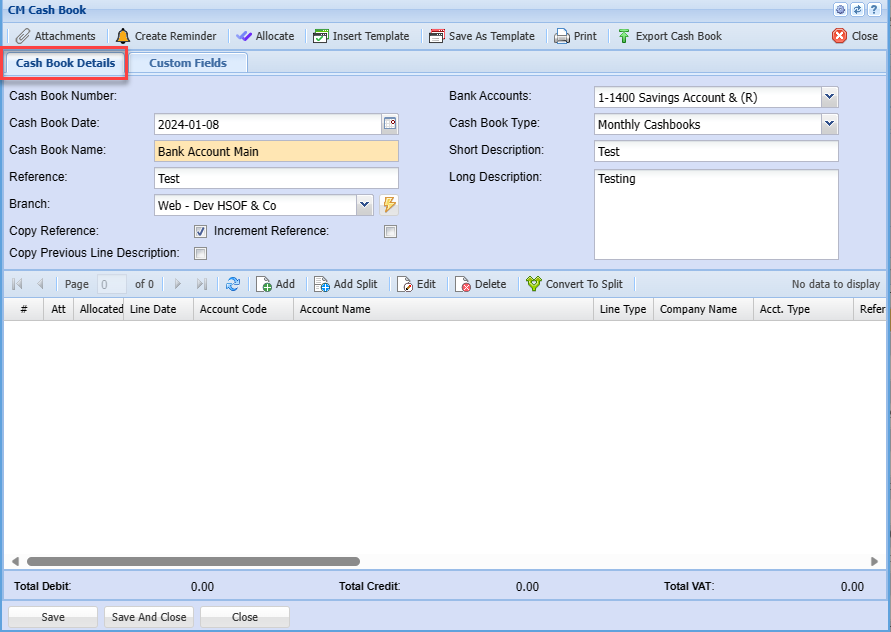
##### **Cash Book Details**

[![image.png](https://hugeerp10.co.za/hsofmanual/uploads/images/gallery/2024-01/scaled-1680-/LHTimage.png)](https://hugeerp10.co.za/hsofmanual/uploads/images/gallery/2024-01/LHTimage.png)

<table border="1" id="bkmrk-cash-book-number-cas" style="border-collapse: collapse; width: 100%;"><colgroup><col style="width: 29.926%;"></col><col style="width: 70.1729%;"></col></colgroup><tbody><tr><td>**Cash Book Number**</td><td>  
</td></tr><tr><td>**Cash Book Date**</td><td>  
</td></tr><tr><td>**Cash Book Name**</td><td> </td></tr><tr><td>**Reference**</td><td>  
</td></tr><tr><td>**Branch**</td><td>  
</td></tr><tr><td>**Copy Reference** </td><td>  
</td></tr><tr><td>**Copy Previous Line Description**</td><td>  
</td></tr><tr><td>**Increment Reference**</td><td>  
</td></tr><tr><td>**Bank Accounts**</td><td>  
</td></tr><tr><td>**Cash Book Type**</td><td>  
</td></tr><tr><td>**Short Description**</td><td>  
</td></tr><tr><td>**Long Description**</td><td>  
</td></tr></tbody></table>

---

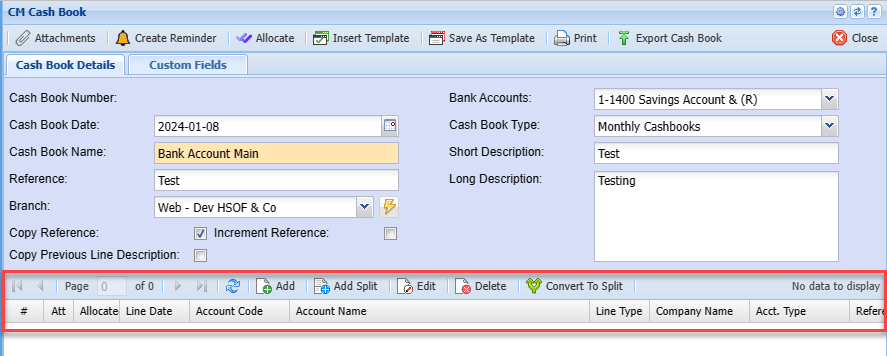
#### **Cash Book Line**

[![image.png](https://hugeerp10.co.za/hsofmanual/uploads/images/gallery/2024-01/scaled-1680-/Z3Uimage.png)](https://hugeerp10.co.za/hsofmanual/uploads/images/gallery/2024-01/Z3Uimage.png)

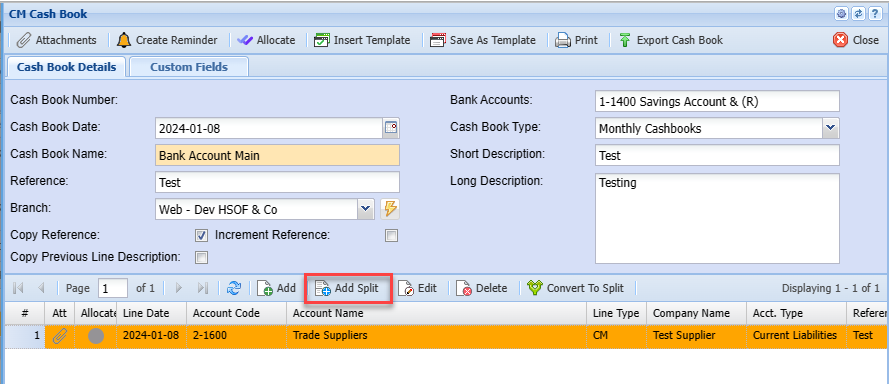
<table border="1" id="bkmrk-add-add-split-edit-%C2%A0" style="border-collapse: collapse; width: 100%;"><colgroup><col style="width: 19.926%;"></col><col style="width: 80.1729%;"></col></colgroup><tbody><tr><td>**Add**</td><td>  
</td></tr><tr><td>**Add Split**</td><td>  
</td></tr><tr><td>**Edit**</td><td> </td></tr><tr><td>**Delete**</td><td>  
</td></tr><tr><td>**Convert To Split**</td><td>  
</td></tr></tbody></table>

---

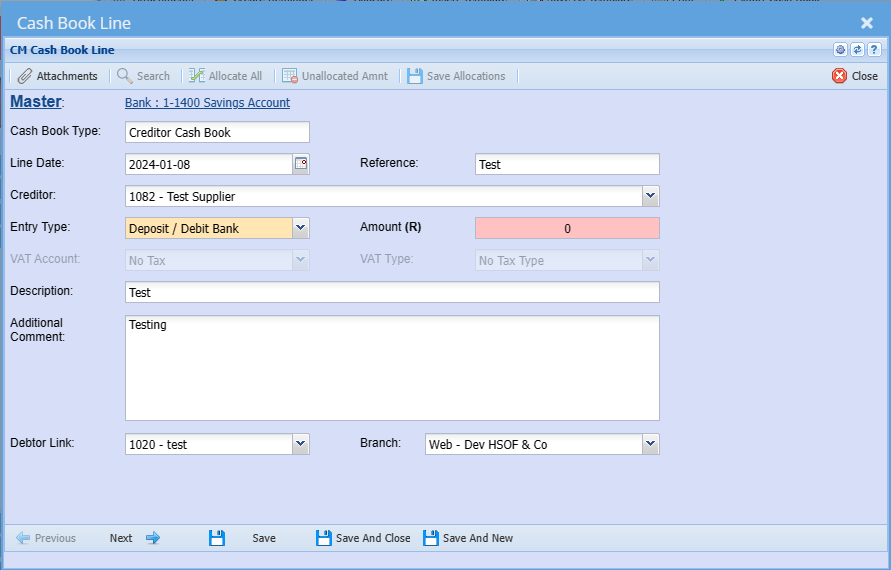
##### **Cash Book Adding Line**

<span class="ts0">Creditors payments can be captured separately in the creditor's cashbook</span>

<div aria-label="Page Section Options" class="pointer-container" id="bkmrk-%C2%A0-8" refs="pointer@pointer" tabindex="-1"><div class="pointer flex-container-row items-center justify-space-between p-s anim is-page-editable"><div class="flex-container-row items-center gap-s" refs="pointer@mode-section"><button class="text-button icon px-xs" title="Permalink mode, Press to show include tag"><svg class="svg-icon" data-icon="link" role="presentation" viewbox="0 0 24 24" xmlns="http://www.w3.org/2000/svg"></svg></button><div class="input-group"> <button class="button outline icon" title="Copy Link" type="button"><svg class="svg-icon" data-icon="copy" role="presentation" viewbox="0 0 24 24" xmlns="http://www.w3.org/2000/svg"></svg></button></div></div><svg class="svg-icon" data-icon="edit" role="presentation" viewbox="0 0 24 24" xmlns="http://www.w3.org/2000/svg"></svg></div></div><span class="ts0">this is ideal for Creditors Clerks who deal with creditors only</span>

[![image.png](https://hugeerp10.co.za/hsofmanual/uploads/images/gallery/2024-01/scaled-1680-/EEeimage.png)](https://hugeerp10.co.za/hsofmanual/uploads/images/gallery/2024-01/EEeimage.png)

<table border="1" id="bkmrk-attachments-%C2%A0-search" style="border-collapse: collapse; width: 100%;"><colgroup><col style="width: 21.1605%;"></col><col style="width: 78.9383%;"></col></colgroup><tbody><tr><td>**Attachments**</td><td> </td></tr><tr><td>**Search**</td><td>  
</td></tr><tr><td>**Allocate All**</td><td>  
</td></tr><tr><td>**Unallocated Amnt**</td><td>  
</td></tr><tr><td>**Save Allocations**</td><td>  
</td></tr></tbody></table>

[![image.png](https://hugeerp10.co.za/hsofmanual/uploads/images/gallery/2024-01/scaled-1680-/XAoimage.png)](https://hugeerp10.co.za/hsofmanual/uploads/images/gallery/2024-01/XAoimage.png)

<table border="1" id="bkmrk-cash-book-type-line-" style="border-collapse: collapse; width: 100%;"><colgroup><col style="width: 20.4198%;"></col><col style="width: 79.6791%;"></col></colgroup><tbody><tr><td>**Cash Book Type**</td><td>  
</td></tr><tr><td>**Line Date**</td><td>Transaction date</td></tr><tr><td>**Reference** </td><td>Add reference</td></tr><tr><td>**Creditor**</td><td>Select Creditor being paid</td></tr><tr><td>**Entry Type**</td><td>Entry Type will be Payment (Money going out of the selected bank account)</td></tr><tr><td>**Amount**</td><td>The Amount being paid</td></tr><tr><td>**VAT Account**</td><td>  
</td></tr><tr><td>**VAT Type**</td><td>  
</td></tr><tr><td>**Description**</td><td>Enter Description for this transaction</td></tr><tr><td>**Additional Comment**</td><td>  
</td></tr><tr><td>**Debtor Link**</td><td>  
</td></tr><tr><td>**Branch**</td><td>  
</td></tr></tbody></table>

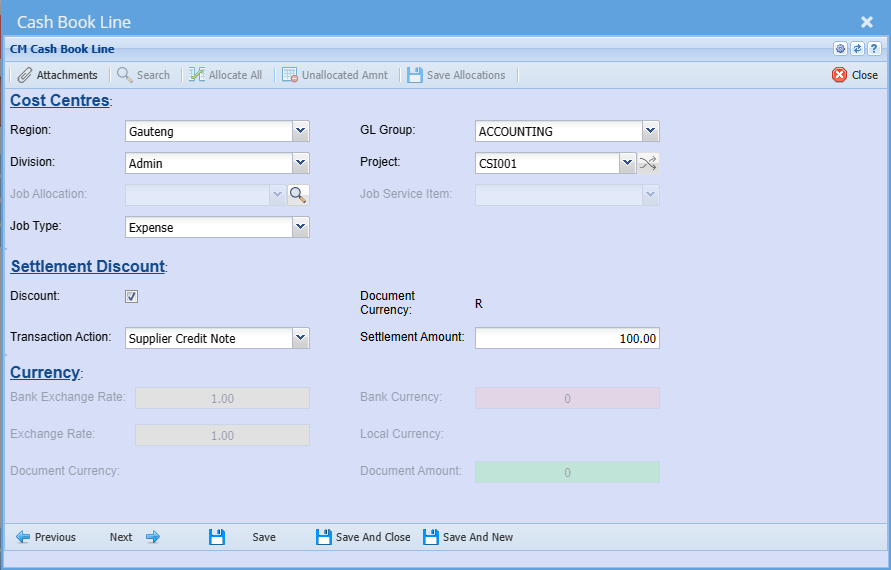
<span class="ts0">In the next window you can select the divisions , GL Group, Projects and Add the discount function if applicable</span>

<span class="ts0">When you tick the discount box – you will be required to add the transaction action</span>

<span class="ts0">You can select from the drop down list</span>

<span class="ts0">Then click Next to go to the Allocations Window or Alternatively Save and close</span>

[![image.png](https://hugeerp10.co.za/hsofmanual/uploads/images/gallery/2024-01/scaled-1680-/ZJCimage.png)](https://hugeerp10.co.za/hsofmanual/uploads/images/gallery/2024-01/ZJCimage.png)

<table border="1" id="bkmrk-cost-centres%3A-region" style="border-collapse: collapse; width: 100%;"><colgroup><col style="width: 23.3828%;"></col><col style="width: 76.7161%;"></col></colgroup><tbody><tr><td><span style="text-decoration: underline;">**Cost Centres:**</span></td><td>  
</td></tr><tr><td>**Region**</td><td>  
</td></tr><tr><td>**Division**</td><td> </td></tr><tr><td>**Job Allocation**</td><td>  
</td></tr><tr><td>**Job Type**</td><td>  
</td></tr><tr><td>**GL Group**</td><td>  
</td></tr><tr><td>**Project**</td><td>  
</td></tr><tr><td>**Job Service Item**</td><td>  
</td></tr><tr><td><span style="text-decoration: underline;">**Settlement Discount:**</span></td><td>  
</td></tr><tr><td>**Discount**</td><td>  
</td></tr><tr><td>**Transaction Action**</td><td>  
</td></tr><tr><td>**Document Currency**</td><td>  
</td></tr><tr><td>**Settlement Amount**</td><td>  
</td></tr><tr><td><span style="text-decoration: underline;">**Currency:**</span></td><td>  
</td></tr><tr><td>**Bank Exchange Rate**</td><td>  
</td></tr><tr><td>**Exchange Rate**</td><td>  
</td></tr><tr><td>**Document Currency**</td><td>  
</td></tr><tr><td>**Bank Currency**</td><td>  
</td></tr><tr><td>**Local Currency**</td><td>  
</td></tr><tr><td>**Document Amount**</td><td>  
</td></tr></tbody></table>

[![image.png](https://hugeerp10.co.za/hsofmanual/uploads/images/gallery/2024-01/scaled-1680-/JsJimage.png)](https://hugeerp10.co.za/hsofmanual/uploads/images/gallery/2024-01/JsJimage.png)

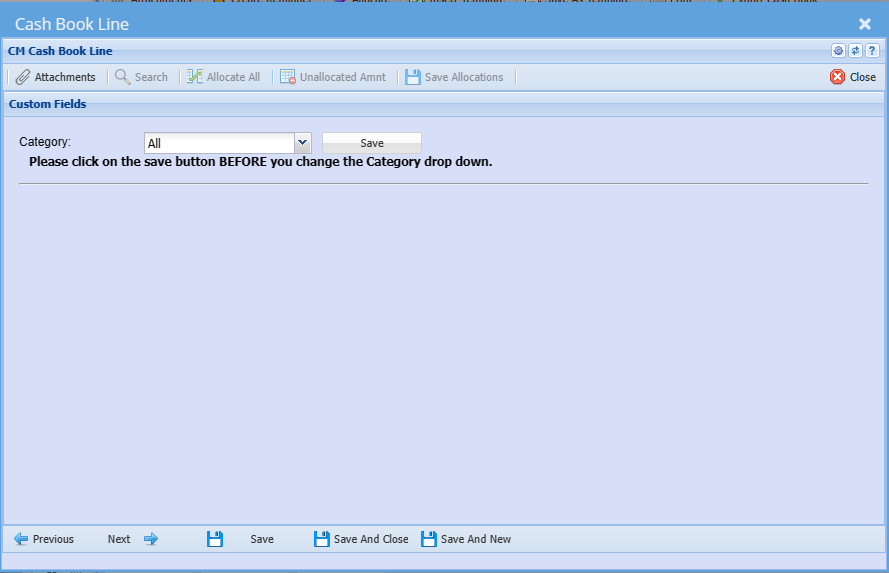
<table border="1" id="bkmrk-category-%C2%A0-1" style="border-collapse: collapse; width: 100%;"><colgroup><col style="width: 19.0618%;"></col><col style="width: 81.0371%;"></col></colgroup><tbody><tr><td>**Category**</td><td> </td></tr></tbody></table>

---

**Add Split**

[![image.png](https://hugeerp10.co.za/hsofmanual/uploads/images/gallery/2024-01/scaled-1680-/ezXimage.png)](https://hugeerp10.co.za/hsofmanual/uploads/images/gallery/2024-01/ezXimage.png)

[![image.png](https://hugeerp10.co.za/hsofmanual/uploads/images/gallery/2024-01/scaled-1680-/R4Zimage.png)](https://hugeerp10.co.za/hsofmanual/uploads/images/gallery/2024-01/R4Zimage.png)

<table border="1" id="bkmrk-create-reminder-atta" style="border-collapse: collapse; width: 100%;"><colgroup><col style="width: 21.284%;"></col><col style="width: 78.8149%;"></col></colgroup><tbody><tr><td>**Create Reminder**</td><td>  
</td></tr><tr><td>**Attachments**</td><td>  
</td></tr><tr><td>**Import Split Lines**</td><td> </td></tr><tr><td>**Print**</td><td>  
</td></tr></tbody></table>

[![image.png](https://hugeerp10.co.za/hsofmanual/uploads/images/gallery/2024-01/scaled-1680-/M0eimage.png)](https://hugeerp10.co.za/hsofmanual/uploads/images/gallery/2024-01/M0eimage.png)

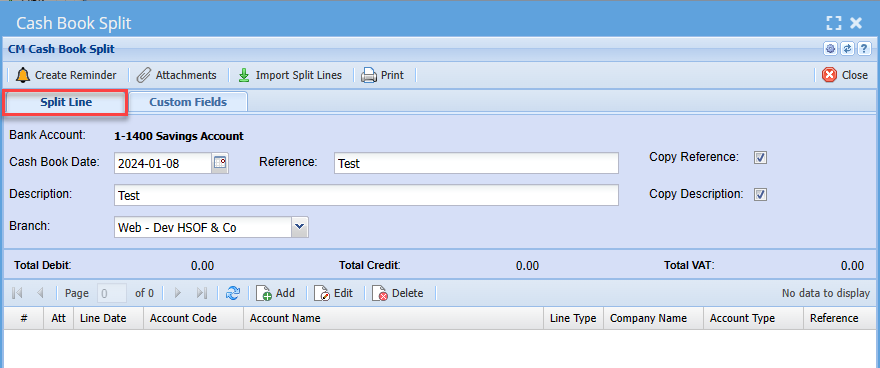
<table border="1" id="bkmrk-bank-account-cash-bo" style="border-collapse: collapse; width: 100%; height: 207.2px;"><colgroup><col style="width: 24.6173%;"></col><col style="width: 75.4815%;"></col></colgroup><tbody><tr style="height: 29.6px;"><td style="height: 29.6px;">**Bank Account**</td><td style="height: 29.6px;">  
</td></tr><tr style="height: 29.6px;"><td style="height: 29.6px;">**Cash Book Date**</td><td style="height: 29.6px;">  
</td></tr><tr style="height: 29.6px;"><td style="height: 29.6px;">**Reference**</td><td style="height: 29.6px;"> </td></tr><tr style="height: 29.6px;"><td style="height: 29.6px;">**Description**</td><td style="height: 29.6px;">  
</td></tr><tr style="height: 29.6px;"><td style="height: 29.6px;">**Branch**</td><td style="height: 29.6px;">  
</td></tr><tr style="height: 29.6px;"><td style="height: 29.6px;">**Copy Reference Tick**</td><td style="height: 29.6px;">  
</td></tr><tr style="height: 29.6px;"><td style="height: 29.6px;">**Copy Description Tick**</td><td style="height: 29.6px;">  
</td></tr></tbody></table>

---

##### **Adding New Line in Cash Book Split**

After Clicking Add

Fill in the information on the first 2 pages same as in [Cash Book Adding Line](#bkmrk-cash-book-adding-lin) on the 3rd page in Cash Book Split you can Seach and Allocate.

[![image.png](https://hugeerp10.co.za/hsofmanual/uploads/images/gallery/2024-01/scaled-1680-/EFXimage.png)](https://hugeerp10.co.za/hsofmanual/uploads/images/gallery/2024-01/EFXimage.png)
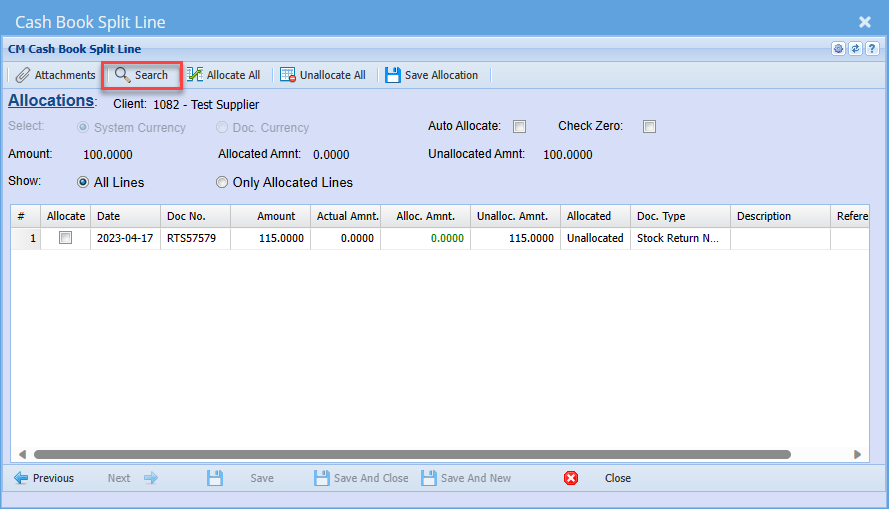
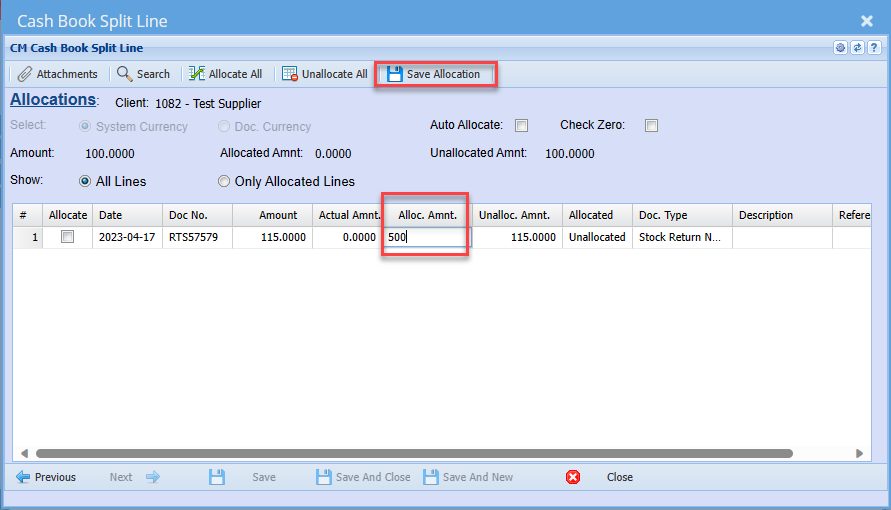
<span class="ts0">A list of available transactions against this client will be listed</span>

<span class="ts0">Select one that you want to allocate this captured payment to and add the amount</span>

<span class="ts0">You can manually type in the amount</span>

<span class="ts0">When you have entered the amount remember to save Allocations before closing this window</span>

[![image.png](https://hugeerp10.co.za/hsofmanual/uploads/images/gallery/2024-01/scaled-1680-/ELIimage.png)](https://hugeerp10.co.za/hsofmanual/uploads/images/gallery/2024-01/ELIimage.png)

The Message below will come up after saving

[![image.png](https://hugeerp10.co.za/hsofmanual/uploads/images/gallery/2024-01/scaled-1680-/s9Himage.png)](https://hugeerp10.co.za/hsofmanual/uploads/images/gallery/2024-01/s9Himage.png)
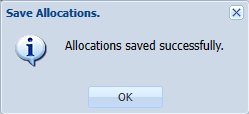
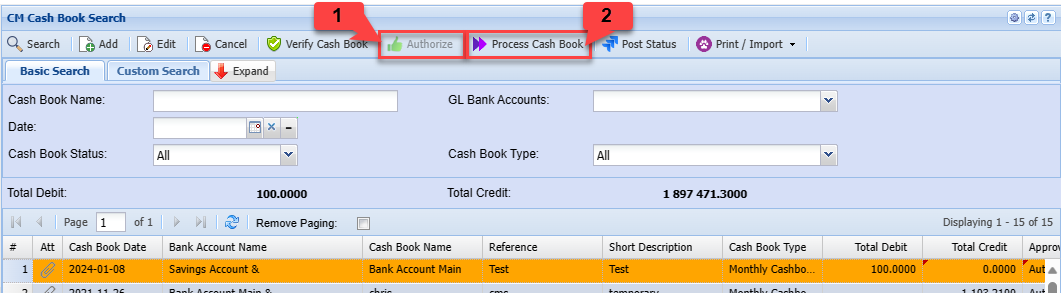
<span class="ts0">The cashbook can be authorized </span><span class="ts0">and processed</span>

[![image.png](https://hugeerp10.co.za/hsofmanual/uploads/images/gallery/2024-01/scaled-1680-/gxoimage.png)](https://hugeerp10.co.za/hsofmanual/uploads/images/gallery/2024-01/gxoimage.png)

---

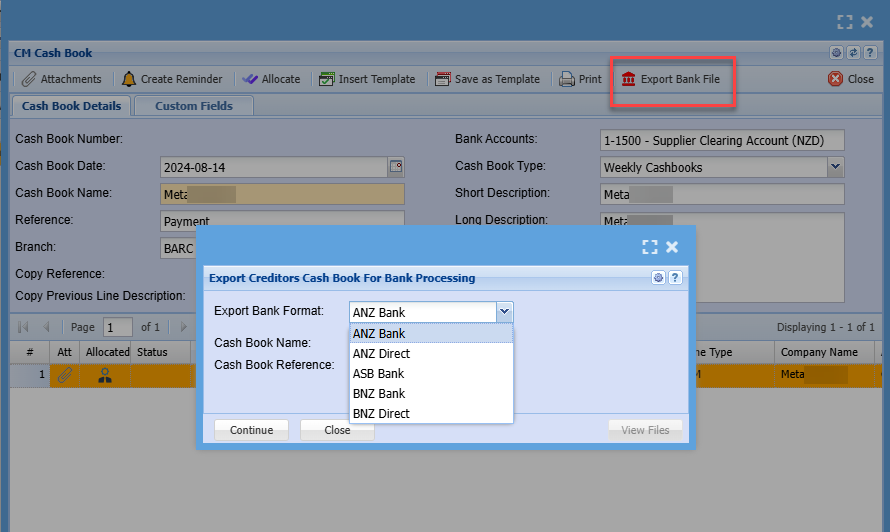
#### Export Bank File

[![image.png](https://hugeerp10.co.za/hsofmanual/uploads/images/gallery/2024-09/scaled-1680-/pipimage.png)](https://hugeerp10.co.za/hsofmanual/uploads/images/gallery/2024-09/pipimage.png)
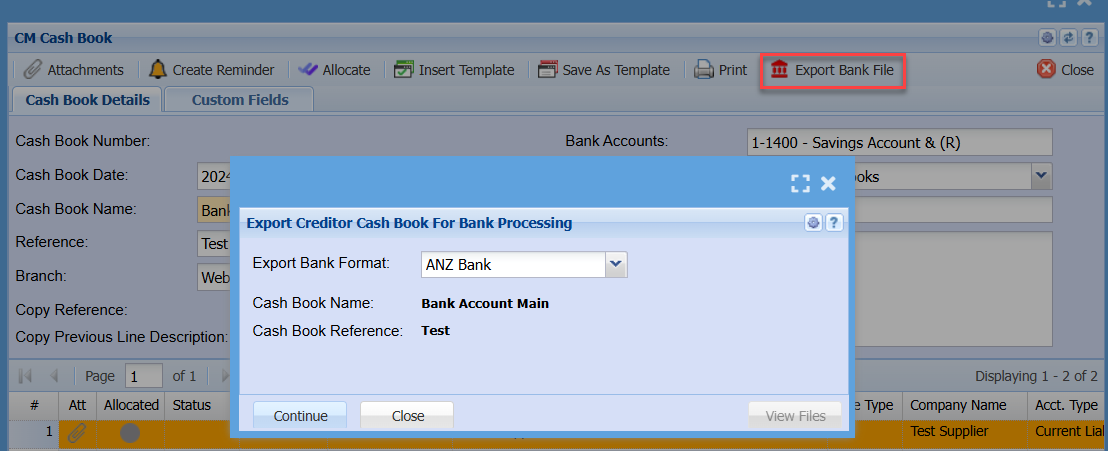
Clicking on the View Files button

[![image.png](https://hugeerp10.co.za/hsofmanual/uploads/images/gallery/2024-09/scaled-1680-/QvRimage.png)](https://hugeerp10.co.za/hsofmanual/uploads/images/gallery/2024-09/QvRimage.png)
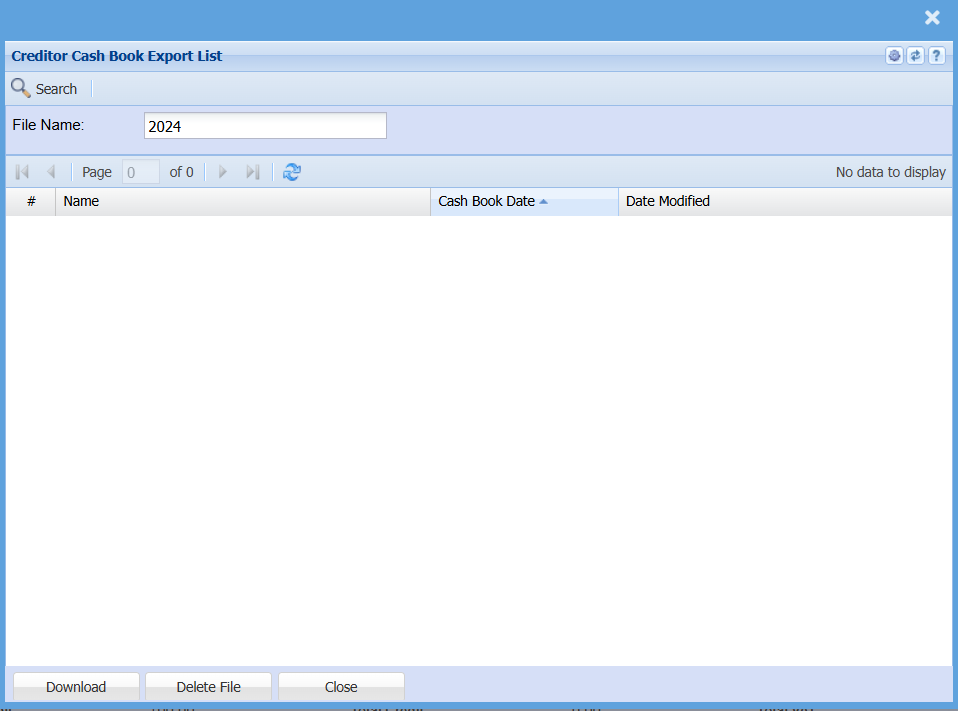
# Bank Payment Schedule Export

Bulk supplier payment Export bank file

Supported banks

1. ANZ Bank
2. ANZ Direct
3. ASB Bank
4. BNZ Bank
5. BNZ Direct

<p class="callout warning">Bank export files have specific algorithms which check for any changes to bank accounts and amounts. This is to ensure that files are not tampered with, so be careful on opening the file to make any changes. This will create the file invalid.</p>

[![image.png](https://hugeerp10.co.za/hsofmanual/uploads/images/gallery/2024-08/scaled-1680-/YUCimage.png)](https://hugeerp10.co.za/hsofmanual/uploads/images/gallery/2024-08/YUCimage.png)

---

#### Reference fields

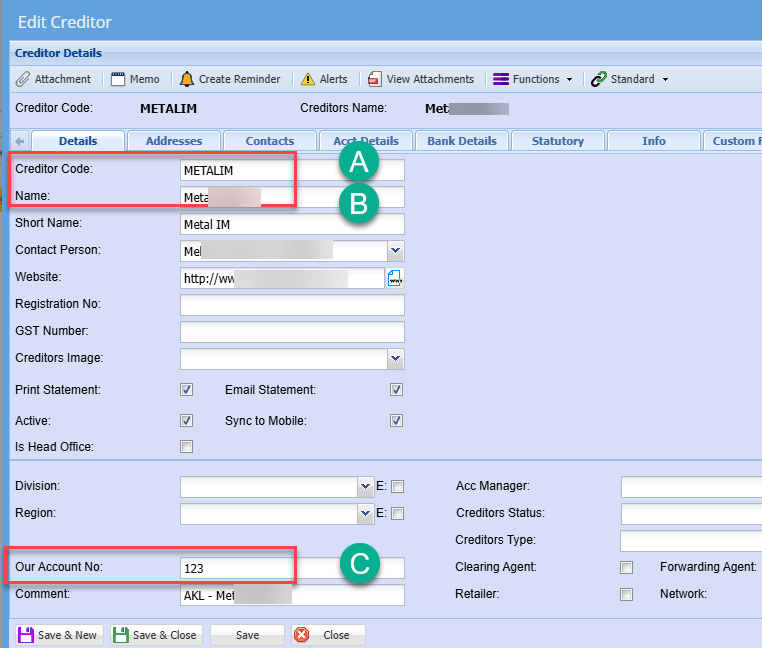
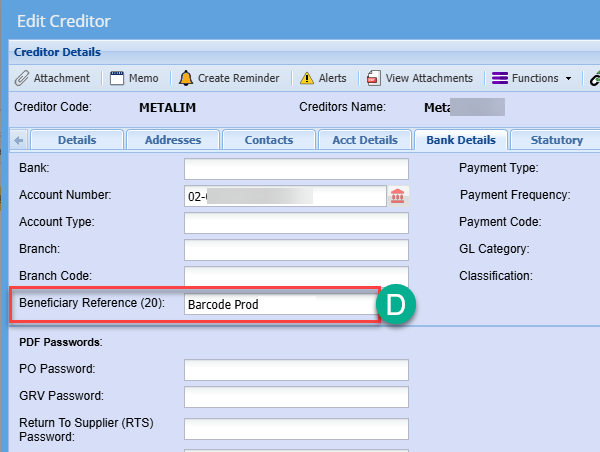
Setup reference fields for suppliers for bank references

<table border="1" id="bkmrk-a-supplier-code-used" style="border-collapse: collapse; width: 100%; height: 89.3907px;"><colgroup><col style="width: 16.3581%;"></col><col style="width: 83.7655%;"></col></colgroup><tbody><tr style="height: 29.7969px;"><td style="height: 29.7969px;">A</td><td style="height: 29.7969px;">Supplier code used</td></tr><tr><td>B</td><td>Suppler name</td></tr><tr style="height: 29.7969px;"><td style="height: 29.7969px;">C</td><td style="height: 29.7969px;">Supplier account number</td></tr><tr style="height: 29.7969px;"><td style="height: 29.7969px;">D</td><td style="height: 29.7969px;">Beneficiary reference</td></tr></tbody></table>

<p class="callout info">Some banks have limits on beneficiary reference, please check how many characters are allowed</p>

[![image.png](https://hugeerp10.co.za/hsofmanual/uploads/images/gallery/2024-08/scaled-1680-/OyIimage.png)](https://hugeerp10.co.za/hsofmanual/uploads/images/gallery/2024-08/OyIimage.png)

[![image.png](https://hugeerp10.co.za/hsofmanual/uploads/images/gallery/2024-08/scaled-1680-/RKIimage.png)](https://hugeerp10.co.za/hsofmanual/uploads/images/gallery/2024-08/RKIimage.png)
---

#### ANZ Bank and ANZ Direct reference fields

After the bank file has been imported these are the fields that will show.

[![image.png](https://hugeerp10.co.za/hsofmanual/uploads/images/gallery/2024-08/scaled-1680-/rMHimage.png)](https://hugeerp10.co.za/hsofmanual/uploads/images/gallery/2024-08/rMHimage.png)
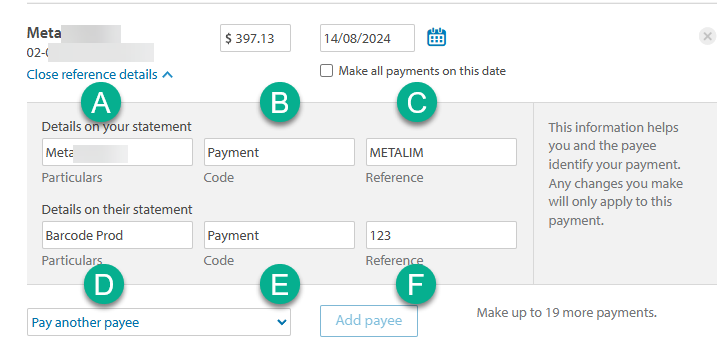
<table border="1" id="bkmrk-a-supplier-name-b-ha" style="border-collapse: collapse; width: 100%;"><colgroup><col style="width: 13.5186%;"></col><col style="width: 86.605%;"></col></colgroup><tbody><tr><td>**A**</td><td>Supplier Name ((Limited to 12 characters)</td></tr><tr><td>**B**</td><td>Hardcoded to say Payment</td></tr><tr><td>**C**</td><td>Supplier Code</td></tr><tr><td>**D**</td><td>Beneficiary reference (Limited to 12 characters)</td></tr><tr><td>**E**</td><td>Hardcoded to say Payment</td></tr><tr><td>**F**</td><td>Our Account Number (supplier account number)</td></tr></tbody></table>

Bank export file is a txt file

1 to 9 are positions in the bank file

[![image.png](https://hugeerp10.co.za/hsofmanual/uploads/images/gallery/2024-08/scaled-1680-/CLPimage.png)](https://hugeerp10.co.za/hsofmanual/uploads/images/gallery/2024-08/CLPimage.png)