# System Defaults tab

<span style="color: rgb(45, 194, 107);">**System Config &gt; Defaults &gt; System Defaults**</span>

System Defaults tab have multiple sub functions

### Leave Allocation: Time log Defaults

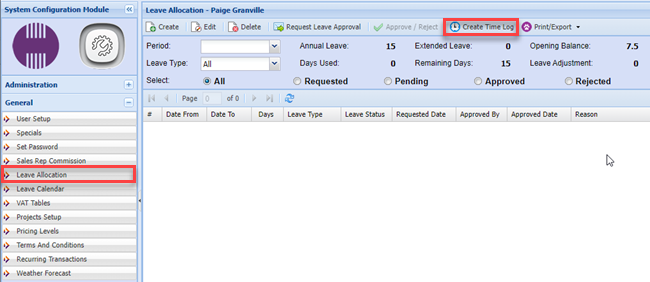
When a person turns leave into a time sheet, the system will use this as the default.

[![image.png](https://hugeerp10.co.za/hsofmanual/uploads/images/gallery/2023-04/scaled-1680-/6oyimage.png)](https://hugeerp10.co.za/hsofmanual/uploads/images/gallery/2023-04/6oyimage.png)
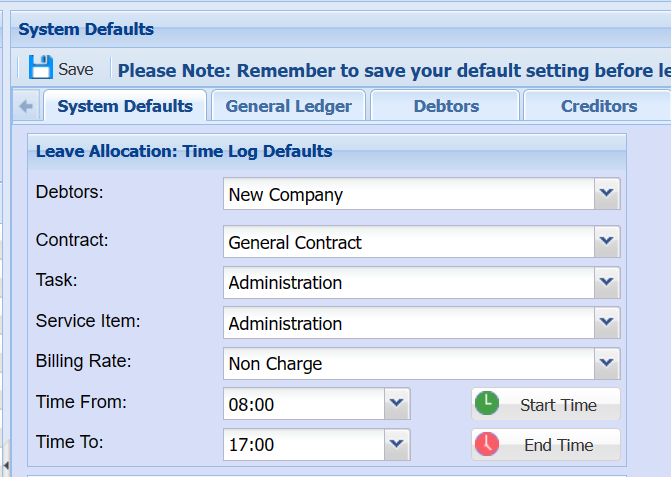
It works with Leave Allocations, when you go to create time log it uses the time log defaults.

[![image.png](https://hugeerp10.co.za/hsofmanual/uploads/images/gallery/2023-07/scaled-1680-/YaGimage.png)](https://hugeerp10.co.za/hsofmanual/uploads/images/gallery/2023-07/YaGimage.png)
<div aria-label="Page Section Options" class="pointer-container" id="bkmrk-%C2%A0" refs="pointer@pointer" tabindex="-1"><div class="pointer flex-container-row items-center justify-space-between p-s anim is-page-editable"><div class="flex-container-row items-center gap-s" refs="pointer@mode-section"><button class="text-button icon px-xs" title="Permalink mode, Press to show include tag"><svg class="svg-icon" data-icon="link" role="presentation" viewbox="0 0 24 24" xmlns="http://www.w3.org/2000/svg"></svg></button><div class="input-group"> <button class="button outline icon" title="Copy Link" type="button"><svg class="svg-icon" data-icon="copy" role="presentation" viewbox="0 0 24 24" xmlns="http://www.w3.org/2000/svg"></svg></button></div></div><svg class="svg-icon" data-icon="edit" role="presentation" viewbox="0 0 24 24" xmlns="http://www.w3.org/2000/svg"></svg></div></div>---

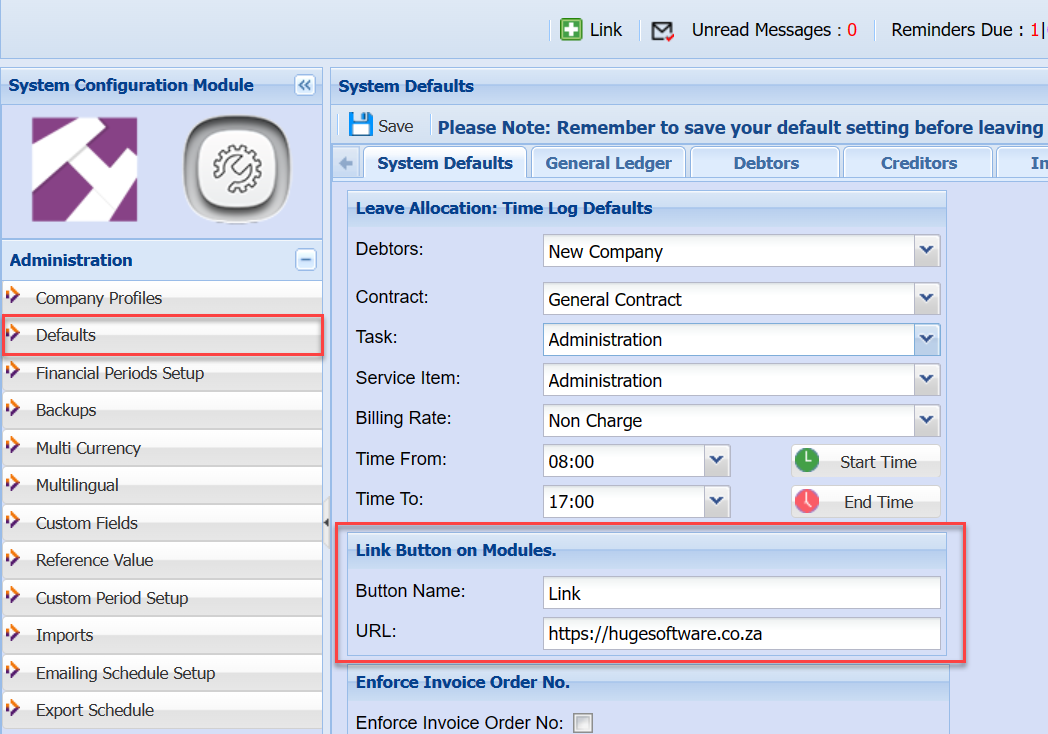
### Link Button on Modules

This allows you to change the button name and URL

<p class="callout info">Create own manual for company</p>

Link button on Modules works with the Link button on the top of menu.  
Generally used to create internal specific manuals for a customer.   
Usually the name is called company manuals

<div aria-label="Page Section Options" class="pointer-container" id="bkmrk-%C2%A0-1" refs="pointer@pointer" tabindex="-1"><div class="pointer flex-container-row items-center justify-space-between p-s anim is-page-editable"><div class="flex-container-row items-center gap-s" refs="pointer@mode-section"><button class="text-button icon px-xs" title="Permalink mode, Press to show include tag"><svg class="svg-icon" data-icon="link" role="presentation" viewbox="0 0 24 24" xmlns="http://www.w3.org/2000/svg"></svg></button><div class="input-group"> <button class="button outline icon" title="Copy Link" type="button"><svg class="svg-icon" data-icon="copy" role="presentation" viewbox="0 0 24 24" xmlns="http://www.w3.org/2000/svg"></svg></button></div></div><svg class="svg-icon" data-icon="edit" role="presentation" viewbox="0 0 24 24" xmlns="http://www.w3.org/2000/svg"></svg></div></div>[![image.png](https://hugeerp10.co.za/hsofmanual/uploads/images/gallery/2023-04/scaled-1680-/5kUimage.png)](https://hugeerp10.co.za/hsofmanual/uploads/images/gallery/2023-04/5kUimage.png)

The button appears on each header page

[![image.png](https://hugeerp10.co.za/hsofmanual/uploads/images/gallery/2023-04/scaled-1680-/7y6image.png)](https://hugeerp10.co.za/hsofmanual/uploads/images/gallery/2023-04/7y6image.png)

---

### Enforce Invoice Order No

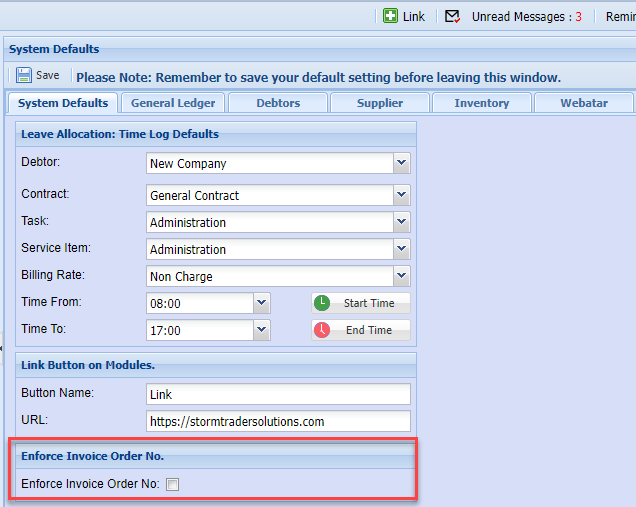
When creating a customer invoice, if the setting is on then it will ask you for an order number on invoice documents.

[![image.png](https://hugeerp10.co.za/hsofmanual/uploads/images/gallery/2023-07/scaled-1680-/9S9image.png)](https://hugeerp10.co.za/hsofmanual/uploads/images/gallery/2023-07/9S9image.png)
---

### Credit Card Surcharge Setup

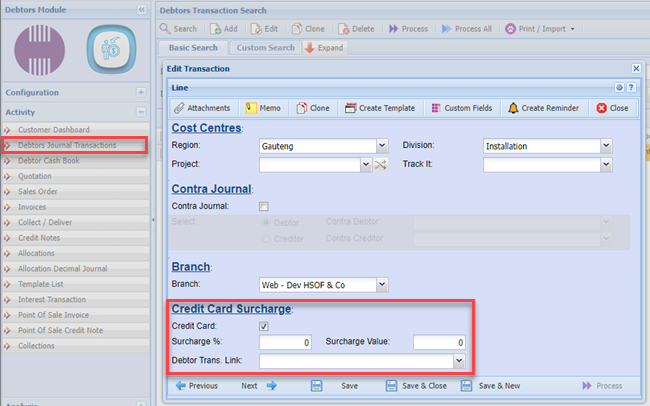
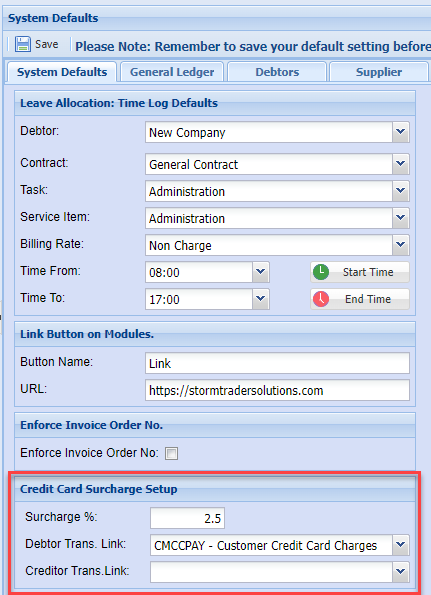
Credit card surcharge is used in the debtors / customer transaction journal.  
When a customer makes a payment with a credit card, the system will work out the surcharge on top of the payment.  
This will create and additional debtors transaction journal.

[![image.png](https://hugeerp10.co.za/hsofmanual/uploads/images/gallery/2023-07/scaled-1680-/Cvdimage.png)](https://hugeerp10.co.za/hsofmanual/uploads/images/gallery/2023-07/Cvdimage.png)
After you have saved the journal transaction, proceed to the next screen to view the credit card surcharge.

<div aria-label="Page Section Options" class="pointer-container" id="bkmrk-%C2%A0-4" refs="pointer@pointer" tabindex="-1"><div class="pointer flex-container-row items-center justify-space-between p-s anim is-page-editable"><div class="flex-container-row items-center gap-s" refs="pointer@mode-section"><button class="text-button icon px-xs" title="Permalink mode, Press to show include tag"><svg class="svg-icon" data-icon="link" role="presentation" viewbox="0 0 24 24" xmlns="http://www.w3.org/2000/svg"></svg></button><div class="input-group"> <button class="button outline icon" title="Copy Link" type="button"><svg class="svg-icon" data-icon="copy" role="presentation" viewbox="0 0 24 24" xmlns="http://www.w3.org/2000/svg"></svg></button></div></div><svg class="svg-icon" data-icon="edit" role="presentation" viewbox="0 0 24 24" xmlns="http://www.w3.org/2000/svg"></svg></div></div>[![image.png](https://hugeerp10.co.za/hsofmanual/uploads/images/gallery/2023-07/scaled-1680-/JiCimage.png)](https://hugeerp10.co.za/hsofmanual/uploads/images/gallery/2023-07/JiCimage.png)

---

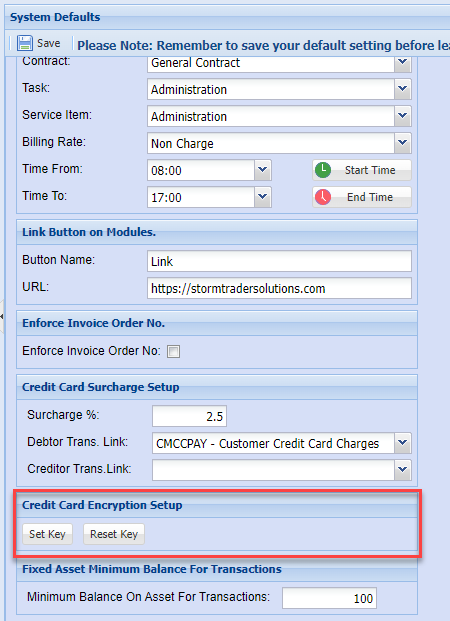
### Credit Card Encryption Setup

This is used to set in encryption key to encrypt credit card numbers.

<p class="callout danger">If you lose the key, ask support consultant to reset the key, all previous credit card details will be wiped out.   
This is a security feature to ensure their client credit card details are not compromised.</p>

[![image.png](https://hugeerp10.co.za/hsofmanual/uploads/images/gallery/2023-07/scaled-1680-/2Ofimage.png)](https://hugeerp10.co.za/hsofmanual/uploads/images/gallery/2023-07/2Ofimage.png)

---

### Export Schedule Date Delay Setup

Set the days to be delayed until the scheduled reports for the new month.

Example: Setting the days at 10, means that up to the 10th of a month (using November)

The reports will still report on October month end, after this date it will start to report for November end month

[![image.png](https://hugeerp10.co.za/hsofmanual/uploads/images/gallery/2023-12/scaled-1680-/VTUimage.png)](https://hugeerp10.co.za/hsofmanual/uploads/images/gallery/2023-12/VTUimage.png)
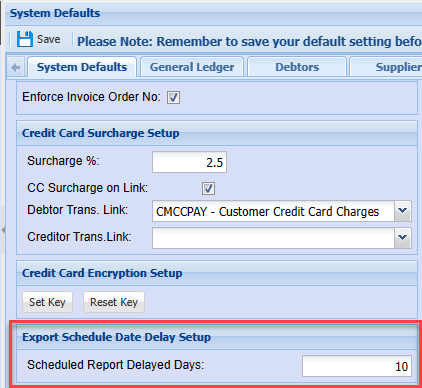
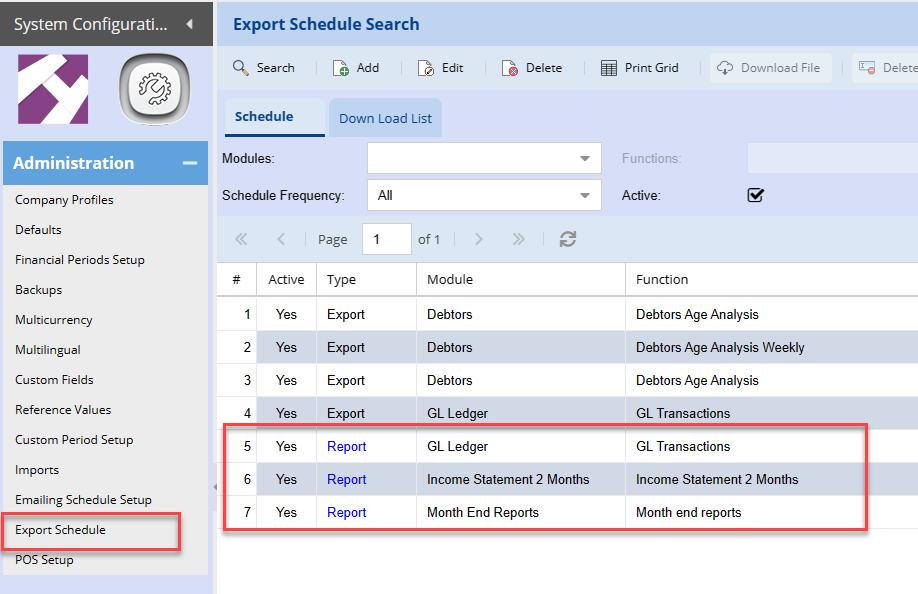
Used for Export schedule automatic reports

[![image.png](https://hugeerp10.co.za/hsofmanual/uploads/images/gallery/2023-12/scaled-1680-/f8Dimage.png)](https://hugeerp10.co.za/hsofmanual/uploads/images/gallery/2023-12/f8Dimage.png)
---

### Fixed Asset Minimum Balance for Transactions

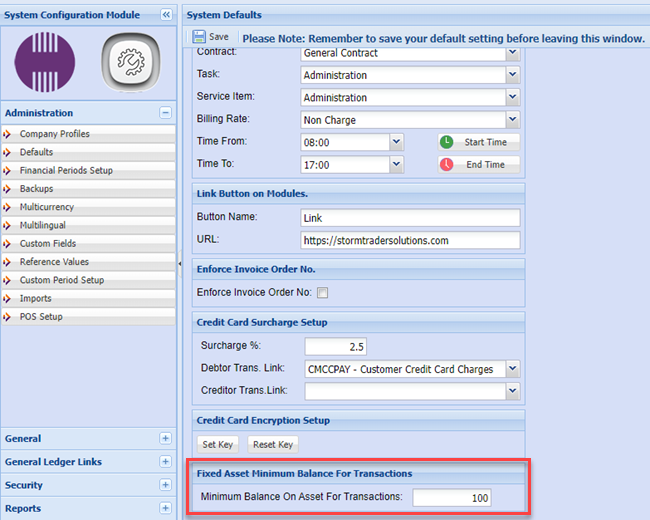
This is a value that you can set is the minimum value for fixed assets.   
Once a fixed asset reaches this minimum value, it will **NOT** create a Depreciation journal.   
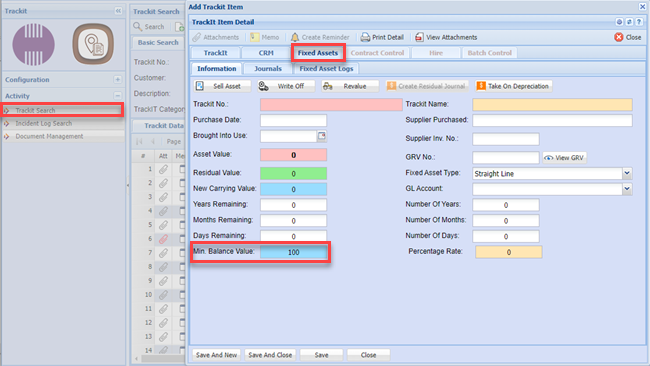
The value used here is used as the default value when setting up a new fixed asset item.

[![image.png](https://hugeerp10.co.za/hsofmanual/uploads/images/gallery/2023-07/scaled-1680-/6ctimage.png)](https://hugeerp10.co.za/hsofmanual/uploads/images/gallery/2023-07/6ctimage.png)
The value is populated in the TrackIT Module for fixed asset.

[![image.png](https://hugeerp10.co.za/hsofmanual/uploads/images/gallery/2023-07/scaled-1680-/0Noimage.png)](https://hugeerp10.co.za/hsofmanual/uploads/images/gallery/2023-07/0Noimage.png)
---

### Default User

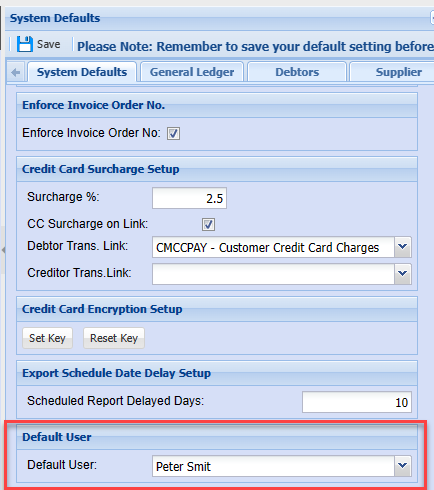
Used to set the user when it is blank

[![image.png](https://hugeerp10.co.za/hsofmanual/uploads/images/gallery/2023-12/scaled-1680-/1T0image.png)](https://hugeerp10.co.za/hsofmanual/uploads/images/gallery/2023-12/1T0image.png)
####