# Customer Access
There are a few areas to take note of when setting up customer access into the package:
| 1 | Branch setup |
| 2 | Branch links to Accounts |
| 3 | Security setup on form |
| 4 | Security form access |
Branch Setup
Create a Branch for the customer so that the customer’s name is the branch.
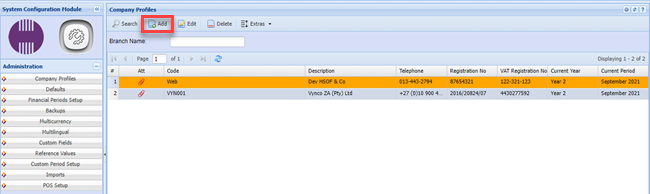
**System Configuration> Administration >Company Profile**
Click on the Add button and create a code and Description for the customer branch
Code: - CUST001
Description - Customer A (name)
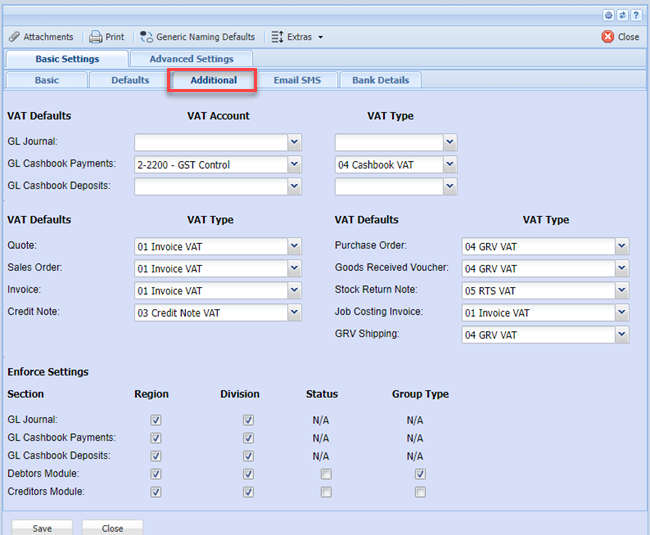
Fill in all the information relevant for the Customer A, you will also have to fill in the details under the “Additional” Button.
[](https://hugeerp10.co.za/hsofmanual/uploads/images/gallery/2023-07/1X8image.png)
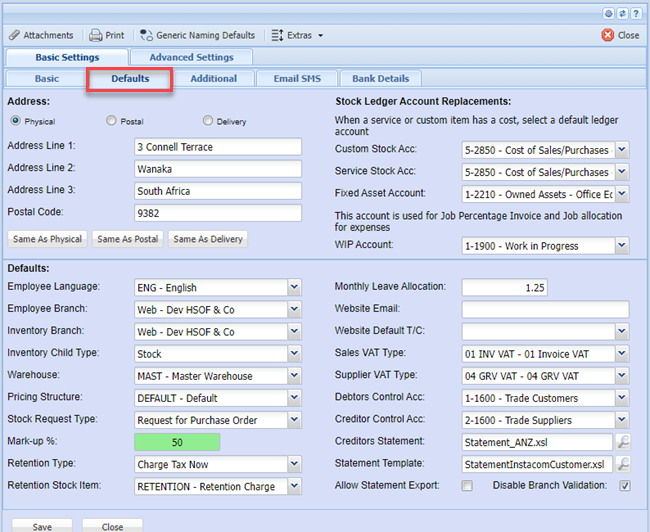
Remember to fill in all the information under the Defaults Tab.
[](https://hugeerp10.co.za/hsofmanual/uploads/images/gallery/2023-07/k4dimage.png)
Click on the button “Additional” and fill in all the tabs with their fields including the General Ledger Links tab.
[](https://hugeerp10.co.za/hsofmanual/uploads/images/gallery/2023-07/zFAimage.png)
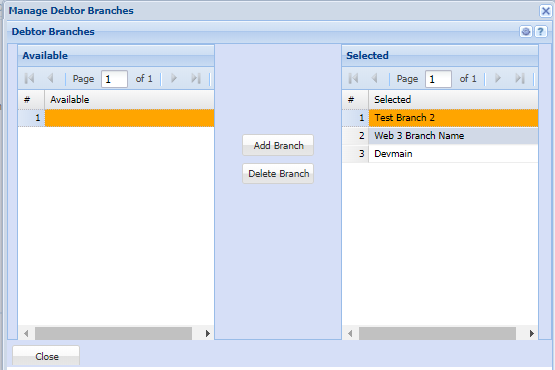
After you have created the branch (Customer Branch), you will notice all setup areas have a button called Branch.
When clicking on that button the following window will appear:
Select which items the customer has access to see by moving the branch from the left column to the right column.
[](https://hugeerp10.co.za/hsofmanual/uploads/images/gallery/2023-07/3nLimage.png)