# Archive Past Financial Years
Huge ERP supports an unlimited number of financial years and can store an unlimited volume of data. When system performance begins to slow due to the amount of stored information, older financial years can be archived to improve speed and efficiency.
A financial year cannot be archived unless the preceding year has already been archived, and you will not be able to archive any year that has not been fully closed off and blocked.
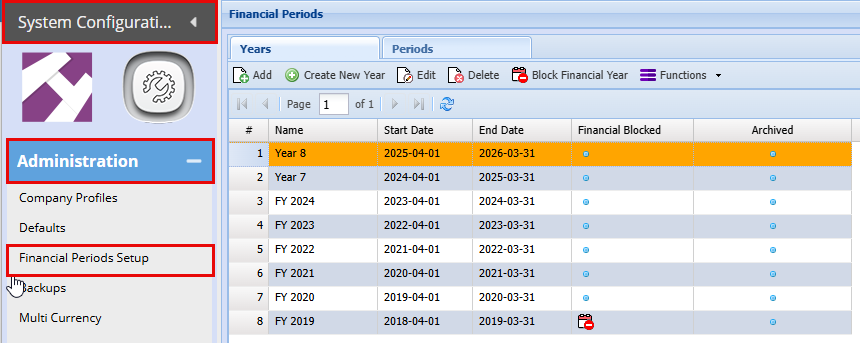
**Configuration > Administration >Financial Year Setup**
[](https://hugeerp10.co.za/hsofmanual/uploads/images/gallery/2026-01/YeLimage.png)
##### **To archive a financial year:**
1. **Configuration > Administration >Financial Year Setup**
2. **Highlight the financial year** you want to archive.
3. At the top of the grid, **click *Functions***.
4. Select **Archive Year**.
[](https://hugeerp10.co.za/hsofmanual/uploads/images/gallery/2026-01/Ogsimage.png)
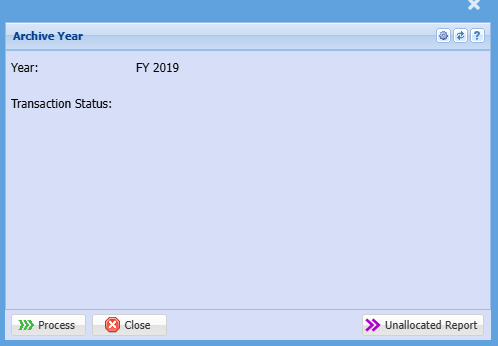
When you click on archive year you can run an Unallocated Report before processing the Archive.
[](https://hugeerp10.co.za/hsofmanual/uploads/images/gallery/2026-01/ybximage.png)