# Department Setup
# Department Setup
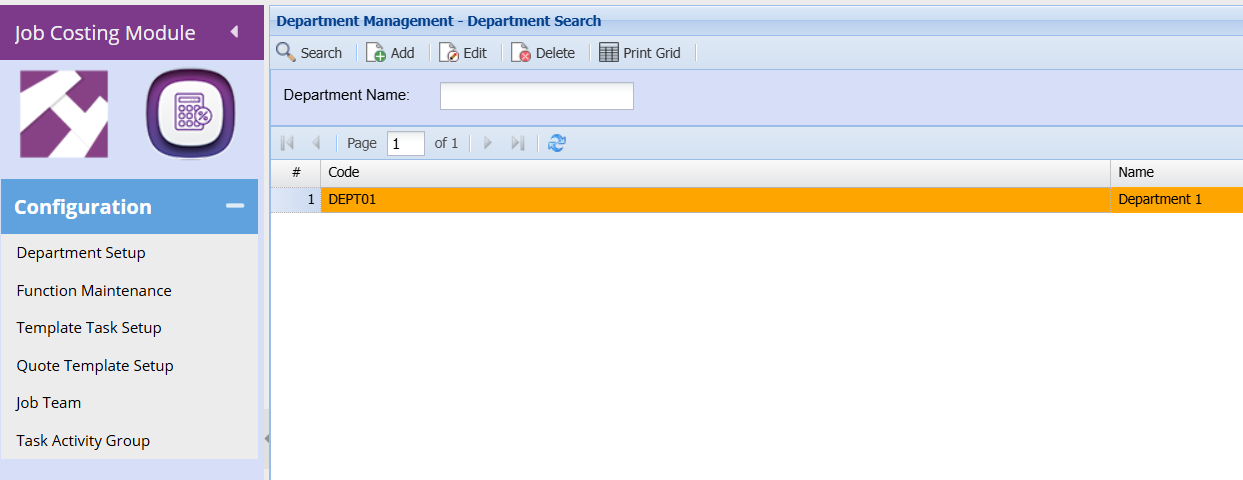
**Job Costing >Configuration>Department setup**
[](https://hugeerp10.co.za/hsofmanual/uploads/images/gallery/2024-06/UXeimage.png)
Departments are the entities organizations form to organize people,
Reporting Hierachy, and work in a way that best supports the realisation of the organization's goals.
Add button: to insert a new Department Management Item.
Edit button: to view or edit an already added Department Management Item.
Delete button: to delete the currently selected Department Management Item.
Print Grid button: to print the displayed grid of Department Management Item.
[](https://hugeerp10.co.za/hsofmanual/uploads/images/gallery/2024-06/LAbimage.png)
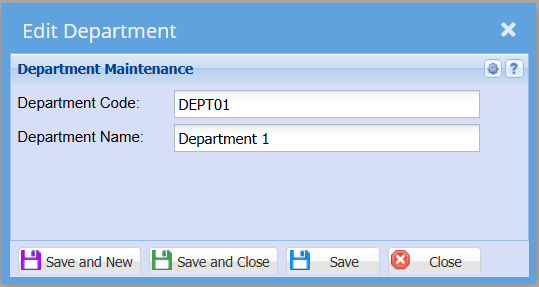
Department Maintenance Window.
This form is used to add departments by entering the code and the name of the department
Save And New – Saves the form and then reopens it so you may create multiple forms without have to close and reopen constantly.
Save And Close – Saves the form then closes it.