# Additional Debtor Property Import

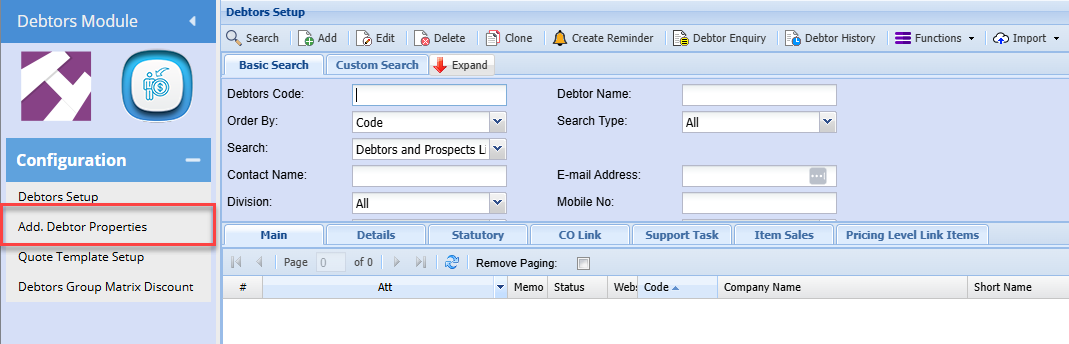
**<span style="color: rgb(45, 194, 107);"><span class="ts15">Debtors Module&gt; Configuration&gt; </span><span class="ts15">Add. Debtor Properties</span></span>**

<span class="ts43">Populate your data in Excel into the below template:</span>

![](https://hugeerp0.co.za/csp/webhelp/topics/images/image(111).png)

<p class="callout info"><span class="ts44">The input in the Division, Region, Status and Category fields is always the respective field code, not the description on the field setup. (this is the code on the setup above)</span></p>

<span class="ts43">Once the file has been compiled, save the file as a CSV (comma Delimited) file</span>

<span class="ts43">Upload Process:</span>

<span class="ts43">Log onto the company</span>

<span style="color: rgb(45, 194, 107);">**<span class="ts43">Go to Debtors Module&gt; Configuration&gt; Debtor Setup</span>**</span>

[![image.png](https://hugeerp10.co.za/hsofmanual/uploads/images/gallery/2024-06/scaled-1680-/eZ0image.png)](https://hugeerp10.co.za/hsofmanual/uploads/images/gallery/2024-06/eZ0image.png)

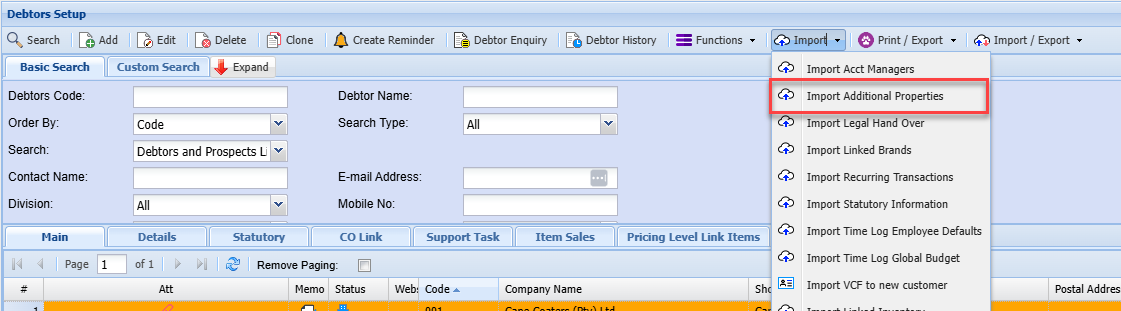
<span class="ts43">Click on the Import Tab dropdown arrow</span>

<span class="ts43">Select “Import Additional Properties”</span>

[![image.png](https://hugeerp10.co.za/hsofmanual/uploads/images/gallery/2024-06/scaled-1680-/QcKimage.png)](https://hugeerp10.co.za/hsofmanual/uploads/images/gallery/2024-06/QcKimage.png)

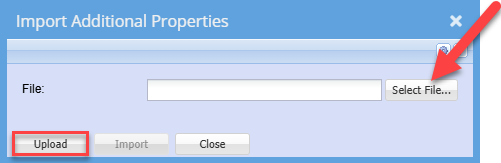
<span class="ts43">Search for the file that you saved earlier</span>

<span class="ts43">Click Upload</span>

[![image.png](https://hugeerp10.co.za/hsofmanual/uploads/images/gallery/2024-06/scaled-1680-/Oxwimage.png)](https://hugeerp10.co.za/hsofmanual/uploads/images/gallery/2024-06/Oxwimage.png)

<span class="ts43">The below Message will be displayed (assuming the import file is correctly formatted)</span>

![](https://hugeerp0.co.za/csp/webhelp/topics/images/image(115).png)

<span class="ts43">Click OK</span>

<span class="ts43">Click Import</span>

![](https://hugeerp0.co.za/csp/webhelp/topics/images/image(116).png)

<span class="ts43">The system will verify the details on your file, e.g. All account codes exist, and all category codes exist</span>

<span class="ts43">If all is OK, the file will be imported and all respective debtor accounts updated accordingly.</span>

<span class="ts43">If errors are received, these will be listed.</span>

<span class="ts43">Make the necessary corrections on your import file and resave the file</span>

<span class="ts43">Then retry the import as per the above process</span>