# Support Form Search

<span class="ts15"><span class="ts0">This is where the user creates a new Website Support Form or search for an existing one.</span></span>

<p class="callout info"><span class="ts15"><span class="ts0">If you don't put anything on the search criteria, all support forms will appear</span></span></p>

<span style="color: rgb(45, 194, 107);">**<span class="ts15">Webatar &gt; Configuration &gt; Website Support Forms</span>**</span>

<span class="ts0">Video training manual - </span>[Click Here](https://vimeo.com/357006914)

[![image.png](https://hugeerp10.co.za/hsofmanual/uploads/images/gallery/2024-01/scaled-1680-/C2Cimage.png)](https://hugeerp10.co.za/hsofmanual/uploads/images/gallery/2024-01/C2Cimage.png)
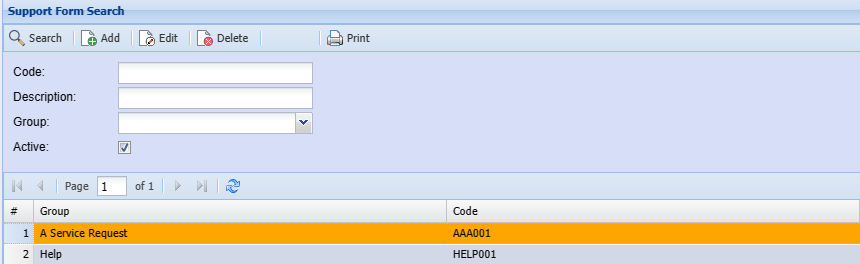
<table border="1" id="bkmrk-code-description-gro" style="border-collapse: collapse; width: 100%; height: 119.188px;"><colgroup><col style="width: 26.5926%;"></col><col style="width: 73.5062%;"></col></colgroup><tbody><tr style="height: 29.7969px;"><td style="height: 29.7969px;">**Code**</td><td style="height: 29.7969px;">Search by code name or parts of the code if you know the code you are searching for</td></tr><tr style="height: 29.7969px;"><td style="height: 29.7969px;">**Description**</td><td style="height: 29.7969px;">Search by description/ name or park of the description of the support form if you know it</td></tr><tr style="height: 29.7969px;"><td style="height: 29.7969px;">**Group**</td><td style="height: 29.7969px;">Search by group </td></tr><tr style="height: 29.7969px;"><td style="height: 29.7969px;">**Active**</td><td style="height: 29.7969px;"><span class="ts0">Searching for Active or Inactive Support Forms</span></td></tr></tbody></table>