# Expense Setup Search

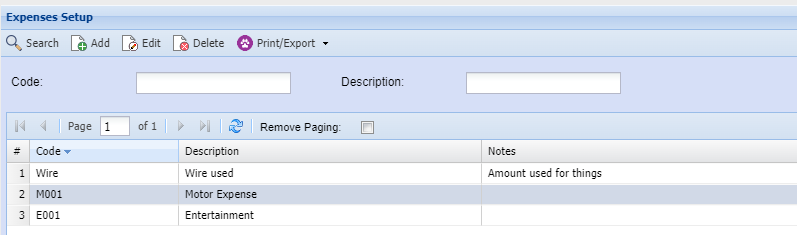
This screen allows you to search for a expense set up

<p class="callout info">If you don't put filter your search this will bring up expenses</p>

<span style="color: rgb(45, 194, 107);">**CRM Module&gt; Configuration&gt; Expense Setup**</span>

[![image.png](https://hugeerp10.co.za/hsofmanual/uploads/images/gallery/2024-02/scaled-1680-/LRwimage.png)](https://hugeerp10.co.za/hsofmanual/uploads/images/gallery/2024-02/LRwimage.png)

<table border="1" id="bkmrk-code-description-%C2%A0-p" style="border-collapse: collapse; width: 100%; height: 121.188px;"><colgroup><col style="width: 26.0955%;"></col><col style="width: 73.9045%;"></col></colgroup><tbody><tr style="height: 29.7969px;"><td style="height: 29.7969px;">**Code**</td><td style="height: 29.7969px;">  
</td></tr><tr style="height: 29.7969px;"><td style="height: 29.7969px;">**Description**</td><td style="height: 29.7969px;"> </td></tr><tr style="height: 29.7969px;"><td style="height: 29.7969px;">**Print/ Export**</td><td style="height: 29.7969px;">  
</td></tr></tbody></table>

To add a new expense category or to edit an existing one [click here](https://hugeerp10.co.za/hsofmanual/books/acr-configuration/page/expense-add)