# Website Support Groups Menu

# Website Support Groups

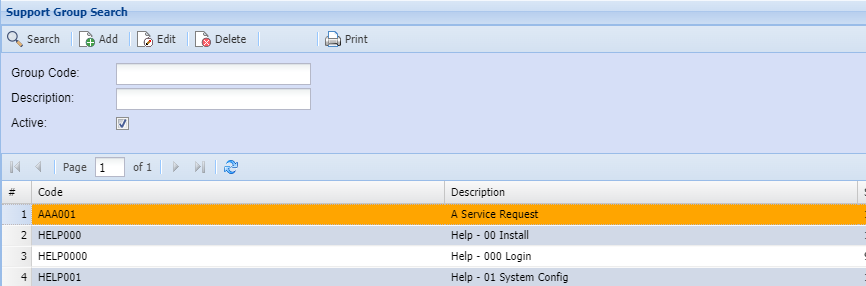
<span class="ts0">This is where the user creates a new Website Support Groups or search for an existing one.</span>

<span style="color: rgb(45, 194, 107);">**<span class="ts0">CRM Module&gt; Configuration&gt; Website Support Groups.</span>**</span>

<p class="callout info"><span style="color: rgb(0, 0, 0);"><span class="ts0">If no filter options are selected all Website Support Groups records are displayed on the gird.</span></span></p>

[![image.png](https://hugeerp10.co.za/hsofmanual/uploads/images/gallery/2024-02/scaled-1680-/5ccimage.png)](https://hugeerp10.co.za/hsofmanual/uploads/images/gallery/2024-02/5ccimage.png)

<table border="1" id="bkmrk-group-code-search-bu" style="border-collapse: collapse; width: 100%; height: 236.8px;"><colgroup><col style="width: 28.321%;"></col><col style="width: 71.7778%;"></col></colgroup><tbody><tr style="height: 29.6px;"><td style="height: 29.6px;">**Group Code**</td><td style="height: 29.6px;"> </td></tr><tr style="height: 29.6px;"><td style="height: 29.6px;">**Description**</td><td style="height: 29.6px;">  
</td></tr><tr style="height: 29.6px;"><td style="height: 29.6px;">**Active**</td><td style="height: 29.6px;"><span class="ts0">Searching for Active or Inactive Website Support Groups</span></td></tr><tr style="height: 29.6px;"><td style="height: 29.6px;">**Search**</td><td style="height: 29.6px;"><span class="ts0">Search button allows a user to search using filter options.</span></td></tr><tr style="height: 29.6px;"><td style="height: 29.6px;">**Add**</td><td style="height: 29.6px;"><span class="ts0">to create a new Website Support Group.</span>

</td></tr><tr style="height: 29.6px;"><td style="height: 29.6px;">**Edit**</td><td style="height: 29.6px;"><span class="ts0">to make changes to an existing Website Support Group.</span></td></tr><tr style="height: 29.6px;"><td style="height: 29.6px;">**Delete**</td><td style="height: 29.6px;"><span class="ts0">to delete an existing Website Support Group.</span></td></tr><tr style="height: 29.6px;"><td style="height: 29.6px;">**Print**</td><td style="height: 29.6px;"><span class="ts0">print all the Website Support Group display on the gird</span></td></tr></tbody></table>

# Add Website Support Groups

<span class="ts0">This is where the user adds or edits a Website Support Group.</span>

**<span class="ts0" style="color: rgb(45, 194, 107);">CRM Module&gt; Configuration&gt; Website Support Groups&gt; Add/ Edit Button</span>**

[![image.png](https://hugeerp10.co.za/hsofmanual/uploads/images/gallery/2024-02/scaled-1680-/fcRimage.png)](https://hugeerp10.co.za/hsofmanual/uploads/images/gallery/2024-02/fcRimage.png)

<table border="1" id="bkmrk-%C2%A0-1" style="border-collapse: collapse; width: 100%; height: 118.4px;"><colgroup><col style="width: 25.4579%;"></col><col style="width: 74.5174%;"></col></colgroup><tbody><tr style="height: 29.6px;"><td style="height: 29.6px;">**<span class="ts0">Group Code</span>**</td><td style="height: 29.6px;"><span class="ts0">Enter Group Code</span></td></tr><tr style="height: 29.6px;"><td style="height: 29.6px;">**<span class="ts0">Group Description</span>**</td><td style="height: 29.6px;"><span class="ts0">Enter Group Description</span></td></tr><tr style="height: 29.6px;"><td style="height: 29.6px;">**<span class="ts0">Sequence No</span>**</td><td style="height: 29.6px;"><span class="ts0">Enter Sequence number of Group Detail</span></td></tr><tr style="height: 29.6px;"><td style="height: 29.6px;">**Active**</td><td style="height: 29.6px;"><span class="ts0">Searching for Active or Inactive Website Support Groups</span></td></tr><tr><td>**Set as Default Group**</td><td><span class="ts0">  
</span></td></tr></tbody></table>