# ACM Configuration

# Creditors Setup Menu

# Creditors Setup

<span class="ts7">This is where the user creates a new Creditor or search for existing ones</span>

<span class="ts7">Search button allows a user to search using Basic Search Tab and Custom Search Tab</span>

<span style="color: rgb(45, 194, 107);">**<span class="ts7"><span class="ts15">Creditors &gt; </span><span class="ts15">C</span><span class="ts15">onfiguration &gt; </span><span class="ts15">C</span><span class="ts15">reditors </span><span class="ts15">S</span><span class="ts15">etup</span></span>**</span>

[![image.png](https://hugeerp10.co.za/hsofmanual/uploads/images/gallery/2023-11/scaled-1680-/sEMimage.png)](https://hugeerp10.co.za/hsofmanual/uploads/images/gallery/2023-11/sEMimage.png)

<table border="1" id="bkmrk-search-to-search-for" style="border-collapse: collapse; width: 100%;"><colgroup><col style="width: 18.6914%;"></col><col style="width: 81.4075%;"></col></colgroup><tbody><tr><td>**Search**</td><td>to search for a creditor</td></tr><tr><td>**Add**</td><td><span class="ts7">to create a new creditor.</span></td></tr><tr><td>**Edit**</td><td><span class="ts7">to make changes onto an existing creditor.</span></td></tr><tr><td>**Delete**</td><td><span class="ts7">to delete an existing creditor provided the creditor has no transactions linked to it.</span></td></tr><tr><td>**Clone**</td><td>to clone an existing creditor</td></tr><tr><td>**Create Reminder**</td><td><span class="ts7">Allows a user to interact with the creditor via sms or email and only if the contact person has an email address for emailing and cell number for sms.</span></td></tr><tr><td>**Creditor History**</td><td>  
</td></tr></tbody></table>

##### <span class="ts7">Basic Search Tab</span>

<span class="ts7">This contains basic filtering options to find a creditor</span>

[![image.png](https://hugeerp10.co.za/hsofmanual/uploads/images/gallery/2023-11/scaled-1680-/8udimage.png)](https://hugeerp10.co.za/hsofmanual/uploads/images/gallery/2023-11/8udimage.png)

<table border="1" id="bkmrk-creditors-code-conta" style="border-collapse: collapse; width: 100%;"><colgroup><col style="width: 20.6667%;"></col><col style="width: 79.4321%;"></col></colgroup><tbody><tr><td>**Creditors Code**</td><td>  
</td></tr><tr><td>**Contact Name**</td><td>  
</td></tr><tr><td>**Division**</td><td>  
</td></tr><tr><td>**Creditor Status**</td><td>  
</td></tr><tr><td>**Order By**</td><td>  
</td></tr><tr><td>**Creditor Name**</td><td>  
</td></tr><tr><td>**Currency**</td><td>  
</td></tr><tr><td>**Region**</td><td>  
</td></tr><tr><td>**Active Tick**</td><td> </td></tr></tbody></table>

---

##### Custom Fields Tab

Search by custom fields which have been setup for creditor filtering

[![image.png](https://hugeerp10.co.za/hsofmanual/uploads/images/gallery/2023-11/scaled-1680-/w6nimage.png)](https://hugeerp10.co.za/hsofmanual/uploads/images/gallery/2023-11/w6nimage.png)

<table border="1" id="bkmrk-category-recurring-o" style="border-collapse: collapse; width: 100%;"><colgroup><col style="width: 17.3334%;"></col><col style="width: 82.7655%;"></col></colgroup><tbody><tr><td>**Category**</td><td>  
</td></tr><tr><td>**Recurring Order**</td><td> </td></tr></tbody></table>

---

#### Functions dropdown

##### Alerts

[![image.png](https://hugeerp10.co.za/hsofmanual/uploads/images/gallery/2023-11/scaled-1680-/xcWimage.png)](https://hugeerp10.co.za/hsofmanual/uploads/images/gallery/2023-11/xcWimage.png)

[![image.png](https://hugeerp10.co.za/hsofmanual/uploads/images/gallery/2023-11/scaled-1680-/CQUimage.png)](https://hugeerp10.co.za/hsofmanual/uploads/images/gallery/2023-11/CQUimage.png)

Clicking Add will allow you to add a new Alert

<table border="1" id="bkmrk-source-type-doc-type" style="border-collapse: collapse; width: 100%;"><colgroup><col style="width: 20.0494%;"></col><col style="width: 80.0494%;"></col></colgroup><tbody><tr><td>**Source Type**</td><td>  
</td></tr><tr><td>**Doc Type**</td><td>  
</td></tr><tr><td>**Creditor**</td><td> </td></tr><tr><td>**Target User**</td><td>  
</td></tr><tr><td>**Reference**</td><td>  
</td></tr><tr><td>**Action On**</td><td>  
</td></tr><tr><td>**Name**</td><td>  
</td></tr><tr><td>**Active**</td><td>  
</td></tr><tr><td>**Note**</td><td>  
</td></tr></tbody></table>

Once you have filled in the information, you can press save or save and new to create a new one

[![image.png](https://hugeerp10.co.za/hsofmanual/uploads/images/gallery/2023-11/scaled-1680-/YPCimage.png)](https://hugeerp10.co.za/hsofmanual/uploads/images/gallery/2023-11/YPCimage.png)

Your Alert will then pop up when you open your Creditor

[![image.png](https://hugeerp10.co.za/hsofmanual/uploads/images/gallery/2023-11/scaled-1680-/d4Aimage.png)](https://hugeerp10.co.za/hsofmanual/uploads/images/gallery/2023-11/d4Aimage.png)

---


##### Import Contacts

[![image.png](https://hugeerp10.co.za/hsofmanual/uploads/images/gallery/2023-11/scaled-1680-/n93image.png)](https://hugeerp10.co.za/hsofmanual/uploads/images/gallery/2023-11/n93image.png)

<span class="ts7">The file containing the Creditor Contacts must be in a CSV format.</span>

[![image.png](https://hugeerp10.co.za/hsofmanual/uploads/images/gallery/2023-11/scaled-1680-/GVMimage.png)](https://hugeerp10.co.za/hsofmanual/uploads/images/gallery/2023-11/GVMimage.png)

<span class="ts7">The column heading can be left in the CSV file the import program makes allowance for them. Please ensure that the spelling is as per the sample below.</span>

<span class="ts7">Fields as follows;</span>

![](https://hugeerp0.co.za/csp/webhelp/topics/images/image(80).png)

<span class="ts7">To avoid the cell phone number from losing the leading zero type an apostrophe and then the cell number e.g. ‘0798102541 Excel then treats this as letters and not numbers.</span>

---

##### View Recurring Transactions

[![image.png](https://hugeerp10.co.za/hsofmanual/uploads/images/gallery/2023-11/scaled-1680-/Z3Bimage.png)](https://hugeerp10.co.za/hsofmanual/uploads/images/gallery/2023-11/Z3Bimage.png)

[![image.png](https://hugeerp10.co.za/hsofmanual/uploads/images/gallery/2023-11/scaled-1680-/V1limage.png) ](https://hugeerp10.co.za/hsofmanual/uploads/images/gallery/2023-11/V1limage.png)

<table border="1" id="bkmrk-good-received-note-p" style="border-collapse: collapse; width: 100%;"><colgroup><col style="width: 20.1729%;"></col><col style="width: 79.926%;"></col></colgroup><tbody><tr><td>**Good Received Note**</td><td>  
</td></tr><tr><td>**Purchase Order**</td><td> </td></tr></tbody></table>

[![image.png](https://hugeerp10.co.za/hsofmanual/uploads/images/gallery/2023-11/scaled-1680-/gYfimage.png)](https://hugeerp10.co.za/hsofmanual/uploads/images/gallery/2023-11/gYfimage.png)

<table border="1" id="bkmrk-search-add-transacti" style="border-collapse: collapse; width: 100%;"><colgroup><col style="width: 19.5556%;"></col><col style="width: 80.5433%;"></col></colgroup><tbody><tr><td>**Search**</td><td>  
</td></tr><tr><td>**Add Transactions**</td><td>  
</td></tr><tr><td>**Delete Transactions**</td><td> </td></tr><tr><td>**Active Tick**</td><td>  
</td></tr></tbody></table>

[![image.png](https://hugeerp10.co.za/hsofmanual/uploads/images/gallery/2023-11/scaled-1680-/kr8image.png)](https://hugeerp10.co.za/hsofmanual/uploads/images/gallery/2023-11/kr8image.png)

<table border="1" id="bkmrk-view-transaction-cha" style="border-collapse: collapse; width: 100%;"><colgroup><col style="width: 18.9383%;"></col><col style="width: 81.1605%;"></col></colgroup><tbody><tr><td>**View Transaction**</td><td>  
</td></tr><tr><td>**Change Status**</td><td>  
</td></tr><tr><td>**Update Items**</td><td> </td></tr><tr><td>**Toggle Process Type**</td><td>  
</td></tr></tbody></table>

[![image.png](https://hugeerp10.co.za/hsofmanual/uploads/images/gallery/2023-11/scaled-1680-/y4Zimage.png)](https://hugeerp10.co.za/hsofmanual/uploads/images/gallery/2023-11/y4Zimage.png)

<table border="1" id="bkmrk-cancel-cancel-all-%C2%A0-" style="border-collapse: collapse; width: 100%;"><colgroup><col style="width: 24.3431%;"></col><col style="width: 75.6322%;"></col></colgroup><tbody><tr><td>**Cancel**</td><td>  
</td></tr><tr><td>**Cancel All**</td><td> </td></tr><tr><td>**Reinstate Transactions**</td><td>  
</td></tr><tr><td>**Reinstate All Transactions**</td><td>  
</td></tr></tbody></table>

[![image.png](https://hugeerp10.co.za/hsofmanual/uploads/images/gallery/2023-11/scaled-1680-/oI3image.png)](https://hugeerp10.co.za/hsofmanual/uploads/images/gallery/2023-11/oI3image.png)

<table border="1" id="bkmrk-change-transaction-d" style="border-collapse: collapse; width: 100%;"><colgroup><col style="width: 26.3457%;"></col><col style="width: 73.7531%;"></col></colgroup><tbody><tr><td>**Change Transaction Dates**</td><td>  
</td></tr><tr><td>**Update Transaction Dates**</td><td> </td></tr></tbody></table>

---

##### Mobile Sync Activate All

[![image.png](https://hugeerp10.co.za/hsofmanual/uploads/images/gallery/2023-11/scaled-1680-/oWPimage.png)](https://hugeerp10.co.za/hsofmanual/uploads/images/gallery/2023-11/oWPimage.png)

---

##### Mobile Sync Deactivate All

[![image.png](https://hugeerp10.co.za/hsofmanual/uploads/images/gallery/2023-11/scaled-1680-/yBzimage.png)](https://hugeerp10.co.za/hsofmanual/uploads/images/gallery/2023-11/yBzimage.png)

---

##### Update Creditors

[![image.png](https://hugeerp10.co.za/hsofmanual/uploads/images/gallery/2023-11/scaled-1680-/vxximage.png)](https://hugeerp10.co.za/hsofmanual/uploads/images/gallery/2023-11/vxximage.png)

[![image.png](https://hugeerp10.co.za/hsofmanual/uploads/images/gallery/2023-11/scaled-1680-/mnVimage.png)](https://hugeerp10.co.za/hsofmanual/uploads/images/gallery/2023-11/mnVimage.png)

<table border="1" id="bkmrk-division-region-stat" style="border-collapse: collapse; width: 100%;"><colgroup><col style="width: 20.4198%;"></col><col style="width: 79.6791%;"></col></colgroup><tbody><tr><td>**Division**</td><td>  
</td></tr><tr><td>**Region**</td><td>  
</td></tr><tr><td>**Status**</td><td>  
</td></tr><tr><td>**Acc Manager**</td><td> </td></tr><tr><td>**Default Address**</td><td>  
</td></tr><tr><td>**Clearing Agent**</td><td>  
</td></tr><tr><td>**Forwarding Agent**</td><td>  
</td></tr><tr><td>**Enforce Credit Limit**</td><td>  
</td></tr><tr><td>**Credit Limit**</td><td>  
</td></tr><tr><td>**Override Ticks**</td><td> </td></tr></tbody></table>


---

#### Print / Export dropdown

##### Print

[![image.png](https://hugeerp10.co.za/hsofmanual/uploads/images/gallery/2023-11/scaled-1680-/LKkimage.png)](https://hugeerp10.co.za/hsofmanual/uploads/images/gallery/2023-11/LKkimage.png)

[![image.png](https://hugeerp10.co.za/hsofmanual/uploads/images/gallery/2023-11/scaled-1680-/qvTimage.png)](https://hugeerp10.co.za/hsofmanual/uploads/images/gallery/2023-11/qvTimage.png)

---

##### Export

[![image.png](https://hugeerp10.co.za/hsofmanual/uploads/images/gallery/2023-11/scaled-1680-/Lu6image.png)](https://hugeerp10.co.za/hsofmanual/uploads/images/gallery/2023-11/Lu6image.png)

---

##### Statutory Export

[![image.png](https://hugeerp10.co.za/hsofmanual/uploads/images/gallery/2023-11/scaled-1680-/sF3image.png)](https://hugeerp10.co.za/hsofmanual/uploads/images/gallery/2023-11/sF3image.png)

---

##### Main Tab

[![image.png](https://hugeerp10.co.za/hsofmanual/uploads/images/gallery/2023-11/scaled-1680-/l8timage.png)](https://hugeerp10.co.za/hsofmanual/uploads/images/gallery/2023-11/l8timage.png)

---

##### Details Tab

Allows you to see more details on the creditor you have selected

[![image.png](https://hugeerp10.co.za/hsofmanual/uploads/images/gallery/2023-11/scaled-1680-/cmbimage.png)](https://hugeerp10.co.za/hsofmanual/uploads/images/gallery/2023-11/cmbimage.png)

#### Keyboard quick keys

Quick keys help access functions using the keyboard

Used with Alt + Letter

[![image.png](https://hugeerp10.co.za/hsofmanual/uploads/images/gallery/2024-11/scaled-1680-/Ofyimage.png)](https://hugeerp10.co.za/hsofmanual/uploads/images/gallery/2024-11/Ofyimage.png)

<table border="1" id="bkmrk-search-alt-%2B-s-searc"><tbody><tr><td>**S**earch</td><td>Alt + s</td><td>Search for Debtors</td></tr><tr><td>**A**dd</td><td>Alt + a</td><td>Add a new Debtor</td></tr><tr><td>**E**dit</td><td>Alt + e</td><td>Edits the Debtor that is highlighted</td></tr><tr><td>**D**elete</td><td>Alt + d</td><td>Deletes the Debtor that is highlighted</td></tr><tr><td>**C**lone</td><td>Alt + c</td><td>Clones the highlighted Debtor</td></tr><tr><td>Expa**<span style="text-decoration: underline;">n</span>**d / Co**<span style="text-decoration: underline;">n</span>**tract</td><td>Alt + n</td><td>Expands / Contracts the header section of the window</td></tr><tr><td>Create **R**eminder</td><td>Alt + r</td><td>Creates a reminder to highlighted Debtor</td></tr><tr><td>Debtor En**q**uiry</td><td>Alt + q</td><td>Opens up the Debtor enquiry screen for highlighted Debtor</td></tr><tr><td>Debtor H**i**story</td><td>Alt + i</td><td>Opens up the Debtor analysis screen for highlighted Debtor</td></tr><tr><td>**F**unctions</td><td>Alt + f</td><td>Focus on the button</td></tr><tr><td>Tab Basic Search</td><td>Alt + 1</td><td>Basic Search</td></tr><tr><td>Tab Custom Search</td><td>Alt + 2</td><td>Custom Search</td></tr><tr><td>Tab Main</td><td>Alt + 3</td><td>Main Search Grid</td></tr><tr><td>  
</td><td>Alt + 4</td><td>Pressing Alt + 4 repeatedly will step through all the tabs e.g. Detail, Statutory etc.</td></tr></tbody></table>

# Creditors Setup Import/Export

#### Creditor Import / Export

[![image.png](https://hugeerp10.co.za/hsofmanual/uploads/images/gallery/2023-11/scaled-1680-/LjYimage.png)](https://hugeerp10.co.za/hsofmanual/uploads/images/gallery/2023-11/LjYimage.png)

[![image.png](https://hugeerp10.co.za/hsofmanual/uploads/images/gallery/2023-11/scaled-1680-/zaTimage.png)](https://hugeerp10.co.za/hsofmanual/uploads/images/gallery/2023-11/zaTimage.png)

---

#### Creditor Contact Import / Export

[![image.png](https://hugeerp10.co.za/hsofmanual/uploads/images/gallery/2023-11/scaled-1680-/kKGimage.png)](https://hugeerp10.co.za/hsofmanual/uploads/images/gallery/2023-11/kKGimage.png)

[![image.png](https://hugeerp10.co.za/hsofmanual/uploads/images/gallery/2023-11/scaled-1680-/ALrimage.png)](https://hugeerp10.co.za/hsofmanual/uploads/images/gallery/2023-11/ALrimage.png)

---

#### Statutory Import / Export

[![image.png](https://hugeerp10.co.za/hsofmanual/uploads/images/gallery/2023-11/scaled-1680-/95Fimage.png)](https://hugeerp10.co.za/hsofmanual/uploads/images/gallery/2023-11/95Fimage.png)

[![image.png](https://hugeerp10.co.za/hsofmanual/uploads/images/gallery/2023-11/scaled-1680-/jXOimage.png)](https://hugeerp10.co.za/hsofmanual/uploads/images/gallery/2023-11/jXOimage.png)

# Add Creditor

Adding or Editing a new Creditor / Supplier.

This has many tabs and sections to be filled in.

<span lang="EN-US">To create a new Creditor or edit and existing Creditor:</span>

<span lang="EN-US">Go to: <span style="color: rgb(45, 194, 107);">**Creditors Module&gt; Configuration&gt; Creditors Setup**</span></span>

<span lang="EN-US">To edit an existing Creditor click the Edit Button or to add a new Creditor Click the Add Button</span>

<span lang="EN-US">![](https://hugeerp10.co.za/hsofmanual/uploads/images/gallery/2023-08/embedded-image-0b3h23kz.png)</span>

#### Details Tab

In this section add the basic information for the Creditor

Minimum details are Creditor Code and Name

[![image.png](https://hugeerp10.co.za/hsofmanual/uploads/images/gallery/2023-10/scaled-1680-/uhOimage.png)](https://hugeerp10.co.za/hsofmanual/uploads/images/gallery/2023-10/uhOimage.png)

<table border="1" id="bkmrk-creditors-code-creat" style="width: 100%;"><colgroup><col style="width: 17.433%;"></col><col style="width: 82.5422%;"></col></colgroup><tbody><tr><td>**<span class="ts0">Creditors Code</span>**</td><td><span lang="EN-US">Create a unique code that identifies the supplier/creditor. The Code field </span><span lang="EN-US">can be Alfa Numeric.</span>

<span style="color: rgb(35, 111, 161);"><span lang="EN-US">Recommend: If using only numbers for the code, do not start the code with </span><span lang="EN-US">the number zero (0), as this may cause complications when exporting data. </span></span>

</td></tr><tr><td>**<span class="ts0">Name</span>**</td><td><span class="ts0">Enter the name of the supplier/creditor. <span lang="EN-US">This will ideally be the registered name</span><span lang="EN-US"> of the Creditor. </span></span><span class="ts0">The Name field can be Alfa Numeric and over 500 Characters long</span>

</td></tr><tr><td>**<span class="ts0">Short Name</span>**</td><td><span lang="EN-US">This is essentially a shortened form of the supplier company name, e.g.: ABI</span></td></tr><tr><td>**<span class="ts0">Contact Person</span>**</td><td><span class="ts0">This is a drop down and only shows contact Names which has being entered from the Contact Persons tab: A default contact person can be added against the Supplier</span></td></tr><tr><td>**<span class="ts0">Website</span>**</td><td><span class="ts0">Enter the website address for the Supplier</span></td></tr><tr><td>**<span class="ts0">Registration No</span>**</td><td><span class="ts0">Enter the registration number for the Supplier</span></td></tr><tr><td>**<span class="ts0">VAT Number</span>**</td><td><span class="ts0">Enter the VAT number for the Supplier (if applicable).</span></td></tr><tr><td>**<span class="ts0">Creditor Image</span>**</td><td><span class="ts0">This drop down will only shows Images which have being uploaded as attachments. </span>

<span class="ts0">Select an image for the creditor to show on the right</span>

</td></tr></tbody></table>

<span lang="EN-US">Tick the boxes “Print Statement and Email Statement. This allows for statements (Remittance Advise) to be generated and emailed directly to the Creditor/ Supplier.</span>

<table border="1" id="bkmrk-active-indicates-and" style="width: 100%;"><colgroup><col style="width: 14.4563%;"></col><col style="width: 85.519%;"></col></colgroup><tbody><tr><td>**<span lang="EN-US">Active</span>**</td><td><span lang="EN-US">Indicates and sets the Creditor as an active creditor. Should you no longer deal with the particular Creditor and do not want to see the creditor on searches, then remove the tick on this box</span></td></tr><tr><td>**<span lang="EN-US">Sync to Mobile</span>**</td><td><span lang="EN-US">This tick allows for the particular Creditor to be sync to the Webatar Mobile App</span></td></tr></tbody></table>

<span lang="EN-US">Creditors can be categorized by using one or more of the following fields:</span>

<span lang="EN-US">Division, Region, Creditor Type, Creditor Status</span>

<span lang="EN-US">These fields are user defined as such options can be added to suite your companies specific requirements.</span>

<table border="1" id="bkmrk-division-could-be-us"><colgroup><col></col><col></col></colgroup><tbody><tr><td>**<span lang="EN-US">Division</span>**</td><td><span lang="EN-US">Could be used for differentiating creditors specific to different branches of the organization</span></td></tr><tr><td>**<span lang="EN-US">Region</span>**</td><td><span lang="EN-US">Could be used for Geographic region the creditor is located</span></td></tr><tr><td>**<span lang="EN-US">Our Account No.</span>**</td><td><span lang="EN-US">  
</span></td></tr><tr><td>**<span lang="EN-US">Comment</span>**</td><td><span lang="EN-US">  
</span></td></tr><tr><td>**<span lang="EN-US">Acc Manager</span>**</td><td><span lang="EN-US">  
</span></td></tr><tr><td>**<span lang="EN-US">Creditor Status</span>**</td><td><span lang="EN-US">  
</span></td></tr><tr><td>**<span lang="EN-US">Creditor Type</span>**</td><td><span lang="EN-US">Could be used for the type of supplier, i.e. Raw Materials, Consumables, etc.</span></td></tr><tr><td>**<span lang="EN-US">Clearing Agent Tick</span>**</td><td><span lang="EN-US">  
</span></td></tr><tr><td>**<span lang="EN-US">Forwarding Agent Tick</span>**</td><td><span lang="EN-US">  
</span></td></tr></tbody></table>

<span lang="EN-US">Once you have entered the above information, click the save button for the Address and Contacts Tabs to be activated.</span>

<p class="callout info"><span lang="EN-US">Note: All the above fields are not mandatory by default. The creditor Code and Name are minimum requirements</span></p>

---

<span style="color: rgb(34, 34, 34); font-family: var(--font-heading, var(--font-body)); font-size: 1.666em; font-weight: 400;">Attachments</span>

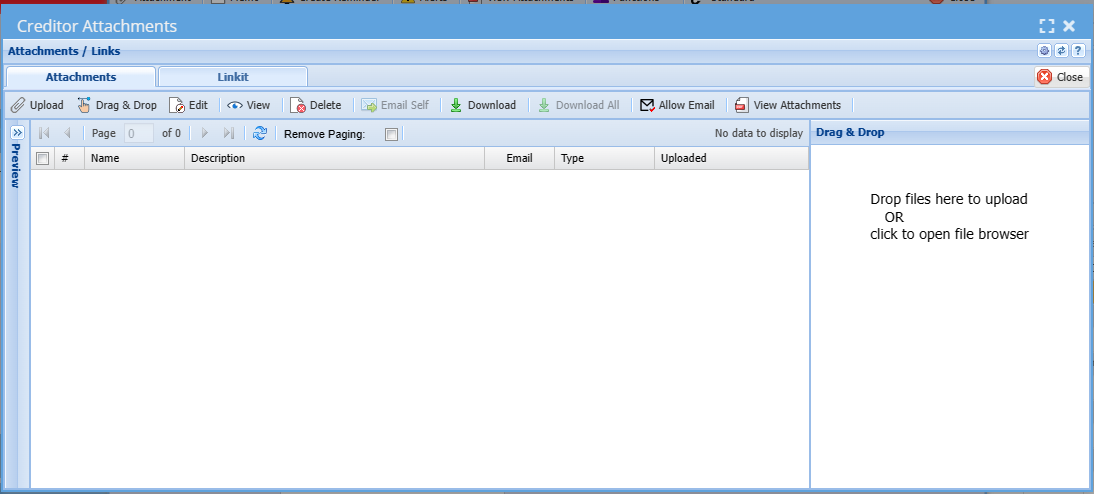
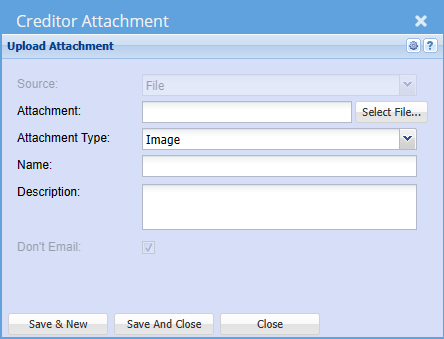
<span lang="EN-US">In this tab we allow for unlimited amount of uploads of documents to be attached to the Creditor. You can attach pictures, Excel sheets, Word and PDF Documents and any file you wish.</span>

[![image.png](https://hugeerp10.co.za/hsofmanual/uploads/images/gallery/2023-11/scaled-1680-/87Ximage.png)](https://hugeerp10.co.za/hsofmanual/uploads/images/gallery/2023-11/87Ximage.png)

<span lang="EN-US">When you click on the Attachments Button the following will come up. You can then drag &amp; drop or upload any documents required.</span>

[![image.png](https://hugeerp10.co.za/hsofmanual/uploads/images/gallery/2023-11/scaled-1680-/tpgimage.png)](https://hugeerp10.co.za/hsofmanual/uploads/images/gallery/2023-11/tpgimage.png)

[![image.png](https://hugeerp10.co.za/hsofmanual/uploads/images/gallery/2023-11/scaled-1680-/YYQimage.png)](https://hugeerp10.co.za/hsofmanual/uploads/images/gallery/2023-11/YYQimage.png)
---


#### Memo

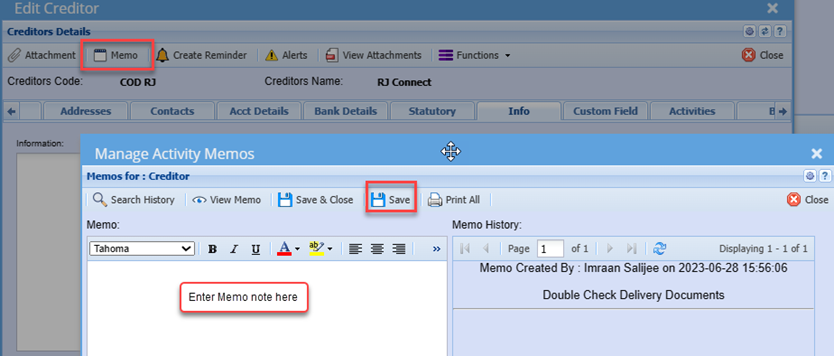
<span style="mso-bidi-font-family: Calibri; mso-bidi-theme-font: minor-latin;">Should there be any information or comments related to the Credit that you wish to note for users to access and be aware of, you can enter this information on the memo note</span>

<span style="mso-bidi-font-family: Calibri; mso-bidi-theme-font: minor-latin;">Memo notes are Date and time stamped and also logs the user how added the Memo</span>

<span style="mso-no-proof: yes;">![](https://hugeerp10.co.za/hsofmanual/uploads/images/gallery/2023-08/embedded-image-37cpoufp.png)</span>

---

<span style="color: rgb(34, 34, 34); font-family: var(--font-heading, var(--font-body)); font-size: 1.666em; font-weight: 400;">Address Tab</span>

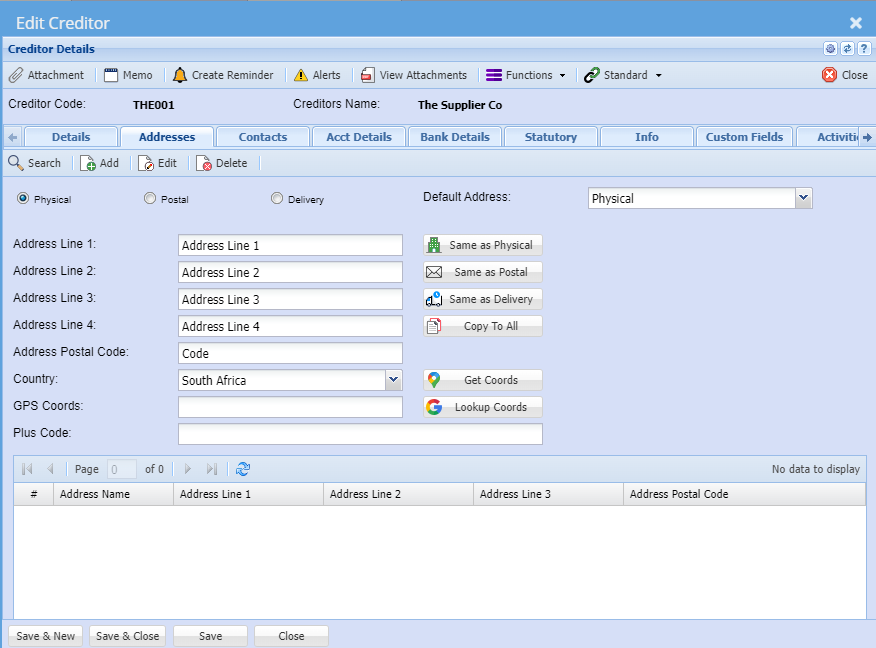
<span class="ts0">Fill in the Physical, Postal and Delivery addresses in the Address Tab. There are buttons called “Same as Physical” etc., once the Postal area button is clicked, it will copy all the details from the Physical Address to the Postal address.</span>

<span class="ts0">The system also allows the entering of multiple Delivery addresses. All addresses created can be selected at the time of the documents i.e. Purchase Orders.</span>

[![image.png](https://hugeerp10.co.za/hsofmanual/uploads/images/gallery/2023-10/scaled-1680-/kNWimage.png)](https://hugeerp10.co.za/hsofmanual/uploads/images/gallery/2023-10/kNWimage.png)

<table border="1" id="bkmrk-default-address-this" style="width: 100%;"><colgroup><col style="width: 25.9557%;"></col><col style="width: 74.0443%;"></col></colgroup><tbody><tr><td>**<span class="ts0">Physical</span>**</td><td><span class="ts0">Physical address default setting</span></td></tr><tr><td>**<span class="ts0">Postal</span>**</td><td><span class="ts0">  
</span></td></tr><tr><td>**<span class="ts0">Delivery</span>**</td><td><span class="ts0">  
</span></td></tr><tr><td>**<span class="ts0">Default Address</span>**</td><td><span class="ts0">This can be selected to be used whenever a document is created, you can override the address selection at the document level.</span></td></tr><tr><td>**<span class="ts0">Address Line 1</span>**</td><td><span class="ts0">  
</span></td></tr><tr><td>**<span class="ts0">Address Line 2</span>**</td><td><span class="ts0">  
</span></td></tr><tr><td>**<span class="ts0">Address Line 3</span>**</td><td><span class="ts0">  
</span></td></tr><tr><td>**<span class="ts0">Address Line 4</span>**</td><td><span class="ts0">  
</span></td></tr><tr><td>**<span class="ts0">Address Postal Code</span>**</td><td><span class="ts0">  
</span></td></tr><tr><td>**<span class="ts0">Country</span>**</td><td><span class="ts0">  
</span></td></tr><tr><td>**<span class="ts0">GPS Coords</span>**</td><td><span class="ts0">  
</span></td></tr><tr><td>**<span class="ts0">Plus Code</span>**</td><td><span class="ts0">  
</span></td></tr><tr><td>**<span class="ts0">User defined address grid</span>**</td><td><span class="ts0">  
</span></td></tr></tbody></table>

Buttons to define address

<table border="1" id="bkmrk-same-as-physical-sam" style="border-collapse: collapse; width: 100%; height: 178.781px;"><colgroup><col style="width: 26.4816%;"></col><col style="width: 73.6421%;"></col></colgroup><tbody><tr style="height: 29.7969px;"><td style="height: 29.7969px;">**Same as Physical**</td><td style="height: 29.7969px;">  
</td></tr><tr style="height: 29.7969px;"><td style="height: 29.7969px;">**Same as Postal**</td><td style="height: 29.7969px;">  
</td></tr><tr style="height: 29.7969px;"><td style="height: 29.7969px;">**Same as Delivery**</td><td style="height: 29.7969px;">  
</td></tr><tr style="height: 29.7969px;"><td style="height: 29.7969px;">**Copy to All**</td><td style="height: 29.7969px;">  
</td></tr><tr style="height: 29.7969px;"><td style="height: 29.7969px;">**Get Coords**</td><td style="height: 29.7969px;">  
</td></tr><tr style="height: 29.7969px;"><td style="height: 29.7969px;">**Lookup Coords**</td><td style="height: 29.7969px;"> </td></tr></tbody></table>

---

#### Contacts Tab

In this tab you can create all the relevant people who work for this company, including all their details.

[![image.png](https://hugeerp10.co.za/hsofmanual/uploads/images/gallery/2023-11/scaled-1680-/KL6image.png)](https://hugeerp10.co.za/hsofmanual/uploads/images/gallery/2023-11/KL6image.png)

<table border="1" id="bkmrk-insert-button-to-ins" style="width: 44.8148%;"><tbody><tr><td style="width: 35.6169%;">**<span class="ts7">View button</span>**</td><td style="width: 64.3279%;"><span class="ts7">to view the contact</span></td></tr><tr><td style="width: 35.6169%;">**<span class="ts7">Add button</span>**</td><td style="width: 64.3279%;"><span class="ts7">to add a new contact</span></td></tr><tr><td style="width: 35.6169%;">**<span class="ts7">Edit button</span>**</td><td style="width: 64.3279%;"><span class="ts7">to edit the contact</span></td></tr><tr><td style="width: 35.6169%;">**<span class="ts7">Delete button</span>**</td><td style="width: 64.3279%;"><span class="ts7">to delete the contact person</span></td></tr><tr><td style="width: 35.6169%;">**<span class="ts7">Show All Tick</span>**</td><td style="width: 64.3279%;"><span class="ts7">  
</span></td></tr></tbody></table>

<table border="1" id="bkmrk-telephone-1-telephon" style="border-collapse: collapse; width: 45.3086%; height: 148px;"><colgroup><col style="width: 34.3961%;"></col><col style="width: 65.5493%;"></col></colgroup><tbody><tr style="height: 29.6px;"><td style="height: 29.6px;">**Telephone 1**</td><td style="height: 29.6px;">  
</td></tr><tr style="height: 29.6px;"><td style="height: 29.6px;">**Telephone 2**</td><td style="height: 29.6px;">  
</td></tr><tr style="height: 29.6px;"><td style="height: 29.6px;">**Fax**</td><td style="height: 29.6px;"> </td></tr><tr style="height: 29.6px;"><td style="height: 29.6px;">**Mobile No**</td><td style="height: 29.6px;">  
</td></tr><tr style="height: 29.6px;"><td style="height: 29.6px;">**Email**</td><td style="height: 29.6px;">  
</td></tr></tbody></table>

Click the Add button to add Creditors contacts details

[![image.png](https://hugeerp10.co.za/hsofmanual/uploads/images/gallery/2023-11/scaled-1680-/bPYimage.png)](https://hugeerp10.co.za/hsofmanual/uploads/images/gallery/2023-11/bPYimage.png)

<span lang="EN-US">Enter the contact persons First Name, Surname, Contact Numbers and email address:</span>

<span lang="EN-US">You can add the addition details if preferred</span>

<span lang="EN-US">If the particular Contact person being added is the default contact for this particular Creditor, you can click the Update Company and Set as Default button, which saves you from recapturing these details as default contacts</span>

<table border="1" id="bkmrk-receive-remittance-t" style="border-collapse: collapse; width: 100%;"><colgroup><col style="width: 18.5679%;"></col><col style="width: 81.5309%;"></col></colgroup><tbody><tr><td>**Receive Remittance**</td><td><span lang="EN-US">Ticking this box implies that the particular Contact can receive remittance </span>advises when emailed from the system.

</td></tr></tbody></table>

<span lang="EN-US">Recommended that the contact person’s email addresses are captured as this will save the</span>

<span lang="EN-US">User from manually having to type the email each time documents are emailed from the system.</span>

---

<span style="color: rgb(34, 34, 34); font-family: var(--font-heading, var(--font-body)); font-size: 1.666em; font-weight: 400;">Account Details Tab</span>

The account details tab stores all the specific account information related to this creditor

<span class="ts28">I</span><span class="ts0">mportant information about the Creditor can be added in the Account Details. For purposes of security, lock down this tab as a precaution against users who should not have access to these details.</span>

<span class="ts0">When doing a Goods Received Note for example a message will appear to the user that the account is on hold and will give the reason for it.</span>

[![image.png](https://hugeerp10.co.za/hsofmanual/uploads/images/gallery/2023-11/scaled-1680-/bHSimage.png)](https://hugeerp10.co.za/hsofmanual/uploads/images/gallery/2023-11/bHSimage.png)

<table border="1" id="bkmrk-currency-when-workin" style="font-family: var(--font-body); font-size: 14px; width: 100%;"><colgroup><col style="width: 15.0766%;"></col><col style="width: 84.8987%;"></col></colgroup><tbody><tr><td>**<span class="ts0">Currency</span>**</td><td><span class="ts0">The system caters for Multicurrency. As such one can setup a foreign creditor account and all values could then be in USD, Euro etc. When working with multi-currency Suppliers, you can select the default currency to work with on that Supplier. Note - Once the first transaction has been posted against the currency you cannot change the currency.</span></td></tr><tr><td>**<span class="ts0">Account Terms</span>**</td><td><span class="ts0">Select the terms of your Supplier in the drop down. This is the account payment terms that the organization has with the creditor, e.g. COD, 30 Days, 60 Days, etc.</span>

<p class="callout info"><span class="ts0">Note: The account terms set here will determine and auto populate the due dates on Purchase orders.</span></p>

</td></tr><tr><td>**<span class="ts0">Rating</span>**</td><td>  
</td></tr><tr><td>**<span class="ts0">Discount</span>**</td><td><span class="ts0">Used as an indication of discount rates received from the Supplier. <span lang="EN-US">Should the creditor always allow a discount percentage to all purchases made, you can set </span><span lang="EN-US">this on the discount field and the discount percentage will then pull through to all purchase </span><span lang="EN-US">Orders created.</span></span></td></tr><tr><td>**<span class="ts0">Outstanding Balance</span>**</td><td><span class="ts0">This is the running balance of the Supplier irrespective of transaction dates.</span></td></tr><tr><td>**<span class="ts0">Aging</span>**</td><td><span class="ts0">We allow for aging of Date of Statement and Date of Invoice per Creditor. <span lang="EN-US" style="mso-ansi-language: EN-US;">This is the ageing method for outstanding accounts</span><span lang="EN-US" style="mso-ansi-language: EN-US;"><span style="mso-spacerun: yes;"> i</span>s the terms calculated from Date of Invoice or Month End (Statement) Date.</span></span></td></tr><tr><td>**Forex Tax Type Override**</td><td><span lang="EN-US" style="mso-ansi-language: EN-US;">This field is only used for Foreign Creditors where the default GRV VAT type will not apply </span><span lang="EN-US" style="mso-ansi-language: EN-US;">You can select Non-VAT or Import VAT here, which will pull through to order and prevent </span><span lang="EN-US" style="mso-ansi-language: EN-US;">users from erroneously selecting GRV VAT. </span><span lang="EN-US" style="mso-ansi-language: EN-US;">For local Creditors, you will leave this blank</span>

</td></tr><tr><td>**Payment Terms**</td><td>  
</td></tr><tr><td>  
</td><td>  
</td></tr><tr><td style="height: 46.4px;">**<span class="ts0">Credit Limit</span>**</td><td><span class="ts0">This field is used to enter the purchasing limit from a Supplier. This could be enforced or used as an indicator. <span lang="EN-US">You can enter a purchase limit value and select to enforce the limit or not</span><span lang="EN-US"> if this limit is reached, the system will notify the user that the credit limit will be </span><span lang="EN-US">exceeded and provide option to continue (depending on if limit is enforced or not)</span></span></td></tr><tr><td>**<span class="ts0">Enforce Credit limit</span>**</td><td><span class="ts0">Tick this check box if you want to enforce the credit limit indicated in the Credit limit box.</span></td></tr><tr><td>**<span class="ts0">On Hold</span>**</td><td><span class="ts0">Tick this box to put the Supplier account on hold. <span lang="EN-US" style="mso-ansi-language: EN-US;">Should you wish to not deal with a particular supplier but do not want to de activate the creditor, you can set the Creditor on hold, which will prevent any orders from being processed.</span></span></td></tr><tr><td>**<span class="ts0">On Hold Reason</span>**</td><td><span class="ts0">Put in a reason for putting the Supplier on hold.</span></td></tr><tr><td>**<span class="ts0">  
</span>**</td><td><span class="ts0">  
</span></td></tr><tr><td>**<span class="ts0">Enable Statement Note</span>**</td><td><span class="ts0">  
</span></td></tr><tr><td>**<span class="ts0">Statement Note</span>**</td><td><span class="ts0">If you tick the box and put a message in the Statement text box, this message will appear on this Supplier’s statement only. If you have added a global message under System Configuration Module – Administration Company Profiles both messages will appear on the statement</span></td></tr><tr><td>**<span class="ts0">T/C GRV</span>**

</td><td><span class="ts0">  
</span></td></tr><tr><td>**<span class="ts0">T/C Stock Return</span>**</td><td><span class="ts0">  
</span></td></tr><tr><td>**<span class="ts0">Statement Template</span>**</td><td><span class="ts0">  
</span></td></tr></tbody></table>

---

<span style="color: rgb(34, 34, 34); font-family: var(--font-heading, var(--font-body)); font-size: 1.666em; font-weight: 400;">Bank Details Tab</span>

Put in all the information of the Creditor’s bank details.

[![image.png](https://hugeerp10.co.za/hsofmanual/uploads/images/gallery/2023-11/scaled-1680-/eR9image.png)](https://hugeerp10.co.za/hsofmanual/uploads/images/gallery/2023-11/eR9image.png)

<table border="1" id="bkmrk-bank-name-of-the-ban" style="width: 100%;"><colgroup><col style="width: 19.3998%;"></col><col style="width: 80.5755%;"></col></colgroup><tbody><tr><td>**<span class="ts7">Bank</span>**</td><td><span class="ts7">Name of the bank of the Supplier</span></td></tr><tr><td>**<span class="ts7">Account Number</span>**</td><td><span class="ts7">Account number of the Supplier</span></td></tr><tr><td>**<span class="ts7">Account Type</span>**</td><td><span class="ts7">The type of account the Supplier has example, Current or Savings etc.</span></td></tr><tr><td>**<span class="ts7">Branch</span>**</td><td><span class="ts7">The Branch name of the bank of the Supplier</span></td></tr><tr><td>**<span class="ts7">Branch Code</span>**</td><td><span class="ts7">The branch code of the bank of the Supplier</span></td></tr><tr><td>**<span class="ts7">Beneficiary Reference (20)</span>**</td><td><span class="ts7">  
</span></td></tr><tr><td>**<span class="ts7">Payment Type</span>**</td><td><span class="ts7">  
</span></td></tr><tr><td>**<span class="ts7">Payment Frequency</span>**</td><td><span class="ts7">  
</span></td></tr><tr><td>**<span class="ts7">Payment Code</span>**</td><td><span class="ts7">  
</span></td></tr><tr><td>**<span class="ts7">GL Category</span>**</td><td><span class="ts7">  
</span></td></tr><tr><td>**<span class="ts7">Classification</span>**</td><td><span class="ts7">  
</span></td></tr><tr><td>**<span class="ts7">PDF Passwords</span>**</td><td><span class="ts7">PDF passwords allow passwords to be attached to the various documents for security purposes. Only give the passwords to the Supplier so he can open the documents. If the fields are left blank, the PDF will just open. We have split PDF passwords to various document types so each document can be directed to various people in the organization.</span></td></tr><tr><td>**<span class="ts7">Note</span>**</td><td><span class="ts7">When a document is generated with the PDF password it cannot be changed on that specific document when it was created. You can however change PDF passwords every month, but it is a good idea to write all passwords down for the specific months.</span></td></tr><tr><td>**<span class="ts7">PO Password</span>**</td><td><span class="ts7">  
</span></td></tr><tr><td>**<span class="ts7">GRV Password</span>**</td><td><span class="ts7">  
</span></td></tr><tr><td>**<span class="ts7">Stock Return Password</span>**</td><td><span class="ts7">  
</span></td></tr><tr><td>**<span class="ts7">Report Password</span>**

</td><td><span class="ts7">  
</span></td></tr><tr><td>**<span class="ts7">Statement Password</span>**</td><td><span class="ts7">  
</span></td></tr><tr><td>**<span class="ts7">Key Words</span>**</td><td><span class="ts7"><span lang="EN-US" style="mso-bidi-font-family: Calibri; mso-bidi-theme-font: minor-latin; mso-ansi-language: EN-US;">This fields allows for specific words which appear on Bank statement entries and is used on the BankIT intelligence feature in the system</span></span></td></tr></tbody></table>

<p class="callout info"><span lang="EN-US" style="mso-bidi-font-family: Calibri; mso-bidi-theme-font: minor-latin; mso-ansi-language: EN-US;">Note: When a document is generated with the PDF password it cannot be changed on that specific document when it was created.<span style="mso-spacerun: yes;"> </span>You can however change PDF passwords every month, but it is a good idea to write all passwords down for the specific months.</span></p>

---

<span style="color: rgb(34, 34, 34); font-family: var(--font-heading, var(--font-body)); font-size: 1.666em; font-weight: 400;">Statutory Tab</span>

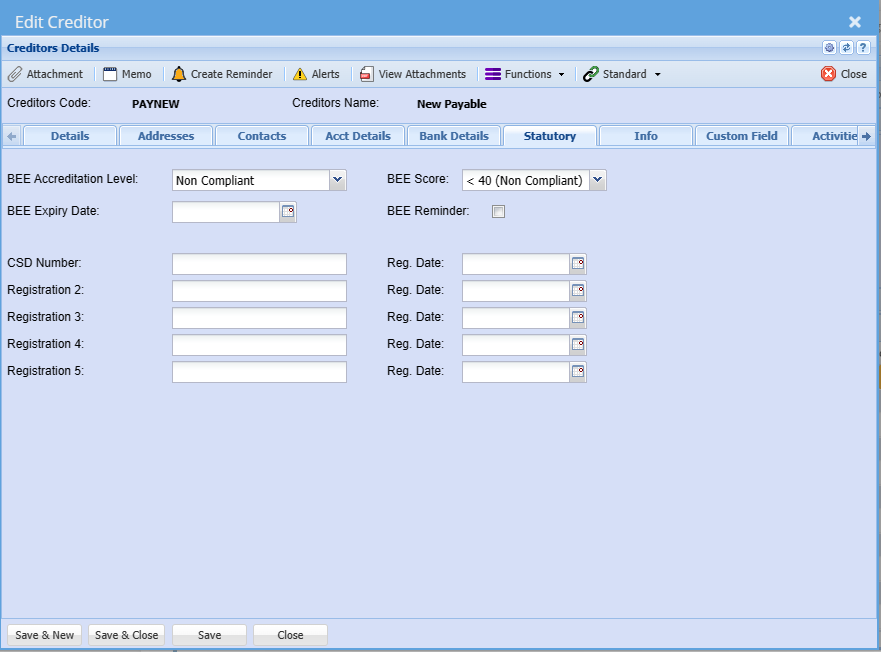
<span lang="EN-US" style="mso-bidi-font-family: Calibri; mso-bidi-theme-font: minor-latin; mso-ansi-language: EN-US; mso-bidi-font-weight: bold;">This tab caters for entering the BEE details of the Creditor</span>

<span lang="EN-US" style="mso-bidi-font-family: Calibri; mso-bidi-theme-font: minor-latin; mso-ansi-language: EN-US; mso-bidi-font-weight: bold;">You can also set reminders, whereby the system will send an email reminder to the dedicated user when the BEE certificate is due to expire. </span>

<span lang="EN-US" style="mso-bidi-font-family: Calibri; mso-bidi-theme-font: minor-latin; mso-ansi-language: EN-US; mso-bidi-font-weight: bold;">The Registration 1 to Registration 5 fields are customizable to the organization’s preference</span>

[![image.png](https://hugeerp10.co.za/hsofmanual/uploads/images/gallery/2023-11/scaled-1680-/strimage.png)](https://hugeerp10.co.za/hsofmanual/uploads/images/gallery/2023-11/strimage.png)

<table border="1" id="bkmrk-bee-accreditation-le" style="border-collapse: collapse; width: 100%;"><colgroup><col style="width: 20.4198%;"></col><col style="width: 79.6791%;"></col></colgroup><tbody><tr><td>**BEE Accreditation Level**</td><td>  
</td></tr><tr><td>**BEE Expiry Date**</td><td>  
</td></tr><tr><td>**CSD Number**</td><td>  
</td></tr><tr><td>**Registration 2**</td><td> </td></tr><tr><td>**Registration 3**</td><td>  
</td></tr><tr><td>**Registration 4**</td><td>  
</td></tr><tr><td>**Registration 5**</td><td>  
</td></tr><tr><td>**BEE Score**</td><td>  
</td></tr><tr><td>**BEE Reminder**</td><td>  
</td></tr><tr><td>**Reg. Date**</td><td>  
</td></tr></tbody></table>

---

<span style="color: rgb(34, 34, 34); font-family: var(--font-heading, var(--font-body)); font-size: 1.666em; font-weight: 400;">Info Tab</span>

<span lang="EN-US" style="mso-bidi-font-family: Calibri; mso-bidi-theme-font: minor-latin; mso-ansi-language: EN-US;">This tab allows you to insert any additional notes against the company.</span>

<span lang="EN-US" style="mso-bidi-font-family: Calibri; mso-bidi-theme-font: minor-latin; mso-ansi-language: EN-US;">You can also set additional indicators as per the respective tock boxes.</span>

[![image.png](https://hugeerp10.co.za/hsofmanual/uploads/images/gallery/2023-11/scaled-1680-/MPTimage.png)](https://hugeerp10.co.za/hsofmanual/uploads/images/gallery/2023-11/MPTimage.png)

<table border="1" id="bkmrk-information-exclude-" style="border-collapse: collapse; width: 100%;"><colgroup><col style="width: 25.9494%;"></col><col style="width: 74.0259%;"></col></colgroup><tbody><tr><td>**Information**</td><td>  
</td></tr><tr><td>**Exclude From Dashboard**</td><td>  
</td></tr><tr><td>**Exclude From Reports**

</td><td>  
</td></tr><tr><td>**Inter-Company Account**</td><td><span lang="EN-US" style="mso-ansi-language: EN-US;">This identifies the creditor as an intercompany Supplier and as such can be<span style="mso-spacerun: yes;"> </span></span><span lang="EN-US" style="mso-ansi-language: EN-US;">excluded from certain reports if need be.</span></td></tr><tr><td>**Allow Delivery To Customer**</td><td>  
</td></tr><tr><td>**Doc Import Item**</td><td> </td></tr><tr><td>**Use Courier API**</td><td>  
</td></tr><tr><td>**Internal Ref. ID**</td><td><span lang="EN-US" style="mso-ansi-language: EN-US;">This is where one can enter a unique identifier of the creditor that may apply to a </span><span lang="EN-US" style="mso-ansi-language: EN-US;">third-party application.</span></td></tr><tr><td>**Shipping Method**</td><td><span lang="EN-US" style="mso-ansi-language: EN-US;">This allows you to select the default shipping method for this creditor so as not to </span><span lang="EN-US" style="mso-ansi-language: EN-US;">select on each document</span></td></tr><tr><td>**Customer Link**</td><td>  
</td></tr></tbody></table>

---

#### Custom Field Tab

<span lang="EN-US" style="mso-bidi-font-family: Calibri; mso-bidi-theme-font: minor-latin; mso-ansi-language: EN-US;">Under the Custom Fields tab, this is where you can insert predefined user fields.<span style="mso-spacerun: yes;"> </span>Add as many custom fields as you require for additional information.</span>

[![image.png](https://hugeerp10.co.za/hsofmanual/uploads/images/gallery/2023-11/scaled-1680-/Duqimage.png)](https://hugeerp10.co.za/hsofmanual/uploads/images/gallery/2023-11/Duqimage.png)

<table border="1" id="bkmrk-category-recurring-o" style="border-collapse: collapse; width: 100%;"><colgroup><col style="width: 17.2099%;"></col><col style="width: 82.8889%;"></col></colgroup><tbody><tr><td>**Category**</td><td>  
</td></tr><tr><td>**Recurring Order**</td><td> </td></tr></tbody></table>

---

<span style="color: rgb(34, 34, 34); font-family: var(--font-heading, var(--font-body)); font-size: 1.666em; font-weight: 400;">Activities Tab</span>

[![image.png](https://hugeerp10.co.za/hsofmanual/uploads/images/gallery/2023-11/scaled-1680-/Xuuimage.png)](https://hugeerp10.co.za/hsofmanual/uploads/images/gallery/2023-11/Xuuimage.png)

<table border="1" id="bkmrk-choice%3A-activity---i" style="border-collapse: collapse; width: 100%;"><colgroup><col style="width: 28.8149%;"></col><col style="width: 71.284%;"></col></colgroup><tbody><tr><td>**Choice: Activity - Interaction**</td><td>  
</td></tr><tr><td>**Search**</td><td>  
</td></tr><tr><td>**View**</td><td>  
</td></tr><tr><td>**Print / Export**</td><td> </td></tr><tr><td>**Document Types**</td><td>  
</td></tr><tr><td>**Date From**</td><td>  
</td></tr><tr><td>**Interaction Type**</td><td>  
</td></tr><tr><td>**Date To**</td><td>  
</td></tr></tbody></table>

---

<span style="color: rgb(34, 34, 34); font-family: var(--font-heading, var(--font-body)); font-size: 1.666em; font-weight: 400;">B2B Tab</span>

[![image.png](https://hugeerp10.co.za/hsofmanual/uploads/images/gallery/2023-11/scaled-1680-/akMimage.png)](https://hugeerp10.co.za/hsofmanual/uploads/images/gallery/2023-11/akMimage.png)

---

### Functions dropdown

#### <span lang="EN-US" style="mso-ansi-language: EN-US;">Branches</span>

<span lang="EN-US" style="mso-ansi-language: EN-US;">Should you be running multi-branches you can select the branch that this Supplier is linked to.</span>

<span lang="EN-US" style="mso-ansi-language: EN-US;">When searching users will then only see the Creditors linked to the branch they have access to.</span>

[![image.png](https://hugeerp10.co.za/hsofmanual/uploads/images/gallery/2023-11/scaled-1680-/vlKimage.png)](https://hugeerp10.co.za/hsofmanual/uploads/images/gallery/2023-11/vlKimage.png)

Move the branch to the right for access

[![image.png](https://hugeerp10.co.za/hsofmanual/uploads/images/gallery/2023-10/scaled-1680-/jJdimage.png)](https://hugeerp10.co.za/hsofmanual/uploads/images/gallery/2023-10/jJdimage.png)

T<span lang="EN-US" style="mso-ansi-language: EN-US;">he right-hand column is the selected branch, i.e. Branches the Creditor is linked to and users with access to these selected branches will then be able to search select these creditors</span>

<span lang="EN-US" style="mso-ansi-language: EN-US;">You can have multiple branches linked to a Creditor</span>

---

#### Creditors Settings

[![image.png](https://hugeerp10.co.za/hsofmanual/uploads/images/gallery/2023-11/scaled-1680-/jZhimage.png)](https://hugeerp10.co.za/hsofmanual/uploads/images/gallery/2023-11/jZhimage.png)

[![image.png](https://hugeerp10.co.za/hsofmanual/uploads/images/gallery/2023-11/scaled-1680-/vUhimage.png)](https://hugeerp10.co.za/hsofmanual/uploads/images/gallery/2023-11/vUhimage.png)

---

#### Creditor Budget

[![image.png](https://hugeerp10.co.za/hsofmanual/uploads/images/gallery/2023-11/scaled-1680-/MXpimage.png)](https://hugeerp10.co.za/hsofmanual/uploads/images/gallery/2023-11/MXpimage.png)

[![image.png](https://hugeerp10.co.za/hsofmanual/uploads/images/gallery/2023-11/scaled-1680-/dAIimage.png)](https://hugeerp10.co.za/hsofmanual/uploads/images/gallery/2023-11/dAIimage.png)

<table border="1" id="bkmrk-search-allocate-calc" style="border-collapse: collapse; width: 100%;"><colgroup><col style="width: 19.926%;"></col><col style="width: 80.1729%;"></col></colgroup><tbody><tr><td>**Search**</td><td>  
</td></tr><tr><td>**Allocate**</td><td>  
</td></tr><tr><td>**Calculate Actuals**</td><td>  
</td></tr><tr><td>**Print**</td><td> </td></tr></tbody></table>

---

#### View Recurring Transactions

[![image.png](https://hugeerp10.co.za/hsofmanual/uploads/images/gallery/2023-11/scaled-1680-/amYimage.png)](https://hugeerp10.co.za/hsofmanual/uploads/images/gallery/2023-11/amYimage.png)

[![image.png](https://hugeerp10.co.za/hsofmanual/uploads/images/gallery/2023-11/scaled-1680-/pNqimage.png)](https://hugeerp10.co.za/hsofmanual/uploads/images/gallery/2023-11/pNqimage.png)

[![image.png](https://hugeerp10.co.za/hsofmanual/uploads/images/gallery/2023-11/scaled-1680-/wVjimage.png)](https://hugeerp10.co.za/hsofmanual/uploads/images/gallery/2023-11/wVjimage.png)

---

### Standard Dropdown

#### Leadtime

[![image.png](https://hugeerp10.co.za/hsofmanual/uploads/images/gallery/2023-11/scaled-1680-/9DHimage.png)](https://hugeerp10.co.za/hsofmanual/uploads/images/gallery/2023-11/9DHimage.png)

[![image.png](https://hugeerp10.co.za/hsofmanual/uploads/images/gallery/2023-11/scaled-1680-/UbZimage.png)](https://hugeerp10.co.za/hsofmanual/uploads/images/gallery/2023-11/UbZimage.png)

---

#### Shipping Terms

[![image.png](https://hugeerp10.co.za/hsofmanual/uploads/images/gallery/2023-11/scaled-1680-/D2wimage.png)](https://hugeerp10.co.za/hsofmanual/uploads/images/gallery/2023-11/D2wimage.png)

[![image.png](https://hugeerp10.co.za/hsofmanual/uploads/images/gallery/2023-11/scaled-1680-/UcAimage.png)](https://hugeerp10.co.za/hsofmanual/uploads/images/gallery/2023-11/UcAimage.png)

<table border="1" id="bkmrk-notify-creditor-noti" style="border-collapse: collapse; width: 100%;"><colgroup><col style="width: 23.3538%;"></col><col style="width: 76.6214%;"></col></colgroup><tbody><tr><td>**Notify Creditor**</td><td>  
</td></tr><tr><td>**Notify Head Office**</td><td> </td></tr><tr><td>**Notify Clearing Agent**</td><td>  
</td></tr><tr><td>**Notify Forwarding Agent**</td><td>  
</td></tr><tr><td>**Default**</td><td>  
</td></tr><tr><td>**Default Clearing Agent**</td><td>  
</td></tr><tr><td>**Default Forwarding Agent**</td><td>  
</td></tr></tbody></table>

[![image.png](https://hugeerp10.co.za/hsofmanual/uploads/images/gallery/2023-11/scaled-1680-/5s9image.png)](https://hugeerp10.co.za/hsofmanual/uploads/images/gallery/2023-11/5s9image.png)

<table border="1" id="bkmrk-shipping-terms-airfr" style="border-collapse: collapse; width: 100%;"><colgroup><col style="width: 25.3581%;"></col><col style="width: 74.7408%;"></col></colgroup><tbody><tr><td>**Shipping Terms**</td><td>  
</td></tr><tr><td>**Airfreight Days**</td><td>  
</td></tr><tr><td>**Rail Freight Days**</td><td> </td></tr><tr><td>**Barge Freight Days**</td><td>  
</td></tr><tr><td>**Shipping Method**</td><td>  
</td></tr><tr><td>**Shipping Days**</td><td>  
</td></tr><tr><td>**Road Freight Days**</td><td>  
</td></tr><tr><td>**Special Shipping Instructions**</td><td>  
</td></tr><tr><td>**Can use Express Docs Tick**</td><td>  
</td></tr><tr><td>**Transmission Letter Tick**</td><td>  
</td></tr><tr><td>**Bill of Lading Tick**</td><td>  
</td></tr><tr><td>**Air Waybill Tick**</td><td>  
</td></tr><tr><td>**EUR 1 Tick**</td><td>  
</td></tr><tr><td>**Commercial Invoice Tick**</td><td>  
</td></tr><tr><td>**Packing List Tick**</td><td>  
</td></tr><tr><td>**Certificate of Analysis Tick**</td><td>  
</td></tr><tr><td>**Certificate of Origin Tick**</td><td>  
</td></tr><tr><td>**Insurance Certificate Tick**</td><td>  
</td></tr><tr><td>**Inspection Certificate Tick**</td><td>  
</td></tr><tr><td>**DHL Waybill for Docs Tick**</td><td>  
</td></tr><tr><td>**N/A Ticks**</td><td>  
</td></tr></tbody></table>

---

##### <span style="color: rgb(34, 34, 34); font-family: var(--font-heading, var(--font-body)); font-size: 1.666em; font-weight: 400;">Linked Inventory</span>  


[![image.png](https://hugeerp10.co.za/hsofmanual/uploads/images/gallery/2023-11/scaled-1680-/as4image.png)](https://hugeerp10.co.za/hsofmanual/uploads/images/gallery/2023-11/as4image.png)

[![image.png](https://hugeerp10.co.za/hsofmanual/uploads/images/gallery/2023-11/scaled-1680-/Bysimage.png)](https://hugeerp10.co.za/hsofmanual/uploads/images/gallery/2023-11/Bysimage.png)

Click Add and fill in the information

[![image.png](https://hugeerp10.co.za/hsofmanual/uploads/images/gallery/2023-11/scaled-1680-/HlRimage.png)](https://hugeerp10.co.za/hsofmanual/uploads/images/gallery/2023-11/HlRimage.png)

<table border="1" id="bkmrk-add-items-to-credito" style="border-collapse: collapse; width: 100%;"><colgroup><col style="width: 23.0124%;"></col><col style="width: 77.0865%;"></col></colgroup><tbody><tr><td>**Add Items To Creditor**</td><td>  
</td></tr><tr><td>**Item Code**</td><td> </td></tr><tr><td>**Supplier Code**</td><td>  
</td></tr><tr><td>**Group Code**</td><td>  
</td></tr><tr><td>**Brand**</td><td>  
</td></tr><tr><td>**Make**</td><td>  
</td></tr><tr><td>**Model**</td><td>  
</td></tr><tr><td>**Item Description**</td><td>  
</td></tr><tr><td>**Supplier Name**</td><td>  
</td></tr><tr><td>**Category**</td><td>  
</td></tr><tr><td>**Order By**</td><td>  
</td></tr><tr><td>**BOM Items Tick**</td><td>  
</td></tr><tr><td>**Serialized Items Tick**</td><td> </td></tr></tbody></table>

---

##### Energy Defaults

[![image.png](https://hugeerp10.co.za/hsofmanual/uploads/images/gallery/2024-09/scaled-1680-/kmzimage.png)](https://hugeerp10.co.za/hsofmanual/uploads/images/gallery/2024-09/kmzimage.png)

[![image.png](https://hugeerp10.co.za/hsofmanual/uploads/images/gallery/2024-09/scaled-1680-/gP6image.png)](https://hugeerp10.co.za/hsofmanual/uploads/images/gallery/2024-09/gP6image.png)

# Creditors Status

#### <span class="ts2">Creditors / Supplier Status</span>

<span class="ts0"> </span><span class="ts0">The Creditors / Supplier status icons are defined as follows:</span>

<div id="bkmrk-icon-details%C2%A0-active"><table class="tbl1"><tbody><tr class="row0"><td class="cell0">**<span class="ts11">Icon</span>**

</td><td class="cell14">**<span class="ts14">Details</span><span class="ts14"> </span>**

</td></tr><tr class="row0"><td class="cell2">![](https://hugeerp0.co.za/csp/webhelp/topics/images/image(2873).png)

</td><td class="cell15"><span class="ts12">Active</span>

</td></tr><tr class="row0"><td class="cell2">![](https://hugeerp0.co.za/csp/webhelp/topics/images/image(3543).png)

</td><td class="cell15"><span class="ts0">Clearing or Forwarding Agent</span>

</td></tr><tr class="row0"><td class="cell2">![](https://hugeerp0.co.za/csp/webhelp/topics/images/image(3546).png)

</td><td class="cell15"><span class="ts0">Enforce Credit Limit</span>

</td></tr><tr class="row0"><td class="cell2">![](https://hugeerp0.co.za/csp/webhelp/topics/images/image(3545).png)

</td><td class="cell15"><span class="ts0">On Hold</span>

</td></tr><tr class="row0"><td class="cell2">![](https://hugeerp0.co.za/csp/webhelp/topics/images/image(2868).png)

</td><td class="cell15"><span class="ts0">Non Active</span>

</td></tr></tbody></table>

</div><span class="ts0"> </span>![](https://hugeerp0.co.za/csp/webhelp/topics/images/image(3550).png)

# Procurement - Standard Operating Procedure (SOP)

#### <span lang="EN-GB" style="font-family: 'Arial',sans-serif;">Purpose</span>

<span lang="EN-GB" style="font-family: 'Arial',sans-serif; color: #202124; background: white;">The purpose of the operating procedure is to provide detailed instructions on how to carry out a task so that any team member can carry out the task correctly every time. The operating procedure also assists in ensuring that all new employees receive the same training. The operating procedure eliminates the guesswork from day-to-day operations and assists employees understand the processes, policies and procedures associated with their jobs. Ultimately, the purpose of the Operating procedure, and adherence to the procedures allows for a logical and continued link between different processes within the organization resulting in reduced errors, time savings on daily processing, greater capturing accuracy, more accurate and easily accessible analytics, adherence to compliance and governance.</span>

#### <span><span lang="EN-GB" style="font-family: 'Arial',sans-serif;">Scope</span></span>

<span lang="EN-GB" style="font-family: 'Arial',sans-serif;"> </span>

<span lang="EN-GB" style="font-family: 'Arial',sans-serif;"><span style="mso-spacerun: yes;"> </span>This procedure will apply to:</span>

<span lang="EN-GB" style="font-family: 'Arial',sans-serif;"><span style="mso-spacerun: yes;"> </span>Job Costing (Project) management processes</span>

<span lang="EN-GB" style="font-family: 'Arial',sans-serif;"><span style="mso-spacerun: yes;"> </span>The full Procurement cycle and processes</span>

<span lang="EN-GB" style="font-family: 'Arial',sans-serif;"><span style="mso-spacerun: yes;"> </span></span>

3. **<u><span lang="EN-GB" style="font-family: 'Arial',sans-serif;">Objectives</span></u>**

<span lang="EN-GB" style="font-family: 'Arial',sans-serif;"> </span>

<span lang="EN-GB" style="font-size: 12.0pt; line-height: 150%; font-family: 'Courier New'; mso-fareast-font-family: 'Courier New'; mso-ansi-language: EN-GB;"><span style="mso-list: Ignore;">o<span style="font: 7.0pt 'Times New Roman';"> </span></span></span><span lang="EN-GB" style="font-size: 12.0pt; line-height: 150%; font-family: 'Arial',sans-serif; mso-ansi-language: EN-GB;">Eliminate manual processes being performed outside of the ERP</span>

<span lang="EN-GB" style="font-size: 12.0pt; line-height: 150%; font-family: 'Courier New'; mso-fareast-font-family: 'Courier New'; mso-ansi-language: EN-GB;"><span style="mso-list: Ignore;">o<span style="font: 7.0pt 'Times New Roman';"> </span></span></span><span lang="EN-GB" style="font-size: 12.0pt; line-height: 150%; font-family: 'Arial',sans-serif; mso-ansi-language: EN-GB;">To maintain the quality of data and transaction processing</span>

<span lang="EN-GB" style="font-size: 12.0pt; line-height: 150%; font-family: 'Courier New'; mso-fareast-font-family: 'Courier New'; mso-ansi-language: EN-GB;"><span style="mso-list: Ignore;">o<span style="font: 7.0pt 'Times New Roman';"> </span></span></span><span lang="EN-GB" style="font-size: 12.0pt; line-height: 150%; font-family: 'Arial',sans-serif; mso-ansi-language: EN-GB;">To serve as a training document for training users on the processes </span>

<span lang="EN-GB" style="font-size: 12.0pt; line-height: 150%; font-family: 'Courier New'; mso-fareast-font-family: 'Courier New'; mso-ansi-language: EN-GB;"><span style="mso-list: Ignore;">o<span style="font: 7.0pt 'Times New Roman';"> </span></span></span><span lang="EN-GB" style="font-size: 12.0pt; line-height: 150%; font-family: 'Arial',sans-serif; mso-ansi-language: EN-GB;">To facilitate consistent conformance to quality system requirements</span>

<span lang="EN-GB" style="font-size: 12.0pt; line-height: 150%; font-family: 'Courier New'; mso-fareast-font-family: 'Courier New'; mso-ansi-language: EN-GB;"><span style="mso-list: Ignore;">o<span style="font: 7.0pt 'Times New Roman';"> </span></span></span><span lang="EN-GB" style="font-size: 12.0pt; line-height: 150%; font-family: 'Arial',sans-serif; mso-ansi-language: EN-GB;">To provide guidelines and a bases for accurate and timely data collections/ reporting</span>

<span lang="EN-GB" style="font-size: 12.0pt; line-height: 150%; font-family: 'Courier New'; mso-fareast-font-family: 'Courier New'; mso-ansi-language: EN-GB;"><span style="mso-list: Ignore;">o<span style="font: 7.0pt 'Times New Roman';"> </span></span></span><span lang="EN-GB" style="font-size: 12.0pt; line-height: 150%; font-family: 'Arial',sans-serif; mso-ansi-language: EN-GB;">Ensure compliance of the process as well achieving governance </span>

<span lang="EN-GB" style="font-family: 'Arial',sans-serif;"> </span>

<span lang="EN-GB" style="font-family: 'Arial',sans-serif;"> </span>

4. **<u><span lang="EN-GB" style="font-family: 'Arial',sans-serif;">Procedure</span></u>**

**<u><span lang="EN-GB" style="font-family: 'Arial',sans-serif;"><span style="text-decoration: none;"> </span></span></u>**

**<span lang="EN-GB" style="font-family: 'Arial',sans-serif;">5.1 Procurement Process Flow Chart</span>**

<span lang="EN-GB" style="font-family: 'Arial',sans-serif; mso-no-proof: yes;">![](https://hugeerp10.co.za/hsofmanual/uploads/images/gallery/2023-08/embedded-image-qmvmejrb.png)  
</span>

**<u><span lang="EN-GB" style="font-family: 'Arial',sans-serif;"><span style="text-decoration: none;"> </span></span></u>**

<span lang="EN-GB" style="font-family: 'Arial',sans-serif; mso-no-proof: yes;">![](https://hugeerp10.co.za/hsofmanual/uploads/images/gallery/2023-08/embedded-image-egqawjcl.png)  
</span>

**<span lang="EN-GB" style="font-family: 'Arial',sans-serif;"><span style="mso-tab-count: 1;"> </span></span>**

**<span lang="EN-GB" style="font-family: 'Arial',sans-serif;"><span style="mso-spacerun: yes;"> </span>5.2 Process Steps </span>**

**<span lang="EN-GB" style="font-family: 'Arial',sans-serif;"><span style="mso-spacerun: yes;"> </span></span>**

<table border="0" cellpadding="0" cellspacing="0" class="MsoNormalTable" id="bkmrk-1-receive-enquiry-2-" style="width: 266.0pt; margin-left: 38.15pt; border-collapse: collapse; mso-yfti-tbllook: 1184; mso-padding-alt: 0cm 5.4pt 0cm 5.4pt;" width="355"><tbody><tr style="mso-yfti-irow: 0; mso-yfti-firstrow: yes; height: 15.0pt;"><td nowrap="nowrap" style="width: 22.0pt; padding: 0cm 5.4pt 0cm 5.4pt; height: 15.0pt;" valign="bottom" width="29"><span lang="EN-GB" style="font-family: 'Arial',sans-serif; color: black;">1</span>

</td><td nowrap="nowrap" style="width: 244.0pt; padding: 0cm 5.4pt 0cm 5.4pt; height: 15.0pt;" valign="bottom" width="325"><span lang="EN-GB" style="font-family: 'Arial',sans-serif; color: black;">Receive Enquiry</span>

</td></tr><tr style="mso-yfti-irow: 1; height: 15.0pt;"><td nowrap="nowrap" style="width: 22.0pt; padding: 0cm 5.4pt 0cm 5.4pt; height: 15.0pt;" valign="bottom" width="29"><span lang="EN-GB" style="font-family: 'Arial',sans-serif; color: black;">2</span>

</td><td nowrap="nowrap" style="width: 244.0pt; padding: 0cm 5.4pt 0cm 5.4pt; height: 15.0pt;" valign="bottom" width="325"><span lang="EN-GB" style="font-family: 'Arial',sans-serif; color: black;">Source Supplier</span>

</td></tr><tr style="mso-yfti-irow: 2; height: 15.0pt;"><td nowrap="nowrap" style="width: 22.0pt; padding: 0cm 5.4pt 0cm 5.4pt; height: 15.0pt;" valign="bottom" width="29"><span lang="EN-GB" style="font-family: 'Arial',sans-serif; color: black;">3</span>

</td><td nowrap="nowrap" style="width: 244.0pt; padding: 0cm 5.4pt 0cm 5.4pt; height: 15.0pt;" valign="bottom" width="325"><span lang="EN-GB" style="font-family: 'Arial',sans-serif; color: black;">Request for Supplier Quote (RFQ)</span>

</td></tr><tr style="mso-yfti-irow: 3; height: 15.0pt;"><td nowrap="nowrap" style="width: 22.0pt; padding: 0cm 5.4pt 0cm 5.4pt; height: 15.0pt;" valign="bottom" width="29"><span lang="EN-GB" style="font-family: 'Arial',sans-serif; color: black;">4</span>

</td><td nowrap="nowrap" style="width: 244.0pt; padding: 0cm 5.4pt 0cm 5.4pt; height: 15.0pt;" valign="bottom" width="325"><span lang="EN-GB" style="font-family: 'Arial',sans-serif; color: black;">Award/ Approve Quote</span>

</td></tr><tr style="mso-yfti-irow: 4; height: 15.0pt;"><td nowrap="nowrap" style="width: 22.0pt; padding: 0cm 5.4pt 0cm 5.4pt; height: 15.0pt;" valign="bottom" width="29"><span lang="EN-GB" style="font-family: 'Arial',sans-serif; color: black;">5</span>

</td><td nowrap="nowrap" style="width: 244.0pt; padding: 0cm 5.4pt 0cm 5.4pt; height: 15.0pt;" valign="bottom" width="325"><span lang="EN-GB" style="font-family: 'Arial',sans-serif; color: black;">Capture Purchase Order</span>

</td></tr><tr style="mso-yfti-irow: 5; height: 15.0pt;"><td nowrap="nowrap" style="width: 22.0pt; padding: 0cm 5.4pt 0cm 5.4pt; height: 15.0pt;" valign="bottom" width="29"><span lang="EN-GB" style="font-family: 'Arial',sans-serif; color: black;">6</span>

</td><td nowrap="nowrap" style="width: 244.0pt; padding: 0cm 5.4pt 0cm 5.4pt; height: 15.0pt;" valign="bottom" width="325"><span lang="EN-GB" style="font-family: 'Arial',sans-serif; color: black;">Attach Supplier Quote</span>

</td></tr><tr style="mso-yfti-irow: 6; height: 15.0pt;"><td nowrap="nowrap" style="width: 22.0pt; padding: 0cm 5.4pt 0cm 5.4pt; height: 15.0pt;" valign="bottom" width="29"><span lang="EN-GB" style="font-family: 'Arial',sans-serif; color: black;">7</span>

</td><td nowrap="nowrap" style="width: 244.0pt; padding: 0cm 5.4pt 0cm 5.4pt; height: 15.0pt;" valign="bottom" width="325"><span lang="EN-GB" style="font-family: 'Arial',sans-serif; color: black;">Request PO Authorization</span>

</td></tr><tr style="mso-yfti-irow: 7; height: 15.0pt;"><td nowrap="nowrap" style="width: 22.0pt; padding: 0cm 5.4pt 0cm 5.4pt; height: 15.0pt;" valign="bottom" width="29"><span lang="EN-GB" style="font-family: 'Arial',sans-serif; color: black;">8</span>

</td><td nowrap="nowrap" style="width: 244.0pt; padding: 0cm 5.4pt 0cm 5.4pt; height: 15.0pt;" valign="bottom" width="325"><span lang="EN-GB" style="font-family: 'Arial',sans-serif; color: black;">PO Authorization</span>

</td></tr><tr style="mso-yfti-irow: 8; height: 15.0pt;"><td nowrap="nowrap" style="width: 22.0pt; padding: 0cm 5.4pt 0cm 5.4pt; height: 15.0pt;" valign="bottom" width="29"><span lang="EN-GB" style="font-family: 'Arial',sans-serif; color: black;">9</span>

</td><td nowrap="nowrap" style="width: 244.0pt; padding: 0cm 5.4pt 0cm 5.4pt; height: 15.0pt;" valign="bottom" width="325"><span lang="EN-GB" style="font-family: 'Arial',sans-serif; color: black;">Attach Authorization</span>

</td></tr><tr style="mso-yfti-irow: 9; height: 15.0pt;"><td nowrap="nowrap" style="width: 22.0pt; padding: 0cm 5.4pt 0cm 5.4pt; height: 15.0pt;" valign="bottom" width="29"><span lang="EN-GB" style="font-family: 'Arial',sans-serif; color: black;">10</span>

</td><td nowrap="nowrap" style="width: 244.0pt; padding: 0cm 5.4pt 0cm 5.4pt; height: 15.0pt;" valign="bottom" width="325"><span lang="EN-GB" style="font-family: 'Arial',sans-serif; color: black;">Order</span>

</td></tr><tr style="mso-yfti-irow: 10; height: 15.0pt;"><td nowrap="nowrap" style="width: 22.0pt; padding: 0cm 5.4pt 0cm 5.4pt; height: 15.0pt;" valign="bottom" width="29"><span lang="EN-GB" style="font-family: 'Arial',sans-serif; color: black;">11</span>

</td><td nowrap="nowrap" style="width: 244.0pt; padding: 0cm 5.4pt 0cm 5.4pt; height: 15.0pt;" valign="bottom" width="325"><span lang="EN-GB" style="font-family: 'Arial',sans-serif; color: black;">Receive Stock / Part Receive Stock</span>

</td></tr><tr style="mso-yfti-irow: 11; height: 15.0pt;"><td nowrap="nowrap" style="width: 22.0pt; padding: 0cm 5.4pt 0cm 5.4pt; height: 15.0pt;" valign="bottom" width="29"><span lang="EN-GB" style="font-family: 'Arial',sans-serif; color: black;">12</span>

</td><td nowrap="nowrap" style="width: 244.0pt; padding: 0cm 5.4pt 0cm 5.4pt; height: 15.0pt;" valign="bottom" width="325"><span lang="EN-GB" style="font-family: 'Arial',sans-serif; color: black;">Complete Receive Stock to GRV/ Delivery Note</span>

</td></tr><tr style="mso-yfti-irow: 12; height: 15.0pt;"><td nowrap="nowrap" style="width: 22.0pt; padding: 0cm 5.4pt 0cm 5.4pt; height: 15.0pt;" valign="bottom" width="29"><span lang="EN-GB" style="font-family: 'Arial',sans-serif; color: black;">13</span>

</td><td nowrap="nowrap" style="width: 244.0pt; padding: 0cm 5.4pt 0cm 5.4pt; height: 15.0pt;" valign="bottom" width="325"><span lang="EN-GB" style="font-family: 'Arial',sans-serif; color: black;">Attach Supplier Invoice/ Delivery Note</span>

</td></tr><tr style="mso-yfti-irow: 13; mso-yfti-lastrow: yes; height: 15.0pt;"><td nowrap="nowrap" style="width: 22.0pt; padding: 0cm 5.4pt 0cm 5.4pt; height: 15.0pt;" valign="bottom" width="29"><span lang="EN-GB" style="font-family: 'Arial',sans-serif; color: black;">14</span>

</td><td nowrap="nowrap" style="width: 244.0pt; padding: 0cm 5.4pt 0cm 5.4pt; height: 15.0pt;" valign="bottom" width="325"><span lang="EN-GB" style="font-family: 'Arial',sans-serif; color: black;">Process Goods Received Voucher (GRV)</span>

</td></tr></tbody></table>

**<span lang="EN-GB" style="font-family: 'Arial',sans-serif;"><span style="mso-spacerun: yes;"> </span></span>**

<span lang="EN-GB" style="font-family: 'Arial',sans-serif;"> </span>

<span lang="EN-GB" style="font-family: 'Arial',sans-serif;"> </span>

<span lang="EN-GB" style="font-family: 'Arial',sans-serif; mso-fareast-font-family: 'Times New Roman'; mso-fareast-theme-font: minor-fareast;"></span>

# Creditors ERROR saving

Creditors Error saving a new supplier

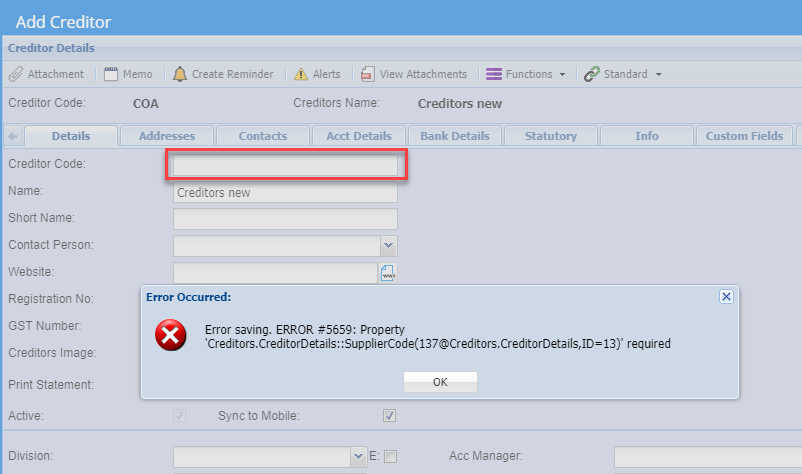
The system does not allow a Creditors code to be:

<table border="1" id="bkmrk-1-duplicated-2-blank" style="border-collapse: collapse; width: 37.284%;"><colgroup><col style="width: 12.2666%;"></col><col style="width: 87.667%;"></col></colgroup><tbody><tr><td>**1**</td><td>Duplicated

</td></tr><tr><td>**2**</td><td>Blank

</td></tr><tr><td>**3**</td><td>Space in Code (Must be a valid code)

</td></tr></tbody></table>

<p class="callout warning">Error Saving. ERRPR #5659: Property</p>

Blank or space is entered in code, this is not allowed

[![image.png](https://hugeerp10.co.za/hsofmanual/uploads/images/gallery/2023-10/scaled-1680-/YGzimage.png)](https://hugeerp10.co.za/hsofmanual/uploads/images/gallery/2023-10/YGzimage.png)
# Additional Creditor Properties Menu

# Additional Creditor Properties

<span style="color: rgb(45, 194, 107);">**<span class="ts15">Creditors Module&gt;Configuration &gt; Add Creditor Properties</span>**</span>

[![image.png](https://hugeerp10.co.za/hsofmanual/uploads/images/gallery/2023-11/scaled-1680-/IU4image.png)](https://hugeerp10.co.za/hsofmanual/uploads/images/gallery/2023-11/IU4image.png)

<span class="ts0">Additional Creditors Properties Help</span>

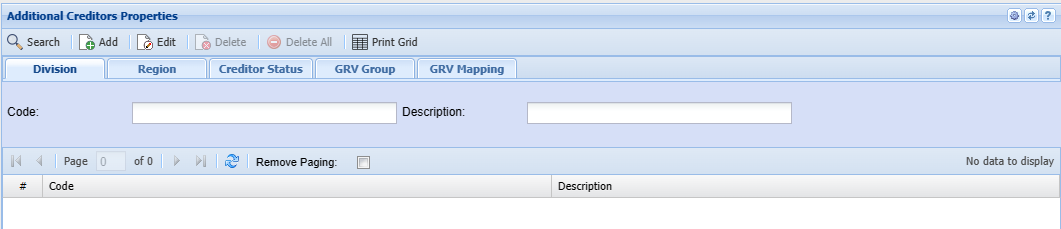
<span class="ts0">This form allows the user to set up Divisions, Regions, Creditor Statuses as well as GRV Groups and Mappings.</span>

<span class="ts0">Search button allows a user to search each tab depending on the criteria selected.</span>

<table border="1" id="bkmrk-add-button-depending" style="border-collapse: collapse; width: 100%;"><colgroup><col style="width: 12.2343%;"></col><col style="width: 87.741%;"></col></colgroup><tbody><tr><td>**<span class="ts0">Add</span>**</td><td><span class="ts0">Depending on the selected tab, this will allow the user to add divisions, regions, Creditor Statuses, GRV Groups and GRV Mappings</span></td></tr><tr><td>**<span class="ts0">Edit</span>**</td><td><span class="ts0">Depending on the selected tab, this will allow the user to edit divisions, regions, Creditor Statuses, GRV Groups and GRV Mappings</span></td></tr><tr><td>**<span class="ts0">Delete</span>**</td><td><span class="ts0">Depending on the selected tab, this will allow the user to delete divisions, regions, Creditor Statuses, GRV Groups and GRV Mappings</span></td></tr><tr><td>**<span class="ts0">Delete All</span>**</td><td><span class="ts0">this will allow the user to delete all the GRV Mapping items</span></td></tr></tbody></table>


####  

---

#### Print Grid Button

Print the creditors additional property grid

<span class="ts0">Enabled on the GRV Mapping tab</span>

[![image.png](https://hugeerp10.co.za/hsofmanual/uploads/images/gallery/2023-11/scaled-1680-/Al8image.png)](https://hugeerp10.co.za/hsofmanual/uploads/images/gallery/2023-11/Al8image.png)

---

#### Division Tab

<span class="ts0">Search by entering the Code or the description </span>

<span class="ts0">Click Add to add new Division</span>

[![image.png](https://hugeerp10.co.za/hsofmanual/uploads/images/gallery/2023-11/scaled-1680-/aR2image.png)](https://hugeerp10.co.za/hsofmanual/uploads/images/gallery/2023-11/aR2image.png)

<table border="1" id="bkmrk-code-description-act" style="border-collapse: collapse; width: 100%; height: 118.4px;"><colgroup><col style="width: 19.926%;"></col><col style="width: 80.1729%;"></col></colgroup><tbody><tr style="height: 29.6px;"><td style="height: 29.6px;">**Code**</td><td style="height: 29.6px;">  
</td></tr><tr style="height: 29.6px;"><td style="height: 29.6px;">**Description**</td><td style="height: 29.6px;">  
</td></tr><tr style="height: 29.6px;"><td style="height: 29.6px;">**Active**</td><td style="height: 29.6px;">  
</td></tr><tr style="height: 29.6px;"><td style="height: 29.6px;">**Charge Up Job Time**</td><td style="height: 29.6px;"> </td></tr></tbody></table>

---


#### Region Tab

<span class="ts0">Search by entering the Code or the description</span>

<span class="ts0">Click Add to add a new Region</span>

[![image.png](https://hugeerp10.co.za/hsofmanual/uploads/images/gallery/2023-11/scaled-1680-/lj9image.png)](https://hugeerp10.co.za/hsofmanual/uploads/images/gallery/2023-11/lj9image.png)

<table border="1" id="bkmrk-code-description-wea" style="border-collapse: collapse; width: 100%;"><colgroup><col style="width: 17.7038%;"></col><col style="width: 82.3951%;"></col></colgroup><tbody><tr><td>**Code**</td><td>  
</td></tr><tr><td>**Description**</td><td>  
</td></tr><tr><td>**Weather Region**</td><td>  
</td></tr><tr><td>**Active Tick**</td><td> </td></tr></tbody></table>

---


#### Creditor Status Tab

<span class="ts0">Search by entering the Code or the description</span>

<span class="ts0">Click Add to add a new Creditor Status</span>

[![image.png](https://hugeerp10.co.za/hsofmanual/uploads/images/gallery/2023-11/scaled-1680-/T89image.png)](https://hugeerp10.co.za/hsofmanual/uploads/images/gallery/2023-11/T89image.png)

---


#### GRV Group Tab

<span class="ts0">Search by entering the Code or the description</span>

<span class="ts0">Click Add to add a new GRV Group</span>

[![image.png](https://hugeerp10.co.za/hsofmanual/uploads/images/gallery/2023-11/scaled-1680-/O4qimage.png)](https://hugeerp10.co.za/hsofmanual/uploads/images/gallery/2023-11/O4qimage.png)

---

#### GRV Mapping Tab

<span class="ts0">Allows the user to search by selecting Division, Region and GRV Group from the drop-down arrow.</span>

Click Add to add a new GRV Mapping

[![image.png](https://hugeerp10.co.za/hsofmanual/uploads/images/gallery/2023-11/scaled-1680-/7Cximage.png)](https://hugeerp10.co.za/hsofmanual/uploads/images/gallery/2023-11/7Cximage.png)

<table border="1" id="bkmrk-division-region-grv-" style="border-collapse: collapse; width: 100%;"><colgroup><col style="width: 19.0618%;"></col><col style="width: 81.0371%;"></col></colgroup><tbody><tr><td>**Division**</td><td>  
</td></tr><tr><td>**Region**</td><td>  
</td></tr><tr><td>**GRV Group**</td><td> </td></tr><tr><td>**Expense Account**</td><td>  
</td></tr></tbody></table>

# Creditors Email Mailing List Menu

# Add Creditors Email Mailing List

<span class="ts2">Add Supplier Bulk E-mailing List</span>

**<span class="ts15" style="color: rgb(45, 194, 107);">Creditors&gt; Configuration&gt; Email mailing List</span>**

- <span class="ts15" style="color: rgb(0, 0, 0);">Click "**Add**"</span>

[![image.png](https://hugeerp10.co.za/hsofmanual/uploads/images/gallery/2025-11/scaled-1680-/9j6image.png)](https://hugeerp10.co.za/hsofmanual/uploads/images/gallery/2025-11/9j6image.png)

- <span class="ts10">Add the Mailing **List Name** and a **Description**</span>
- <span class="ts10">Click "**Save**"</span>

[![image.png](https://hugeerp10.co.za/hsofmanual/uploads/images/gallery/2025-11/scaled-1680-/MdIimage.png)](https://hugeerp10.co.za/hsofmanual/uploads/images/gallery/2025-11/MdIimage.png)

<table border="1" id="bkmrk-list-name-enter-a-na" style="border-collapse: collapse; width: 100%;"><colgroup><col style="width: 17.2099%;"></col><col style="width: 82.8889%;"></col></colgroup><tbody><tr><td>**<span class="ts0">List Name</span>**</td><td><span class="ts0">Enter a name or code for your list</span></td></tr><tr><td>**<span class="ts0">List Description</span>**</td><td><span class="ts0">Enter a description for the list</span></td></tr><tr><td>**<span class="ts0">Add</span>**</td><td><span class="ts0">Add button opens up Creditors setup function that allows you to select from your supplier contact the email to add on the list.</span></td></tr></tbody></table>

Once you click "**Add**" you will have the below screen open.

- Select your preferred Creditors you would like to email by using the **drop-down menus**, if you want to send it to all, leave the selection as "**All**"
- Click "**Add Creditors**"

[![image.png](https://hugeerp10.co.za/hsofmanual/uploads/images/gallery/2025-11/scaled-1680-/v3Iimage.png)](https://hugeerp10.co.za/hsofmanual/uploads/images/gallery/2025-11/v3Iimage.png)

By clicking "Add Creditors" the system will create your mailing list.

Here you can "Add" more creditors and can "**Delete**" the ones you want to remove.

Click "**Save**"

<span class="ts0"> </span>[![image.png](https://hugeerp10.co.za/hsofmanual/uploads/images/gallery/2025-11/scaled-1680-/dhoimage.png)](https://hugeerp10.co.za/hsofmanual/uploads/images/gallery/2025-11/dhoimage.png)

You will be prompted to Name this list

- Click "**Ok**"
- Click "**Close**"

[![image.png](https://hugeerp10.co.za/hsofmanual/uploads/images/gallery/2025-11/scaled-1680-/QlXimage.png)](https://hugeerp10.co.za/hsofmanual/uploads/images/gallery/2025-11/QlXimage.png)

---

# Creating and Send Bulk Mail to Creditors

#### <span class="ts0">Process Email</span>

![](https://hugeerp0.co.za/csp/webhelp/topics/images/image(3372).png)

<span class="ts7">Process mailing list is the part that allows a user to prepare the message to be sent. It has five buttons</span>

<span class="ts7">On the white screen, that’s where the message detail is going to be and can be formatted according to users' preference</span>

<table border="1" id="bkmrk-subject-message-subj" style="border-collapse: collapse; width: 101.481%;"><colgroup><col style="width: 14.2116%;"></col><col style="width: 85.7637%;"></col></colgroup><tbody><tr><td>**<span class="ts7">Subject</span>**</td><td><span class="ts7">Message subject</span></td></tr><tr><td>**<span class="ts7">List</span>**</td><td><span class="ts7">The drop-down arrow allows a user to select the one list but while the tree search allows a multiple of email lists</span></td></tr><tr><td>**<span class="ts7">Help</span>**</td><td><span class="ts7">gives the header and a must Copy the bottom part to the header and the message will be read “Dear \[ContactFirstName\]” when processing</span></td></tr><tr><td>**<span class="ts7">Attachment</span>**</td><td><span class="ts7">allows a user to attach either a document or picture related to the message and has five buttons</span></td></tr><tr><td>**<span class="ts7">Process</span>**</td><td><span class="ts7">Processes the email</span></td></tr></tbody></table>